web
You’re offline. This is a read only version of the page.
close
Skip to main content

Announcements

No record found.

News and Announcements icon
Community site session details

Community site session details

Session Id :
Finance | Project Operations, Human Resources, ...
Answered

Proposed Vendor changes workflow

(1) ShareShare
ReportReport
Posted on by 31

Hi guys, 

Within the AP parameters you can enable Vendor approvals which is added security feature 

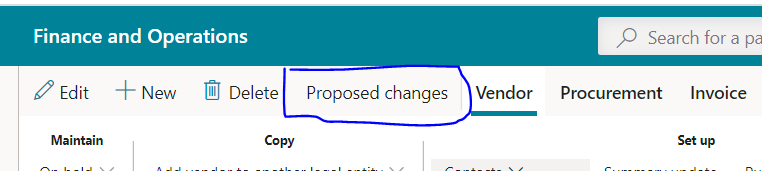
I've checked the credit Limit box, changed the credit limit for a vendor and i can see the Proposed Changes button enabled 

Unfortunately the Workflow button does not seem to appear to run the process through. The workflow has been configured 

and added all the necessary info added  - but why is the workflow button not enabled?

could you please?
pastedimage1590583618873v1.png

I have the same question (0)
  • Suggested answer
    André Arnaud de Calavon Profile Picture
    303,749 Super User 2026 Season 1 on at

    Hi James,

    Did you enable the vendor approvals, but also created a workflow configuration? The workflow configuration is used to determine who should approve the changes. This workflow configuration should have an active version.

    Next to Proposed changes, there should be a button for the Workflow to submit the changes. As this is not visible, you are probably missing or the enablement on the Vendor approval page or the workflow configuration for the 'Proposed vendor changes workflow'.

  • James T Profile Picture
    31 on at

    Thanks Andre for the quick response

    Yes Vendor approval is enabled, the workflow configuration is all set up

    pastedimage1590589851730v2.png

    The admin will approve the changes 

    pastedimage1590589797807v1.png

    The workflow configuration is also active 

    pastedimage1590589948823v3.png

  • James T Profile Picture
    31 on at

    Thanks Andre - I think i figured it out, my condition was wrong 

    This seemed to resolve it:

    pastedimage1590590685847v1.png

  • Verified answer
    André Arnaud de Calavon Profile Picture
    303,749 Super User 2026 Season 1 on at

    Hi James,

    I thought it should also work when you set it to always. Otherwise, you need to make changes when you add a new field for approval.

  • James T Profile Picture
    31 on at

    Many thanks Andre - Point taken

Under review

Thank you for your reply! To ensure a great experience for everyone, your content is awaiting approval by our Community Managers. Please check back later.

Helpful resources

Quick Links

Introducing the 2026 Season 1 community Super Users

Congratulations to our 2026 Super Stars!

Meet the Microsoft Dynamics 365 Contact Center Champions

We are thrilled to have these Champions in our Community!

Congratulations to the March Top 10 Community Leaders

These are the community rock stars!

Leaderboard > Finance | Project Operations, Human Resources, AX, GP, SL

#1
Giorgio Bonacorsi Profile Picture

Giorgio Bonacorsi 663

#2
André Arnaud de Calavon Profile Picture

André Arnaud de Cal... 439 Super User 2026 Season 1

#3
Syed Haris Shah Profile Picture

Syed Haris Shah 337 Super User 2026 Season 1

Last 30 days Overall leaderboard

Product updates

Dynamics 365 release plans
