web
You’re offline. This is a read only version of the page.
close
Skip to main content

Notifications

Announcements

No record found.

Community site session details

Community site session details

Session Id :
Small and medium business | Business Central, N...
Unanswered

New and Delete Button on PageList not working

(0) ShareShare
ReportReport
Posted on by 105

Hi All,

Im quite new to Business Central and i have created a custom pageList having a custom Soure Table and page Card, But the NEW and Delete Button on the Page List in Not working, i clicked on it several times but not working properly.
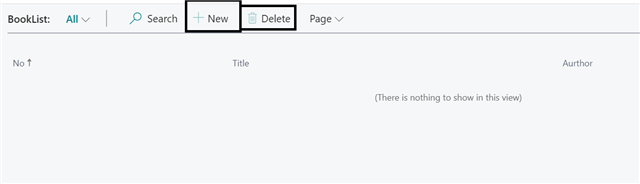
pastedimage1574364009355v1.png

My Code for PageList is : 

page 50102 BookList
{
    PageType = List;
    SourceTable = Book;
    CardPageId = BookCard;
    Editable = false;

    layout
    {
        area(Content)
        {
            repeater(Group)
            {
                field("No."; "No.")
                {
                    ApplicationArea = All;

                }
                field(Title; Title)
                {
                    ApplicationArea = All;

                }
                field(Aurthor; Aurthor)
                {
                    ApplicationArea = All;

                }

            }
        }
    }


}
Can anyone Please help me with this? 
I have the same question (0)
  • Tabrez Ajaz Profile Picture
    785 on at

    Hey Priyanka,

    Please, try the following snippet:

    page 50102 BookList

    {

       PageType = List;

       SourceTable = Book;

       CardPageId = BookCard;

       Editable = true;

       UsageCategory = Lists;

       ApplicationArea = All;

       layout

       {

           area(Content)

           {

               repeater(Group)

               {

                   field("No."; "No.")

                   {

                       ApplicationArea = All;

                   }

                   field(Title; Title)

                   {

                       ApplicationArea = All;

                   }

                   field(Aurthor; Aurthor)

                   {

                       ApplicationArea = All;

                   }

               }

           }

       }

    }

    I am sure this will resolve your issue. Verify if this solves your issue, and let me know if you still having any issue with this.

  • Priyanka05021986 Profile Picture
    105 on at

    Hi Tabrez, used the same code u have provided but its not working.

  • Tabrez Ajaz Profile Picture
    785 on at

    Please check,

    Editable = true;

    For card page.

    Also share table code snippet. If this not works for you.

Under review

Thank you for your reply! To ensure a great experience for everyone, your content is awaiting approval by our Community Managers. Please check back later.

Helpful resources

Quick Links

Responsible AI policies

As AI tools become more common, we’re introducing a Responsible AI Use…

Neeraj Kumar – Community Spotlight

We are honored to recognize Neeraj Kumar as our Community Spotlight honoree for…

Leaderboard > Small and medium business | Business Central, NAV, RMS

#1
OussamaSabbouh Profile Picture

OussamaSabbouh 3,229

#2
Jainam M. Kothari Profile Picture

Jainam M. Kothari 1,867 Super User 2025 Season 2

#3
YUN ZHU Profile Picture

YUN ZHU 1,153 Super User 2025 Season 2

Last 30 days Overall leaderboard

Featured topics

Product updates

Dynamics 365 release plans



