web
You’re offline. This is a read only version of the page.
close
Skip to main content

Notifications

Announcements

No record found.

Community site session details

Community site session details

Session Id :
Microsoft Dynamics AX (Archived)

Error: AX.Framework.Services.Metadata.Contract.Metadata

(0) ShareShare
ReportReport
Posted on by 2,127

Hi All,

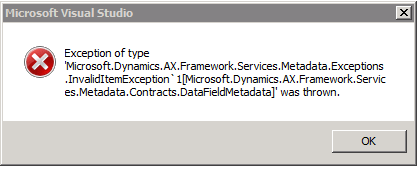
Here the new feed in troubleshooting. I'm getting the below error while refreshing the Dataset in the SSRS report when ever I made a modification on the table in AX for my customization in the SSRS report.

For Eg: I'm adding some 2 to 3 Fields in this SalesInvoiceTmp table when ever I'm doing this I must restart the AOS & SQL services. Even if I restarting the services I'm getting the below error most of the time some time not( even after doing Full CIL, Clearing AOT cache & Sync the Data Dictionary I'm facing the error)

 Is there any solution for this.
*This post is locked for comments

I have the same question (0)
  • Kumar Gaurav @ MS Profile Picture
    on at

    Clear the AUC files in user directory, in some cases I have found that keeping the VS closed while changing AX and opening it only after ax changes are committed helps but not a sure shot way :).

  • Sakthiananth Profile Picture
    2,127 on at

    Thank you so much. Will update you as soon as I fixed this issue.

  • Sakthiananth Profile Picture
    2,127 on at

    Hi Kumar,

    I removed the .uac file still I faced the same problem. After I added the columns again what ever I deleted now It's working. But I'm not able to see the records on the report in AX even "SalesInvoiceTmp" holds the appropriate data in it.

  • Sakthiananth Profile Picture
    2,127 on at

    Hi Kumar,

    I managed to fix the issue by removing the .dll file (SalesInvoiceReport.BusinessLogic.dll) from "C:\Users\donyMathew\AppData\Local\Temp\3\SalesInvoiceReport.BusinessLogic".

    I really do not know whether this will spoil my report in feature ? but now the SalesInvoice report is not rendering the output (Attached the image below). The temporary table "SalesInvoiceTmp" contains the correct records.

    I see the out on the Visual Studio but not in the AX.

    Can you please help me out on this... ?

Under review

Thank you for your reply! To ensure a great experience for everyone, your content is awaiting approval by our Community Managers. Please check back later.

Helpful resources

Quick Links

Responsible AI policies

As AI tools become more common, we’re introducing a Responsible AI Use…

Neeraj Kumar – Community Spotlight

We are honored to recognize Neeraj Kumar as our Community Spotlight honoree for…

Leaderboard > 🔒一 Microsoft Dynamics AX (Archived)

#1
Martin Dráb Profile Picture

Martin Dráb 4 Most Valuable Professional

#1
Priya_K Profile Picture

Priya_K 4

#3
MyDynamicsNAV Profile Picture

MyDynamicsNAV 2

Last 30 days Overall leaderboard

Featured topics

Product updates

Dynamics 365 release plans
