web
You’re offline. This is a read only version of the page.
close
Skip to main content

Announcements

No record found.

News and Announcements icon
Community site session details

Community site session details

Session Id :
Finance | Project Operations, Human Resources, ...
Answered

Upload Control does not show Dialog for me

(0) ShareShare
ReportReport
Posted on by 972

Hi All

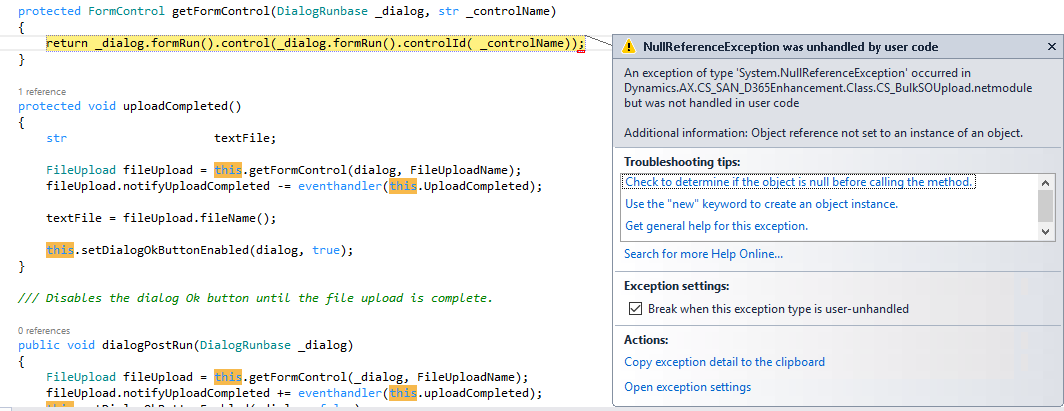
I am following the Link "https://community.dynamics.com/365/financeandoperations/b/365operationswithsukrut/posts/d365fo-use-of-fileupload-control-to-read-csv-file" to create code to upload CSV file and read information. My code is in below. My understanding is when code is running Dialog(), it will show me a dialog to upload my CSV file. However, when I run the code, it just pass thought the code without dialog. Then error show up in "getFormControl" - > "return _dialog.formRun().control(_dialog.formRun().controlId( _controlName));"

Do I miss anything or any steps are incorrect?

Thank you very much!

Best Regards,

JustZM


private str       availableTypes = ".csv";
private const str OkButtonName = 'OkButton';
private const str FileUploadName = 'FileUpload';
DialogRunbase dialog;

public static void main(Args _args)
{
    CS_BulkSOUpload _BulkSOUpload = new CS_BulkSOUpload();
    _BulkSOUpload.CS_Run();
}

public void CS_Run()
{
    dialog = this.dialog();
    this.dialogPostRun(dialog);
    this.processCSVFile();
    this.uploadCompleted();
}

public Object dialog()
    {
        
        DialogGroup      dialogGroup;
        FormBuildControl formBuildControl;
        FileUploadBuild  dialogFileUpload;
        Set              enumSet = new Set(Types::Enum);
                        
        dialog = super();
        #resAppl
        ;
        dialogGroup = dialog.addGroup("File path");
        formBuildControl = dialog.formBuildDesign().control(dialogGroup.name());
        
        dialogFileUpload = formBuildControl.addControlEx(classstr(FileUpload), FileUploadName);
        dialogFileUpload.style(FileUploadStyle::MinimalWithFilename);
        dialogFileUpload.baseFileUploadStrategyClassName(classstr(FileUploadTemporaryStorageStrategy));
        dialogFileUpload.fileTypesAccepted(availableTypes);
        dialogFileUpload.fileNameLabel("@SYS308842");
    
        return dialog;
    }
pastedimage1605125652695v1.png

I have the same question (0)
  • Martin Dráb Profile Picture
    239,632 Most Valuable Professional on at

    The line of code does many things. Find out which of the method returns null; then we can talk about how to fix it.

  • JustZM Profile Picture
    972 on at

    Hi Martin

    Thank you for your reply.

    I think the function public Object dialog() return null. I thought when code run into "public Object dialog()", it should show me a dialog, so I can import my CSV file. But code just pass thought "public Object dialog()", it does not give me chance to import my file.

    public Object dialog()
        {
            
            DialogGroup      dialogGroup;
            FormBuildControl formBuildControl;
            FileUploadBuild  dialogFileUpload;
            Set              enumSet = new Set(Types::Enum);
                            
            dialog = super();
            #resAppl
            ;
            dialogGroup = dialog.addGroup("File path");
            formBuildControl = dialog.formBuildDesign().control(dialogGroup.name());
            
            dialogFileUpload = formBuildControl.addControlEx(classstr(FileUpload), FileUploadName);
            dialogFileUpload.style(FileUploadStyle::MinimalWithFilename);
            dialogFileUpload.baseFileUploadStrategyClassName(classstr(FileUploadTemporaryStorageStrategy));
            dialogFileUpload.fileTypesAccepted(availableTypes);
            dialogFileUpload.fileNameLabel("@SYS308842");
        
            return dialog;
        }

    Best Regards,

    JustZM

  • Martin Dráb Profile Picture
    239,632 Most Valuable Professional on at

    If you were right, it would fail already at line 12 in dialog(). Because it doesn't happen, you guess seems to be wrong.

    I suggest you actually debug the place where the exception does occur, i.e. getFormControl() method.

  • Verified answer
    Sergei Minozhenko Profile Picture
    23,097 on at

    Hi JustZM,

    Do you have any reason why you don't use the prompt method in main instead of custom code for dialog in run?

    Take a look at how standard class AddressZipCodeImportDialog is designed.

Under review

Thank you for your reply! To ensure a great experience for everyone, your content is awaiting approval by our Community Managers. Please check back later.

Helpful resources

Quick Links

Introducing the 2026 Season 1 community Super Users

Congratulations to our 2026 Super Stars!

Meet the Microsoft Dynamics 365 Contact Center Champions

We are thrilled to have these Champions in our Community!

Congratulations to the April Top 10 Community Leaders

These are the community rock stars!

Leaderboard > Finance | Project Operations, Human Resources, AX, GP, SL

#1
Giorgio Bonacorsi Profile Picture

Giorgio Bonacorsi 804

#2
André Arnaud de Calavon Profile Picture

André Arnaud de Cal... 639 Super User 2026 Season 1

#3
Subra Profile Picture

Subra 528

Last 30 days Overall leaderboard

Product updates

Dynamics 365 release plans
