web
You’re offline. This is a read only version of the page.
close
Skip to main content

Notifications

Announcements

No record found.

Community site session details

Community site session details

Session Id :
Small and medium business | Business Central, N...
Suggested Answer

Connect to cloud database?

(0) ShareShare
ReportReport
Posted on by 487

Hi,


Is there any way to connect to the database with an external tool? This is for a cloud version, not on premise. For example using microsoft sql management studio?

Cheers

I have the same question (0)
  • Community Member Profile Picture
    on at

    What kind of tool you what to integrate with dynamics 365? Recently, I integrated MS Teams with Dynamics 365 and it has been working perfectly fine for me. If you could let me know what exactly your tool is, I could help you with some solution.

    Regards,

    Lewis

  • Hedi Daneels Profile Picture
    487 on at

    Microsoft SQL Management Studio for example, that would allow me to read the tables in the business central database.

  • Jidl Profile Picture
    45 on at

    As far as I know this isn't possible.

    You can expose data through web services (odata) but it's a little flaky (I've had problems with data types in SSIS OData Sources for example, and Excel Odata doesn't let you use $select clauses properly).

    If you manage to find another way to replicate / access the data then please let me know! I'm attempting to include it in a data warehouse.

    Dynamics 365 has this: https://docs.microsoft.com/en-us/power-platform/admin/replicate-data-microsoft-azure-sql-database but I don't think it's available for BC.

  • Jidl Profile Picture
    45 on at

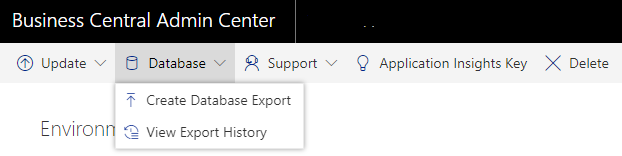
    I forgot to mention. If you have access to /admin center for your instance, then you can do a database export.

    Choose you environment > Database > Create Database Export.
    pastedimage1579726225718v1.png

    It comes through as .bacprac file that you can restore to a local SQL instance. I've found it pretty invaluable for exploring the schema. But you are limited to 10 a month. 

    You also have to export the file into azure storage - but you can download it from there.

  • Suggested answer
    xxDrizzxx Profile Picture
    5 on at

    Sorry to jump on an old post, but I have found a way to do this. You have to build it out per table though. I'm reading the BC tables by querying them from PowerBI, then publishing that as a service. Then using an Automated flow to refresh the dataset, query and parse it, and then compile it into a csv that gets exported to my SQL server. Finally there's a sql job that builds/updates the table from the flat csv file.

  • Suggested answer
    Amit Baru Profile Picture
    3,037 on at

    Hi,

    According to the deep study. For SAAS version this is not possible. I

    Pls refer the below link for above information.

    https://erpconsultors.com/backup-of-business-central-d365-from-saas-tenant/

    Regards

    Amit Sharma

    www.erpconsultors.com

  • Suggested answer
    Inge M. Bruvik Profile Picture
    1,105 Moderator on at

    There is an option that lets you copy BC data to Azure data lake.

    This is an open source app that helps you with that.

    github.com/.../bc2adls

Under review

Thank you for your reply! To ensure a great experience for everyone, your content is awaiting approval by our Community Managers. Please check back later.

Helpful resources

Quick Links

Responsible AI policies

As AI tools become more common, we’re introducing a Responsible AI Use…

Neeraj Kumar – Community Spotlight

We are honored to recognize Neeraj Kumar as our Community Spotlight honoree for…

Leaderboard > Small and medium business | Business Central, NAV, RMS

#1
OussamaSabbouh Profile Picture

OussamaSabbouh 3,226

#2
Jainam M. Kothari Profile Picture

Jainam M. Kothari 2,047 Super User 2025 Season 2

#3
YUN ZHU Profile Picture

YUN ZHU 1,257 Super User 2025 Season 2

Last 30 days Overall leaderboard

Featured topics

Product updates

Dynamics 365 release plans
