web
You’re offline. This is a read only version of the page.
close
Skip to main content

Notifications

Announcements

No record found.

Community site session details

Community site session details

Session Id :
Small and medium business | Business Central, N...
Answered

Physical Inventory - Stock Take

(0) ShareShare
ReportReport
Posted on by

Good Morning, 

In short, we are trying to run our first stock take since going live, now we have settled in to BC. We are using the basic warehouse set up. 

We think we need to use the 'physical inventory order' function having done some research, however when running 'calculate lines' we are getting a large volume of items, which we expect, and the 'Quantity Expected Base' is now showing a quantity, however we are struggling to understand how / where to populate the actual counted number of items when there is a difference. 
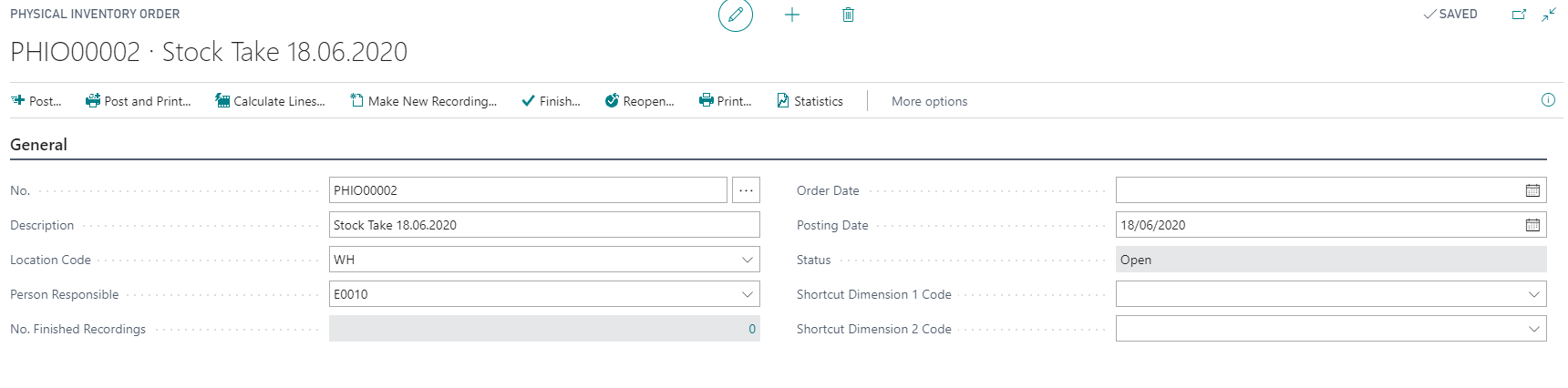
pastedimage1592475235195v2.png

All of the fields do not seem to be editable, so we are a little stuck as to how we move forward and enter in the counts. 

pastedimage1592475948371v3.png

Also, we have set up the counting periods on the item cards, but i'm understanding from the help pages that this is only used on the advanced warehouse set up. If however there is a way of using this information on the basic set up then that would be great. 

As always, thank you in advance. 

Amy

I have the same question (0)
  • Suggested answer
    jerome77 Profile Picture
    on at

    Hi

    Phys inventory order: please let me know if this helpful:

    docs.microsoft.com/.../inventory-how-count-inventory-with-documents

    but if you just need to control your stock level, maybe this is what you are looking for:

    docs.microsoft.com/.../inventory-how-count-adjust-reclassify

  • Verified answer
    Community Member Profile Picture
    on at

    Thank you. We have now managed to get this to work. 

Under review

Thank you for your reply! To ensure a great experience for everyone, your content is awaiting approval by our Community Managers. Please check back later.

Helpful resources

Quick Links

Responsible AI policies

As AI tools become more common, we’re introducing a Responsible AI Use…

Neeraj Kumar – Community Spotlight

We are honored to recognize Neeraj Kumar as our Community Spotlight honoree for…

Leaderboard > Small and medium business | Business Central, NAV, RMS

#1
OussamaSabbouh Profile Picture

OussamaSabbouh 3,143

#2
Jainam M. Kothari Profile Picture

Jainam M. Kothari 1,694 Super User 2025 Season 2

#3
YUN ZHU Profile Picture

YUN ZHU 1,067 Super User 2025 Season 2

Last 30 days Overall leaderboard

Featured topics

Product updates

Dynamics 365 release plans
