web
You’re offline. This is a read only version of the page.
close
Skip to main content

Notifications

Announcements

No record found.

Community site session details

Community site session details

Session Id :
Microsoft Dynamics CRM (Archived)

Creating an appointment on behalf of a colleague in CRM that doesn't show in your calendar.

(0) ShareShare
ReportReport
Posted on by

Hi, I'm trying to create an appointment on behalf of a colleague in CRM that doesn't show in my (the current users) calendar.

On creating the appointment in CRM I am setting the Owner and Organizer fields to the other user.

Grab00.gif

However once synced up the appointment shows in my calendar, and not the other users.
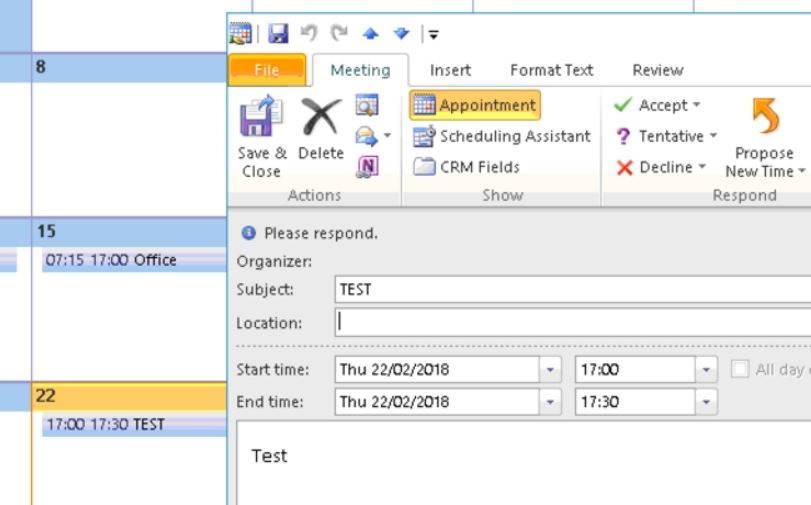
Grab01.jpg

Despite on checking under scheduling assistant the only person listed as both organiser and attendee is the other user.

Grab02.jpg

I also have 'Editor' permission to the users calendar.

*This post is locked for comments

I have the same question (0)
  • Radu Chiribelea Profile Picture
    6,667 on at

    Hi Graeme,

    Does the other user (Freya) - see this entry in his own calendar in Outlook?

    Regards,

    Radu

  • Community Member Profile Picture
    on at

    Hi Radu, no it didn't appear in Freya's dairy.

  • TomSmelser Profile Picture
    1,570 on at

    Are you using Outlook Add-In?

  • Community Member Profile Picture
    on at

    I am Tom, and Appointments have been setup to sync both 'My Appointments' and 'Other Appointments'.

  • TomSmelser Profile Picture
    1,570 on at

    Ok. If I recall under sync filters you can set Appointments "I own".  That should be set for your user's add-in sync. Maybe already but just to verify.

  • Suggested answer
    Radu Chiribelea Profile Picture
    6,667 on at

    Hi Graeme,

    What synchronization method does the user have (Outlook / Server Side Synchronization) ?

    If i'm not mistaken, the way the appointment sync works is following:

    - CRM sends the appointment to Exchange for the organizer

    - Then from Exchange the rest of the parties get the invite

    So if you've set the other user as the organizer and the appointment appears in your Outlook calendar and not theirs as well is very strange.

    If you are using Outlook sync, then the organizer needs to have their Outlook opened and configured with the CRM add-in for the appointment to sync. Have you checked that?

    Regards,

    Radu

  • TomSmelser Profile Picture
    1,570 on at

    That organizer field may not get set automatically. You may have to add that to the appointment form, then physically set it or setup a workflow to owner to organizer.

Under review

Thank you for your reply! To ensure a great experience for everyone, your content is awaiting approval by our Community Managers. Please check back later.

Helpful resources

Quick Links

Responsible AI policies

As AI tools become more common, we’re introducing a Responsible AI Use…

Neeraj Kumar – Community Spotlight

We are honored to recognize Neeraj Kumar as our Community Spotlight honoree for…

Leaderboard > 🔒一 Microsoft Dynamics CRM (Archived)

#1
SA-08121319-0 Profile Picture

SA-08121319-0 4

#1
Calum MacFarlane Profile Picture

Calum MacFarlane 4

#3
Alex Fun Wei Jie Profile Picture

Alex Fun Wei Jie 2

Last 30 days Overall leaderboard

Featured topics

Product updates

Dynamics 365 release plans
