web
You’re offline. This is a read only version of the page.
close
Skip to main content

Announcements

No record found.

News and Announcements icon
Community site session details

Community site session details

Session Id :
Microsoft Dynamics AX (Archived)

Re-refresh grid based on new selected value ?

(0) ShareShare
ReportReport
Posted on by 576

Hello Everyone

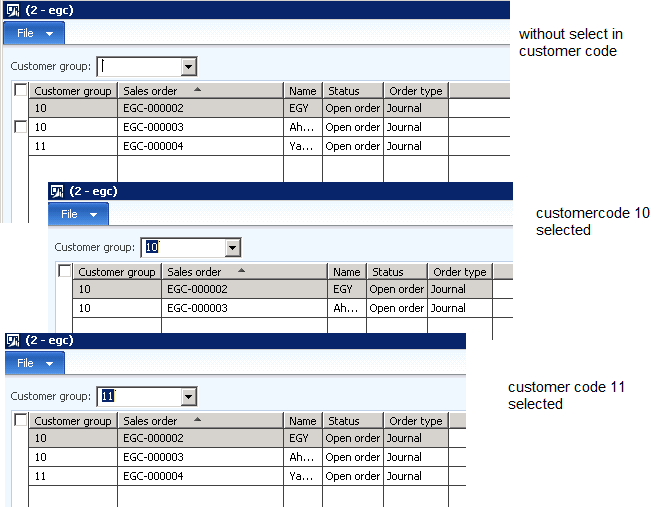
first pic

i11748.1.png
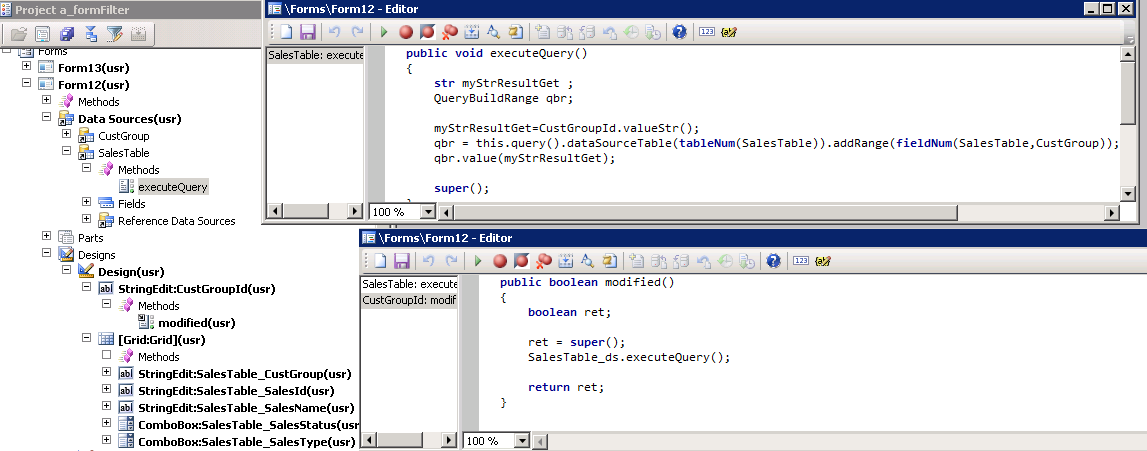
Second pic

164062.2.png

public void executeQuery()
{
    str myStrResultGet ;
    QueryBuildRange qbr;

    myStrResultGet=CustGroupId.valueStr();
    qbr = this.query().dataSourceTable(tableNum(SalesTable)).addRange(fieldNum(SalesTable,CustGroup));
    qbr.value(myStrResultGet);

    super();
}


my problem in second pic when i change the customer group selection for the second time the grid save old records and show it with new selection

thank in advance.

*This post is locked for comments

I have the same question (0)
  • Suggested answer
    Chaitanya Golla Profile Picture
    17,225 on at

    Hi,

    This can be achieved by writing code in the modified method of customer group field like whenever value is selected just pass it as a query range to the formdatasource query and call formdatasource.executequery(at end) to filter the data based on criteria. Can you share your code with us, so that we can check the missing part.

  • Ismail Mohamed Profile Picture
    576 on at

    now you can find the code in the post

    thank you

  • Suggested answer
    Chaitanya Golla Profile Picture
    17,225 on at

    Hi,

    Please try by performing following changes:

    Change queryrange either to qbr.value(queryvalue(myStrResultGet));  (or) qbr.value(queryvalue(CustGroupId.selected()));

  • Ismail Mohamed Profile Picture
    576 on at

    worked fine   this.Query().datasourceNo(1).clearRanges();

    Chaitanya Golla thank you

    not worked qbr.value(queryvalue(myStrResultGet));  (or)

    not worked qbr.value(queryvalue(CustGroupId.selected()));  

    Sukrut Parab thank you

    this example with combocox and in combox there is method named selection changed

    i didn't find it on stringedt

  • Verified answer
    Mea_ Profile Picture
    60,286 on at

    Hi Ismail Mohamed,

    You are adding new range each time query is executed, instead of doing this you need to create range once on init of the form and then set a value of the range in executeQuery.

  • Verified answer
    Vilmos Kintera Profile Picture
    46,149 on at

    As Ievgen has pointed out, you need to shuffle your code around to do it properly. I would recommend using SysQuery::findOrCreateRange() call to avoid duplicate range creation.

    msdn.microsoft.com/.../sysquery.findorcreaterange.aspx

  • Ismail Mohamed Profile Picture
    576 on at

    this.query().dataSourceTable(tableNum(SalesTable)).addRange(fieldNum(SalesTable,CustGroup))

    can anyone tell me what is this.query() means ?

    is there a default query in each form ?

  • Mea_ Profile Picture
    60,286 on at

    Each form has datasources behind, so query is build base on this datasources and their relations.

  • Ismail Mohamed Profile Picture
    576 on at

    Ok my question-  is there a built-in query created with the form creation or the query will create when i execute  this.query()

Under review

Thank you for your reply! To ensure a great experience for everyone, your content is awaiting approval by our Community Managers. Please check back later.

Helpful resources

Quick Links

Introducing the 2026 Season 1 community Super Users

Congratulations to our 2026 Super Stars!

Meet the Microsoft Dynamics 365 Contact Center Champions

We are thrilled to have these Champions in our Community!

Congratulations to the March Top 10 Community Leaders

These are the community rock stars!

Leaderboard > 🔒一 Microsoft Dynamics AX (Archived)

#1
Joris dG Profile Picture

Joris dG 5

#2
Andrew Jones a1x Profile Picture

Andrew Jones a1x 2

#3
Basit Profile Picture

Basit 1

Last 30 days Overall leaderboard

Featured topics

Product updates

Dynamics 365 release plans