web
You’re offline. This is a read only version of the page.
close
Skip to main content

Notifications

Announcements

No record found.

Community site session details

Community site session details

Session Id :
Small and medium business | Business Central, N...
Answered

Line Type in Job Journal always defaults to blank

(0) ShareShare
ReportReport
Posted on by 45

Hi Everyone

I have the following setup with Jobs:

A Job is setup with multiple job tasks and planning lines are set to "Both Budget and Billable" and Resource Prices are set for each Job Task. (Some Jobs would have specific Planning Lines setup whereas others wouldn't have as they would be T&M).

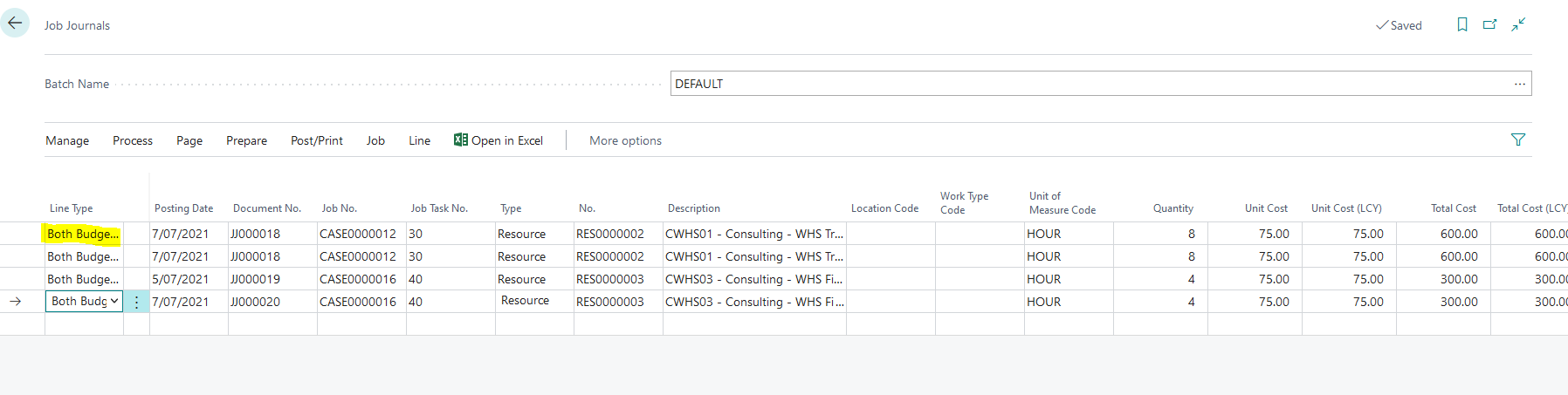
Resources then enter their timesheets and are approved and on the Job Journal the correct data pulls through using the "Suggest Lines from Timesheets" functionality however the Line Type is always blank resulting in having to complete it for every job journal line which can sometimes be a large number.

How is is possible to ensure the Line Type defaults to "Both Budget and Billable" ?
pastedimage1625740874104v1.png

Many Thanks

Ivan

I have the same question (0)
  • Suggested answer
    Bilal Haider Profile Picture
    414 on at

    Hi,

    You can do this by adding a line of code in report Suggest Job Jnl. Line where Line is created and given values:

    JobJnlLine."Line Type" := JobJnlLine."Line Type"::"Both Budget and Billable";

    May be you already know but just to inform again that you should be aware that giving Line type Budget & Billable in Job journal will create new lines each for Budget and Billable in Job planning with the quantity that you have posted. If you are already creating Budget & Billable line with quantities in Job planning then you do not need to create them again.

  • Verified answer
    Ben Baxter Profile Picture
    6,620 Super User 2025 Season 2 on at

    You do not want to post entries through the Job Journal with a Line Type of "Both Budget and Billable".  You would force your estimate to balloon with each entry.

    You also do not want to use "Both Budget and Billable" for the Job Planning Lines if you plan to bill from the actual Time posted from Time Cards.

    Typical setup would be to use "Budget" for the Job Planning Lines, which creates your Job's estimate.

    IF the Job is a Time and Material Job you would use Line Type = Billable for all entries posted through the Job Journal.  This creates lines on the Job that can be transferred to the Invoice during the "Create Invoice" process.

    IF your Job has a set Contract amount, or planned billing milestones, you would use a BLANK Line Type for all entries posted through the Job Journal.  In this scenario you should have already created your Billable Job Planning Lines so they are ready to invoice on a planned future date.

    The only time you want to use "Both Budget and Billable" would be on a Job Planning Line and ONLY if you plan to bill exactly what you estimated regardless of the actual costs involved.  Based on our customer base, almost nobody does this.

  • Ivan Levin Profile Picture
    45 on at

    Thanks, Ben. Appreciate your assistance.

    The only problem I am left with is that the Line Type is still blank in the job journal meaning if there are a large number of timesheet lines on the Job Journal that it is not ideal that the user needs to manually select Billable for each and every line on that job journal.

    Ideally it would be nice to be able to have it default to billable and change if necessary.

  • Suggested answer
    Bilal Haider Profile Picture
    414 on at

    You need to do customization and add a line. I have described this in previous reply.

    You can also achieve it doing customization like that at page level.

  • Ivan Levin Profile Picture
    45 on at

    Thank you, Bilal.

  • tristancliffe Profile Picture
    64 on at

    Dear Bilal,

    How/where might one write that code (to set default line to Billable)? Via a report extension? As a page extension with a trigger? 

    I tried several approaches, but it wouldn't recognise the code as valid (BC SaaS via VS Code). 

    Thanks. 

  • Suggested answer
    Inge M. Bruvik Profile Picture
    1,111 Moderator on at

    The easiest way is through a table extension or through an event subscriber.

    Report is not good for this purpose.

  • tristancliffe Profile Picture
    64 on at

    Alas, I am not clever enough!

    My table extension doesn't work. Report extensions didn't work because of protected variables. I am not good enough to write an event subscription!!!!

    tableextension 50201 "Job Journal Line Ext" extends "Job Journal Line"
    {
        fields
        {
            field(50100; "Work Done"; Text[700])
            {
                CaptionML = ENG = 'Work Done', ENU = 'Work Done';
            }
        }
        trigger OnAfterInsert()
        var
            JobJnlLine: Record "Job Journal Line";
            "Line Type": Option;
        begin
            JobJnlLine."Line Type" := JobJnlLine."Line Type"::Billable
        end;
    }

Under review

Thank you for your reply! To ensure a great experience for everyone, your content is awaiting approval by our Community Managers. Please check back later.

Helpful resources

Quick Links

Responsible AI policies

As AI tools become more common, we’re introducing a Responsible AI Use…

Neeraj Kumar – Community Spotlight

We are honored to recognize Neeraj Kumar as our Community Spotlight honoree for…

Leaderboard > Small and medium business | Business Central, NAV, RMS

#1
OussamaSabbouh Profile Picture

OussamaSabbouh 2,135

#2
YUN ZHU Profile Picture

YUN ZHU 733 Super User 2025 Season 2

#3
Sumit Singh Profile Picture

Sumit Singh 612

Last 30 days Overall leaderboard

Featured topics

Product updates

Dynamics 365 release plans



