web
You’re offline. This is a read only version of the page.
close
Skip to main content

Notifications

Announcements

No record found.

Community site session details

Community site session details

Session Id :
Microsoft Dynamics AX (Archived)

Budgeting on total account

(0) ShareShare
ReportReport
Posted on by 4

Hi guys, 

Im trying to budget on total accounts by recording budget amounts on total ledger accounts. I have created a total account that comprises all personnel expenses. Thereafter, when I try to add the total account no 7699TOT for the year 2018 i get an error message telling me that "The account type for main account 7699TOT is not valid. The main account type must be Financial." For details, please see the following screen-print. I can´f figure out whats wrong. I have followed the steps explained in the link below. 

https://community.dynamics.com/ax/b/dynamicsaxfinanceandcontrolling/archive/2016/04/08/a-note-on-budgeting-on-total-accounts

Please help.

Best regards

Tony
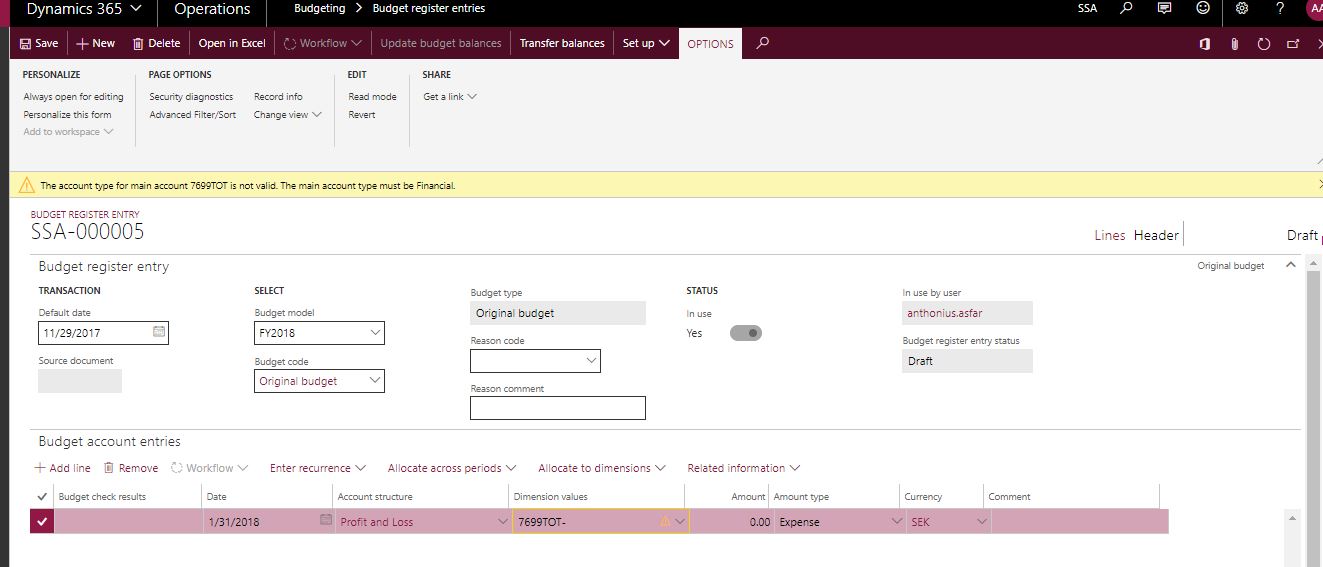
 2768.Capture.JPG

*This post is locked for comments

I have the same question (0)
  • Brandon Wiese Profile Picture
    17,788 on at

    You cannot budget on total accounts because they are not actual main accounts.  Total accounts are merely virtual main accounts that represent an aggregate collection of actual main accounts.  You must budget on main accounts of type Asset, Liability, Equity, etc.

  • Tony111 Profile Picture
    4 on at

    Hi Brandon,

    as you can see from the link above Ludwig creates/sets up an total account for travel expenses and thereafter adds a budget amount in the budget register entries for the total account.

    Best regards

    Anthonius

  • Community Member Profile Picture
    on at

    Brandon is correct, you cannot budget on a total account.

    From what I can see from Ludwig posts, he sets his MainAccount up as a dimension. You can always budget on dimensions and as the total account is also a dimension in the MainAccount dimension, so therefore you can budget on total accounts.

    This is a best guess, I dont have a D365 available to test now.

  • Tony111 Profile Picture
    4 on at

    Hi Martijn,

    The MainAccount that Luwig created is a Total account. As you can see from the post, he selects the Total account when entering a budgeted amount for 2018 in the budget register entries.

    Best regards

    Anthonius

  • Community Member Profile Picture
    on at

    It looks like you are correct. Either the manual is not complete or some wizardy is going.

    I suggest to personal message Ludwig, he is quite active on the forums.

  • Tony111 Profile Picture
    4 on at

    Yes I will do that, thanks for your help.

  • Suggested answer
    guk1964 Profile Picture
    10,888 on at

    AX does support budgeting for total ledger accounts but not for total financial dimensions.

    This functionality is supported through the use of budget groups. For each total main account, the budget that should be controlled for a budget group must be created on the Budget control configuration page. The criteria must include the total main account and the range of accounts.

    https://docs.microsoft.com/en-us/dynamics365/unified-operations/financials/budgeting/create-budget-transaction-accounts-total-accounts

    https://msdn.microsoft.com/en-us/library/aa497123(v=ax.10).aspx

    https://community.dynamics.com/ax/f/33/t/181211

    The two level budget control is provided by use of budget groups.

    Access: Budgeting > Setup > Budget control configuration > Select main accounts

    When the main account financial dimension is defined as a budget control dimension, the main account financial dimension is included in the budget control rules, and no setup step is required.

    When the main account financial dimension is not defined for budget control, then select the main accounts that the budget control rules will be enforced for. Only main account types of Total, Profit and loss, and Expense can be selected. Budget control works only for total accounts that are  linked to either Expense, or Profit and loss accounts.

    In the Define budget groups area,  define budget groups to form a budget pool, or a collection of financial dimension values whose budgets will be pooled for a secondary budget check.

    The financial dimension combinations that are found in the budget control rule are always checked for budget amounts. When a financial dimension combination is also found in a budget group, a second budget check is performed at the budget group level.

  • Suggested answer
    Ludwig Reinhard Profile Picture
    Microsoft Employee on at

    Hi Tony,

    Here some comments:

    1. You can register a budget for a total account.

    Here is an example from my USSI contoso demo company

    4760.bud4.png

    3426.bud2.png

    2. You can not post a transaction on a total account => AX will generate an error.

    1323.bud3.png

    3. What you can do though is recording a transaction on an account that is included in the total account

    In my example, you can post something on the accounts 606000 - 606998

    4760.bud4.png

    4. When you have a budget recorded on a total account and record postings on the accounts that make up the total account, Budget Control won't work in the first place because the account that holds the budget is different from the one that holds the transaction.

    5. The trick to overcome this issue is setting up

    (a) a Budget Control rule and

    (b) a Budget Group rule

    Here is the respective example from my blog

    https://dynamicsaxfico.files.wordpress.com/2016/01/en_95_0015.png

    https://dynamicsaxfico.files.wordpress.com/2016/01/en_95_0030.png

    Note:

    The budget control rule will fail because the budget is recorded on the total account and the transaction on a different account.

    However, the budget group rule will execute a secondary budget check. As this budget group rule includes the total account that holds the budget, the budget control will work.

    Please also take a look at the detailed example illustrated here and probably try to replicate it first in a demo environment.

    https://dynamicsax-fico.com/2016/04/08/a-note-on-budgeting-on-total-accounts/

    Best regards,

    Ludwig


Under review

Thank you for your reply! To ensure a great experience for everyone, your content is awaiting approval by our Community Managers. Please check back later.

Helpful resources

Quick Links

Responsible AI policies

As AI tools become more common, we’re introducing a Responsible AI Use…

Neeraj Kumar – Community Spotlight

We are honored to recognize Neeraj Kumar as our Community Spotlight honoree for…

Leaderboard > 🔒一 Microsoft Dynamics AX (Archived)

#1
Priya_K Profile Picture

Priya_K 4

#1
Martin Dráb Profile Picture

Martin Dráb 4 Most Valuable Professional

#3
Ali Zaidi Profile Picture

Ali Zaidi 2

Last 30 days Overall leaderboard

Featured topics

Product updates

Dynamics 365 release plans
