web
You’re offline. This is a read only version of the page.
close
Skip to main content

Announcements

No record found.

News and Announcements icon
Community site session details

Community site session details

Session Id :
Finance | Project Operations, Human Resources, ...
Answered

How do I access a control with autodeclaration in no

(0) ShareShare
ReportReport
Posted on by 15

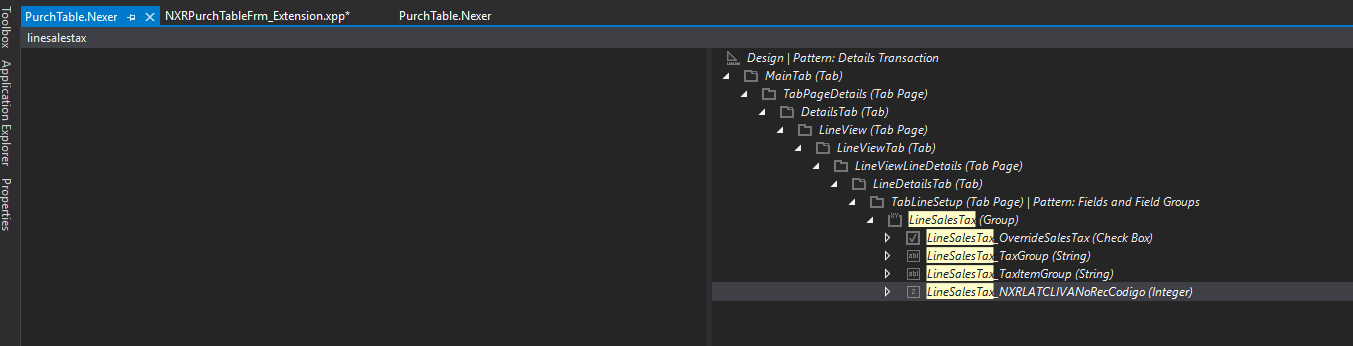
Hello everyone, I have a custom field from a purchTable form extension. This one has the self-declaration set to "no". so I wanted to change it from code, but when doing so, it gives me an error that the control was not in control inside the form.
What am I doing wrong and why can't I log in?
pastedimage1677873105288v1.png

This is the control that I must modify the enabled property with declaration in "no", this cannot be passed to autodeclaration "yes"

For this I try to modify the enabled property with code.

    [FormDataFieldEventHandler(formDataFieldStr(PurchTable, PurchLine, TaxItemGroup), FormDataFieldEventType::Modified)]
    public static void TaxItemGroup_OnModified(FormDataObject sender, FormDataFieldEventArgs e)
    {
            FormDataSource      purchLine_ds = sender.datasource();
            FormRun             form = purchLine_ds.formRun();

            FormControl         NXRLATCLIVANoRec = form.design().controlName(formControlStr(PurchTable, NXRLATCLIVANoRecCodigo));
    }

I have the same question (0)
  • Angel Profile Picture
    15 on at

    Correction. I need to be able to change the enabled property, it would be easier if I could do it from the self-declaration, but it can't be changed from there. That's why I resort to accessing from the form's control with FormControl, but when I do this it gives me an error that the indicated control cannot be found inside the form.

  • Suggested answer
    Komi Siabi Profile Picture
    13,190 Most Valuable Professional on at

    Hello Angel,

    Being a custom field, the easiest way is to set the Autodeclaration  to Yes from the designer. 

    Add the purchtable extension form object to a project with the custom Model.

  • Komi Siabi Profile Picture
    13,190 Most Valuable Professional on at

    Why can't it be changed from there? 

    Don't you have access to the model in which the custom field was added?

  • Angel Profile Picture
    15 on at

    Thanks for your answer, the field is custom, but it was updated due to a modification in a fieldGrup of the PurchTable table, so even though it appears in the design of the form, it is not possible to modify the self-declaration

  • Komi Siabi Profile Picture
    13,190 Most Valuable Professional on at

    Hi Angel,

    When you say custom, it means it was created by a developer, and it is not a standard extension by Microsoft so you should have the right to modify it unless you are trying it in the wrong project.

    Based on your screenshot, It seems the PurchTable from on your environment was extended in the Nexer model.

    Please confirm my assumption. Could you also tell us the model in your project ?

  • Angel Profile Picture
    15 on at

    Yes, the purchtable was extended in my model, however, I can't modify the autodeclaration because it appears disabled

    pastedimage1677874831602v1.png

    The own control that I want to access was added from the fieldGroup of the table to which the datasource refers. so it was not modified directly from the form, but through the purchline table

  • Suggested answer
    Komi Siabi Profile Picture
    13,190 Most Valuable Professional on at

    Oh ok!

    To get you right, the custom field in question wasn't created in your current model.

    I do not think, you can modify the autodeclaration property by code.

    Have you tried something like this?

    NXRLATCLIVANoRecCodigo.visible().

    By the wasy, check this and see if it works for you

  • Suggested answer
    Mohit Rampal Profile Picture
    12,565 Moderator on at

    Hi Angel, I think even if you can access this field in code, it will still remain disabled as this field is in a Field Group. if field group is disabled, field inside it cannot be enabled.

    If you want to make it editable, remove field from field group and add next to this group, you won't need to access it from code.

  • Suggested answer
    GirishS Profile Picture
    27,833 Moderator on at

    Hi Angel,

    Try setting the property using object method of DataSource.

    [FormDataFieldEventHandler(formDataFieldStr(PurchTable, PurchLine, TaxItemGroup), FormDataFieldEventType::Modified)]
        public static void TaxItemGroup_OnModified(FormDataObject sender, FormDataFieldEventArgs e)
        {
                FormDataSource      purchLine_ds = sender.datasource();
                FormRun             form = purchLine_ds.formRun();
                purchLine_ds.object(fieldnum(Tablename, fieldname)).allowEdit(false);
                //FormControl         NXRLATCLIVANoRec = form.design().controlName(formControlStr(PurchTable, NXRLATCLIVANoRecCodigo));
        }

    If the enabled property of the field group was set to be yes, then you need to create new group and make the existing group visibility to No.

    If you want the custom field must be inside the field group then you need to create new group and set the visiblity to No on the existing group. 

    Thanks,

    Girish S.

  • Angel Profile Picture
    15 on at

    thanks for you answer

Under review

Thank you for your reply! To ensure a great experience for everyone, your content is awaiting approval by our Community Managers. Please check back later.

Helpful resources

Quick Links

Introducing the 2026 Season 1 community Super Users

Congratulations to our 2026 Super Stars!

Congratulations to our 2025 Community Spotlights

Thanks to all of our 2025 Community Spotlight stars!

Leaderboard > Finance | Project Operations, Human Resources, AX, GP, SL

#1
André Arnaud de Calavon Profile Picture

André Arnaud de Cal... 512 Super User 2026 Season 1

#2
Giorgio Bonacorsi Profile Picture

Giorgio Bonacorsi 386

#3
Adis Profile Picture

Adis 259 Super User 2026 Season 1

Last 30 days Overall leaderboard

Product updates

Dynamics 365 release plans
