web
You’re offline. This is a read only version of the page.
close
Skip to main content

Notifications

Announcements

No record found.

Community site session details

Community site session details

Session Id :
Microsoft Dynamics CRM (Archived)

Automatic case creation rule for incoming emails is not working in my ms crm 2016 online instance.

(0) ShareShare
ReportReport
Posted on by 35

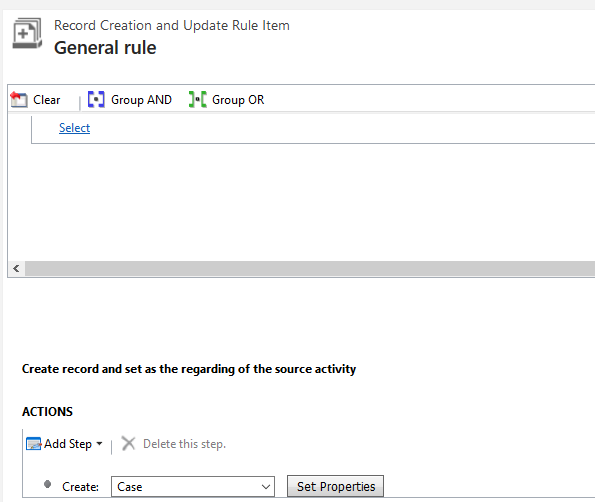
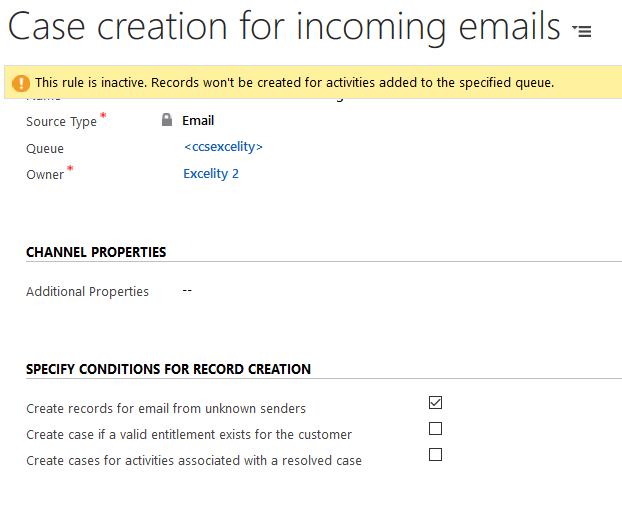
Hi guys, I am trying to create cases for incoming emails by using automatic record creation and update rule. But it is not working in my 2016 online instance. If i use workflow for case creation it is working fine, but out of box option is not working. Even after removing all the conditions for case creation also it is not working. Please comment below If anybody have the solution for this problem. 
blog1.PNGblog2.PNG

Thanks & Regards,

Vijay Bhat

*This post is locked for comments

I have the same question (0)
  • ADavis Profile Picture
    on at

    I am also having the exact same issue and have not been able to work it out. Currently have a support case with the Dynamics 365 folk, so will update you if they are able to resolve it. Would be good to hear from someone who actually has it working.

  • Suggested answer
    Community Member Profile Picture
    on at

    Did you activate the automatic record creation job?

    Is there any error caused by Plugins? Workflow etc.? Advanced find the system job under "workflow" type and see if the automatic record creation workflow has any error.

  • ADavis Profile Picture
    on at

    How would I activate the "automatic record creation job"? This is an "Online" instance, not "On-Prem", I have not been able to find anything that remotely resembles a job management console in the interface.

  • Community Member Profile Picture
    on at

    Dude... there is an ACTIVATE button at the top menu (in between the NEW and DELETE)

  • ADavis Profile Picture
    on at

    Ahh, your referring to the ""Record Creation and Update Rule" ..... yes it has been activated the whole time. If I look at "System Jobs" in Advanced Find I only get one entry of type workflow, and it isn't in relation to the automatic case creation. It is as if there is a service on the back-end not running to kick off the record creation once and email is received. Interestingly, if in the queue mailbox properties, I set "Delete Emails after Processing" to "Yes", then emails are automatically deleted out of the mailbox. Just no cases are created, and I cannot find any error or warning messages pertaining to the operation anywhere. I feel like I am missing one critical component to have this working but it isn't documented anywhere.

  • Suggested answer
    Community Member Profile Picture
    on at

    I suppose it is not an email regarding to a closed case.

    Try disable all the plugins/WF to see if it works?

  • ADavis Profile Picture
    on at

    No, it is in relation to a product expiration workflow. Not related to cases at all.

    There are no other Plug-ins or Workflows to disable, we only started working on this Online instance 2 weeks ago. Pretty much a vanilla config.

  • Community Member Profile Picture
    on at

    Well.. I mess up you and the gentleman who post the actual question..

    What is your question btw? I need some background.

  • Suggested answer
    BusyIntelligence Profile Picture
    562 on at

    Hi ADavis, I have it running without a problem. When setting things up one thing was not correct in first place, resulting in the same behaviour as in your situation.

    The owner of the rule must be a user with permission to create cases within the actual business unit.

    In my first attempts I created the rule with a "team" as owner, but that didn't work.

    Hope this helps you!

Under review

Thank you for your reply! To ensure a great experience for everyone, your content is awaiting approval by our Community Managers. Please check back later.

Helpful resources

Quick Links

Responsible AI policies

As AI tools become more common, we’re introducing a Responsible AI Use…

Neeraj Kumar – Community Spotlight

We are honored to recognize Neeraj Kumar as our Community Spotlight honoree for…

Leaderboard > 🔒一 Microsoft Dynamics CRM (Archived)

#1
SA-08121319-0 Profile Picture

SA-08121319-0 4

#1
Calum MacFarlane Profile Picture

Calum MacFarlane 4

#3
Alex Fun Wei Jie Profile Picture

Alex Fun Wei Jie 2

Last 30 days Overall leaderboard

Featured topics

Product updates

Dynamics 365 release plans