web
You’re offline. This is a read only version of the page.
close
Skip to main content

Notifications

Announcements

No record found.

Community site session details

Community site session details

Session Id :
Customer experience | Sales, Customer Insights,...
Answered

Usage of event trigger Email link clicked in Journey (real time)

(1) ShareShare
ReportReport
Posted on by 13

Hi,

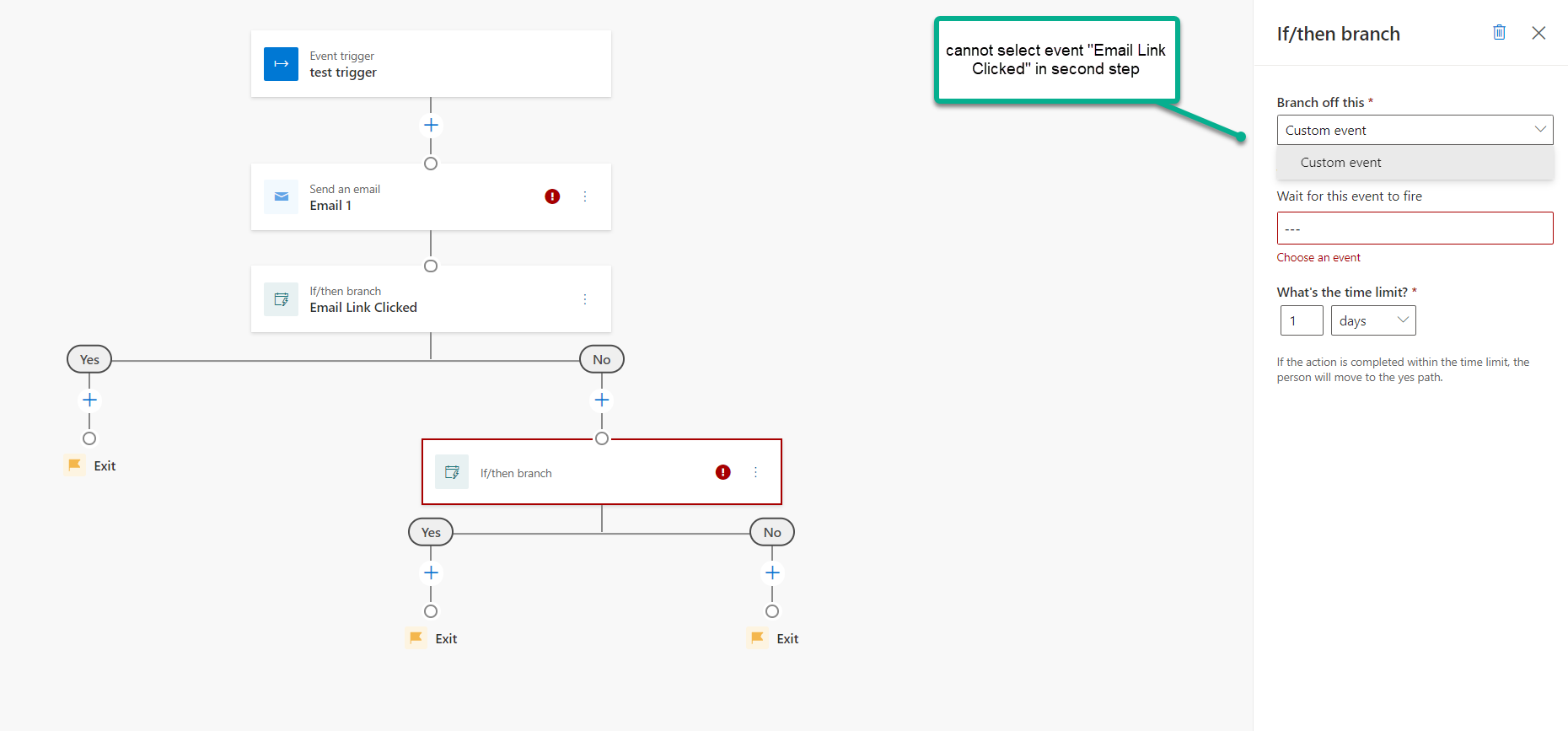
I have this scenario in real-time Journey: 

1. Start Journey 

2. Send Email: Email1

3. If/then branch: Check if linkA in Email1 was clicked

//steps 1-3 can be achived without problem

4 After "No" branch from step 3 I would like to add If/then branch: Check if linkB in Email1 was clicked

but unconfortionaly this cannot be achieved because we cannot use trigger "Email Link Clicked" in any other step except the one that is directly after step "Send an email" ....it look like that MS developers did not think that someone would like to check more that just one thing from previous step  ...realy failed design in my opinion.

I think that workaround could be to create dynamic segment (for all those users that click linkB in email1) and then trigger custom event as new contact is added to segment. but this mean a lot of work for each journey plus cannot imagine the final number of custom event triggers if we create new each time.

This (to use if/else action more times) is possible to achive in Customer Journey (outbound marketing) but sadly there is no option to use event triggers. Its just stupid from MS that now we have 2 type of "journey" (real time and outbound) but both look like half product and it is almost imposible for end user to design a little advanced marketing campaign scenarios.

Is there is any other option/solution for my problem, did maybe I miss something? Can we expect some feature that will solve this gap in the future?
pastedimage1634208465707v1.png

I have the same question (0)
  • Verified answer
    Nya Profile Picture
    29,060 on at

    Hi,

    I can reproduce your issue and it is by deign.

    You have to re-add the Send an email in the branch and then the "Email Link Clicked" can be selected.

    pastedimage1634289552483v1.png

    You can post your proposal in Ideas forum to drive the issue to be solved.

  • Suggested answer
    Gaju G Profile Picture
    on at

    Thank you for your feedback - we've added this to our backlog. If you'd like to discuss your scenario further, feel free to reach out.

Under review

Thank you for your reply! To ensure a great experience for everyone, your content is awaiting approval by our Community Managers. Please check back later.

Helpful resources

Quick Links

Responsible AI policies

As AI tools become more common, we’re introducing a Responsible AI Use…

Neeraj Kumar – Community Spotlight

We are honored to recognize Neeraj Kumar as our Community Spotlight honoree for…

Leaderboard > Customer experience | Sales, Customer Insights, CRM

#1
Tom_Gioielli Profile Picture

Tom_Gioielli 170 Super User 2025 Season 2

#2
#ManoVerse Profile Picture

#ManoVerse 70

#3
Jimmy Passeti Profile Picture

Jimmy Passeti 50 Most Valuable Professional

Last 30 days Overall leaderboard

Product updates

Dynamics 365 release plans
