web
You’re offline. This is a read only version of the page.
close
Skip to main content

Announcements

No record found.

News and Announcements icon
Community site session details

Community site session details

Session Id :
Finance | Project Operations, Human Resources, ...
Suggested Answer

How to cancel a Return Order that has been "Delivered" and has status Packing Slip

(0) ShareShare
ReportReport
Posted on by 18

Hello

We have a IC (SO) Return Order that has been "Delivered" (posted "Packing Slip"), not invoiced yet, but which we need to cancel because we have used the wrong item numbers.

If we go to "Packing Slip Journal" and press "Correct" or "Cancel" then we get error message up.
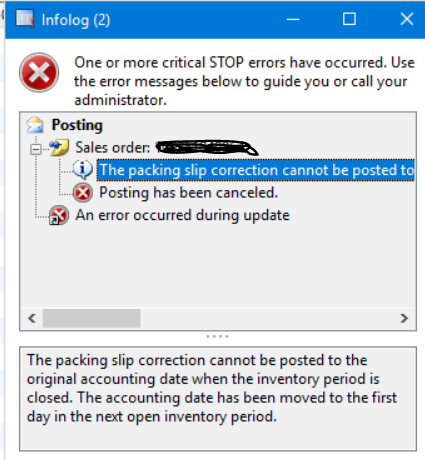
pastedimage1611040228128v1.png

If we try to delete the Depositions code on a line, the code jumps back as soon as you change the line.

The IC order ( the customers purchase/return order) is still open.

Is there any way to cancel an already "Delivered" Return Order?

/ regards BCC

I have the same question (0)
  • Anrini Profile Picture
    Microsoft Employee on at
  • Suggested answer
    Ludwig Reinhard Profile Picture
    Microsoft Employee on at

    Hi BCC,

    When you hit the correct button from the packing slip journal form then you should see a packing slip date that default to your current system date.

    Have you tried changing your system date correspondingly to see if this helps?

    Best regards,

    Ludwig

  • Suggested answer
    Daniel Aguilera Trigos Profile Picture
    on at

    Hi, you need to cancel the packing slip (sales order - packing slips - select packing slip by packing slip and click cancel) and after that the sales order will change to "open order status" instead of delivered, then the cancel button on the sales order will be enabled, click cancel on the sales order and thats it, the sales order will change to canceled status.

Under review

Thank you for your reply! To ensure a great experience for everyone, your content is awaiting approval by our Community Managers. Please check back later.

Helpful resources

Quick Links

Introducing the 2026 Season 1 community Super Users

Congratulations to our 2026 Super Stars!

Meet the Microsoft Dynamics 365 Contact Center Champions

We are thrilled to have these Champions in our Community!

Congratulations to the March Top 10 Community Leaders

These are the community rock stars!

Leaderboard > Finance | Project Operations, Human Resources, AX, GP, SL

#1
Giorgio Bonacorsi Profile Picture

Giorgio Bonacorsi 663

#2
André Arnaud de Calavon Profile Picture

André Arnaud de Cal... 439 Super User 2026 Season 1

#3
Syed Haris Shah Profile Picture

Syed Haris Shah 337 Super User 2026 Season 1

Last 30 days Overall leaderboard

Product updates

Dynamics 365 release plans
