web
You’re offline. This is a read only version of the page.
close
Skip to main content

Notifications

Announcements

No record found.

Community site session details

Community site session details

Session Id :
Small and medium business | Business Central, N...
Answered

How do I pull the Special Price out for this item in Navision 2018?

(0) ShareShare
ReportReport
Posted on by 4,971

HI,

I'm trying to test a special promo for one of my item. I have placed it under Set pecial Prices.
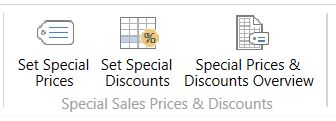
icons.JPG

and then my nor mal prices I set it as $2.

special-price.JPG

When I finished my transaction, the Special Price was not pulled out. There was no place for me to pull out as well.

Please advise how can I let the system choose Special Price over the normal Selling Price?

Thank you.

I have the same question (0)
  • Verified answer
    CarmenNunes Profile Picture
    on at

    Hello Josh,

    You haven't shared how  you have your Item Special Prices set.

    Anyway I have made a repro scenario on my side and system is working fine.

    Here's my repro scenario:

    At Item Card - Access to "Set Special Prices"

    pastedimage1608563559857v1.png

    .Add the Special Prices ( in my case I set for All Customers and without a staring date)

    pastedimage1608563703426v2.png

    :Create a Sales Order 

    At the moment I enter Item at Sales  Order Line, system returns the Special  Sales Price set before.

    pastedimage1608563841409v4.png

    Could it be something missing at your Item Special Sales Prices Setup?

    Hope this help you to move forward.

  • joshtechsolutions Profile Picture
    4,971 on at

    Hi Carmen,

    Thanks for your help. I realize my Customer Group I have place it as Customer Pricing Group. I wonder how that Customer Pricing Group works... Will put out another thread to ask that.

Under review

Thank you for your reply! To ensure a great experience for everyone, your content is awaiting approval by our Community Managers. Please check back later.

Helpful resources

Quick Links

Responsible AI policies

As AI tools become more common, we’re introducing a Responsible AI Use…

Neeraj Kumar – Community Spotlight

We are honored to recognize Neeraj Kumar as our Community Spotlight honoree for…

Leaderboard > Small and medium business | Business Central, NAV, RMS

#1
OussamaSabbouh Profile Picture

OussamaSabbouh 3,226

#2
Jainam M. Kothari Profile Picture

Jainam M. Kothari 2,047 Super User 2025 Season 2

#3
YUN ZHU Profile Picture

YUN ZHU 1,257 Super User 2025 Season 2

Last 30 days Overall leaderboard

Featured topics

Product updates

Dynamics 365 release plans
