web
You’re offline. This is a read only version of the page.
close
Skip to main content

Announcements

No record found.

News and Announcements icon
Community site session details

Community site session details

Session Id :
Microsoft Dynamics AX (Archived)

Data Import Export Framework - Number Sequences Troubles

(0) ShareShare
ReportReport
Posted on by 570

Hi,

I want to import open items in AX2012 (FP), this by means of the DIXF framework.

I'm using the "Opening Balance" target entity for this purpose:

1346.journalnumber.JPG


I want to import into de LedgerJournalTable (journal header) & LedgerJournalTrans (voucher lines).

The concerned fields are JournalNum (Journal Batch Number) and Voucher number which have been setup

as number sequences. These numbers  are formatted as next:

  • For JournalNum: 
    • 3302.vouchernumber.JPG
  • For Voucher:
    • 1663.autonumber2.gif


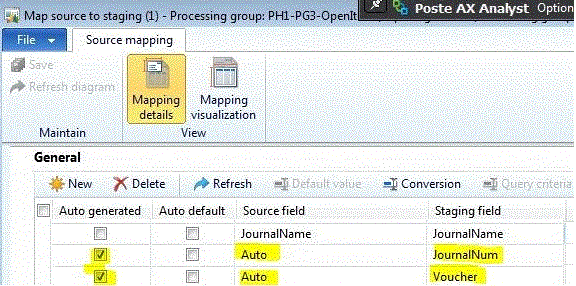
These sequence numbers are activated in the system. Next, I've activated auto number sequencing for the concerned fields in

the DIXF as next:
6355.preview.JPG


Next, when I choose "Preview" from my import file, I get:

 

4555.staging-error.JPG

I expected that DIXF would be smarter here and propose the next sequence to apply in correct format for JournalNum &

Voucher, e.g. PBJ-00001 and POVO-00001 and so on ... but ok ...


Until now, everything OK, but when I apply "Source to Staging" (Get Staging Data) I get next errors in the log:
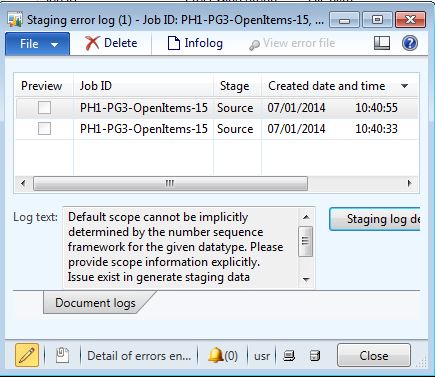
hmmm ... what to do next ?

Besides this error, I wander how AX (or DIXF) maps to the right sequence number while importing open item information,

this because Voucher & Journal num should be created for the journal header (which involves these numbers should be in each

of the detail lines (voucher lines) the same for the imported journal). Does this "auto-numbering" works anyway or do I miss something here ???


Thx for any response ! :)


Greetingz,


Emmanuel Nuyttens.


*This post is locked for comments

I have the same question (0)
  • Suggested answer
    André Arnaud de Calavon Profile Picture
    305,190 Super User 2026 Season 1 on at

    Hi Emmanuel,

    The number sequence  on the JournalNum is not working. Each line will try to retrieve a new journal number.  It is better to create the journal in advance and link the journalnumber. (in source or as default). Or specify a number that does not already exists then it will create a new Journal header with your manual chosen number,

  • dolee Profile Picture
    11,279 on at

    Hi Emmanuel,

    I did something similar before and I had to make quite some changes to get it to work as I like (See this post.)

    I was trying to use DIXF to do ad-hoc import (instead of one-off master data import). I had to modify the code to properly handle incrementing the "Next" value of a number sequence. Also there were problems if the number sequence is continuous and there are Free numbers available.

    The post was target against Pre-CU7 DIXF code though. I haven't check whether CU7 has the same problem.

    Kind regards,

    Dominic

Under review

Thank you for your reply! To ensure a great experience for everyone, your content is awaiting approval by our Community Managers. Please check back later.

Helpful resources

Quick Links

Introducing the 2026 Season 1 community Super Users

Congratulations to our 2026 Super Stars!

Meet the Microsoft Dynamics 365 Contact Center Champions

We are thrilled to have these Champions in our Community!

Congratulations to the April Top 10 Community Leaders

These are the community rock stars!

Leaderboard > 🔒一 Microsoft Dynamics AX (Archived)

#1
CP04-islander Profile Picture

CP04-islander 34

#2
Michel ROY Profile Picture

Michel ROY 14

#3
Jagadabi Profile Picture

Jagadabi 6

Last 30 days Overall leaderboard

Featured topics

Product updates

Dynamics 365 release plans
