web
You’re offline. This is a read only version of the page.
close
Skip to main content

Announcements

No record found.

News and Announcements icon
Community site session details

Community site session details

Session Id :
Small and medium business | Business Central, N...
Answered

How to reverse a purchase order after the quantity received has been used?

(0) ShareShare
ReportReport
Posted on by 241

Hello everyone, 

I created a purchase order and the warehouse put the wrong quantity on Qty. to Receive. The Purchase Order updated as excepeted but now I cant reverse the lines because the invetory received was alredy used. 

When I try to Undo Receipt I get this error. 
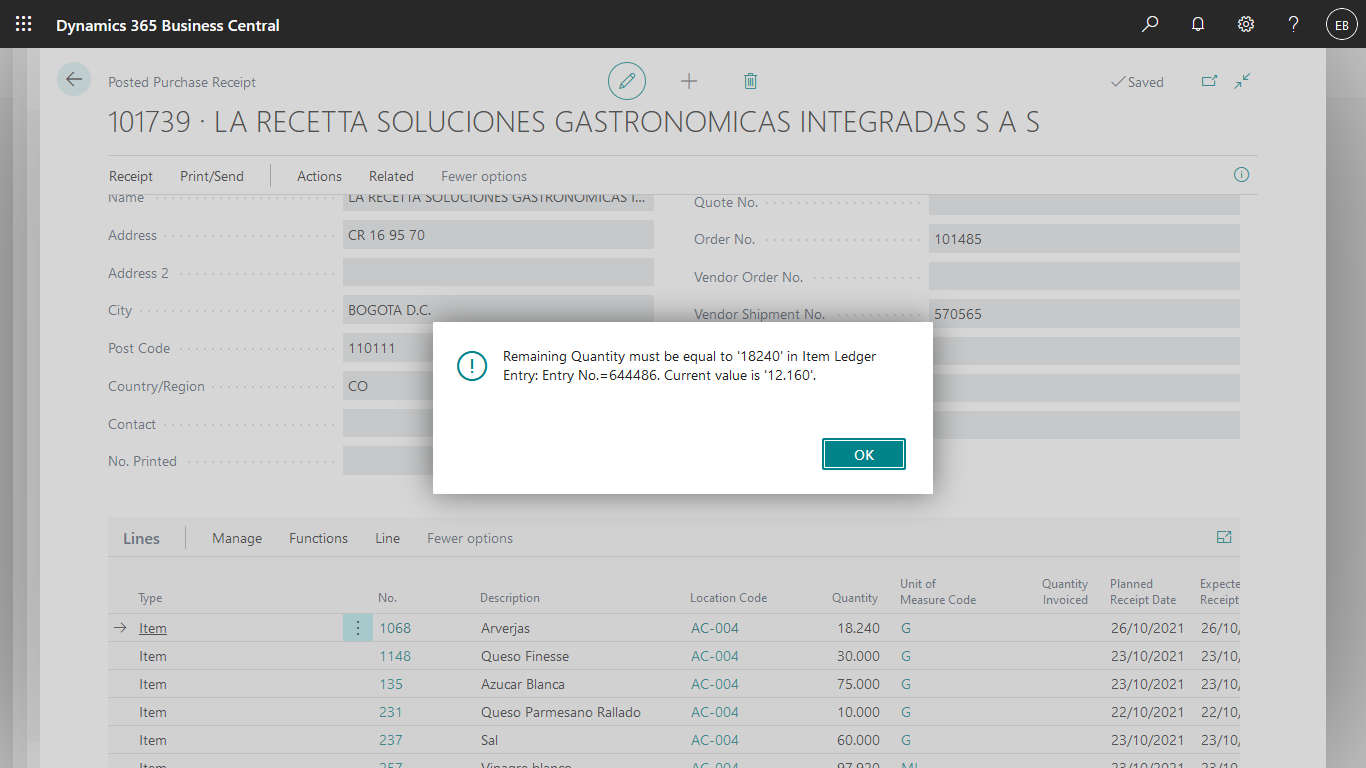
pastedimage1635352131407v1.png

The only suggestion that I have get is to post the Purchase order and then do a corrective credit memo. The problem is that the legistaltion of my country doesent allow to cancel registered purchase invoices. 

Thanks. 

I have the same question (0)
  • Suggested answer
    JAngle Profile Picture
    152 on at

    What about postings a negative qty. line that is otherwise a mirror image of the original line?

  • Suggested answer
    Community Member Profile Picture
    on at

    Esteban,

    The message is telling me that you received the Item and have already used it in production/assembly/or shipped so you do not have the quantity to undo the receipt. I would say where are the Items (check Item Ledger Entry to see what happened to them). If they have been used, continue posting the Purchase Order and then make the correction.

    If you find the Item, add them back to inventory so you can Undo Receipt.

    Thanks,

    Steve

  • Suggested answer
    YUN ZHU Profile Picture
    99,086 Super User 2026 Season 1 on at

    Hi, I know this may be more difficult, but can you reverse the shipment first? Such as Sales Order?

    Then you can undo the purchase order.

    Hope this will help.

    Thanks.

    ZHU

  • Verified answer
    DynamiQs Profile Picture
    on at

    Hi,

    You can post this invoice at 100% discount. This negates the posting impact without having to cancel the purchase order with a corrective credit memo.

Under review

Thank you for your reply! To ensure a great experience for everyone, your content is awaiting approval by our Community Managers. Please check back later.

Helpful resources

Quick Links

Introducing the 2026 Season 1 community Super Users

Congratulations to our 2026 Super Stars!

Meet the Microsoft Dynamics 365 Contact Center Champions

We are thrilled to have these Champions in our Community!

Congratulations to the March Top 10 Community Leaders

These are the community rock stars!

Leaderboard > Small and medium business | Business Central, NAV, RMS

#1
OussamaSabbouh Profile Picture

OussamaSabbouh 2,005 Super User 2026 Season 1

#2
YUN ZHU Profile Picture

YUN ZHU 1,148 Super User 2026 Season 1

#3
Khushbu Rajvi. Profile Picture

Khushbu Rajvi. 557 Super User 2026 Season 1

Last 30 days Overall leaderboard

Featured topics

Product updates

Dynamics 365 release plans
