web
You’re offline. This is a read only version of the page.
close
Skip to main content

Notifications

Announcements

No record found.

Community site session details

Community site session details

Session Id :
Microsoft Dynamics NAV (Archived)

Can't add web reference in Visual Studio to SOAP URL for NAV web service hosted on AZURE

(0) ShareShare
ReportReport
Posted on by

I'm trying to reference a web service on a NAV 2017 instance hosted in AZURE, from a new C# test project in Visual Studio on a local server.

In NAV, I'm going to "[Company]\Departments\Administration\IT Administration\Services\Web Services," and copying the SOAP URL for the desired service (object ID 21; Customer).

In Visual Studio (2015), I'm right clicking on "References" in the Solution Explorer, clicking "Add Service Reference...," followed by "Advanced..." in the popup, then "Add Web Reference..." I then paste the SOAP URL into the appropriate field, and hit Enter.

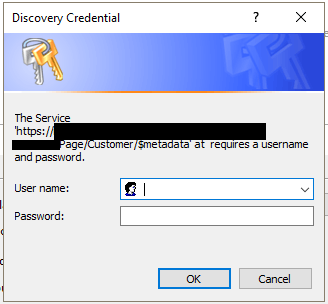
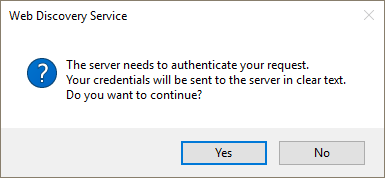
This is where the authentication problem begins. I get a dialog informing me that I;ll have to enter credentials (fig. 1), and then I get a Discovery Credential dialog (fig. 2). In the Discovery Credential dialog, I enter [Domain]\[Username] for my account, followed by the password. The account is configured as SUPER in the targeted NAV instance. After hitting enter, I get the first dialog again, and the authentication process repeats. No confirmation is given after submitting credentials (bad application design IMHO). The authentication repeats indefinitely so long as values are provided, correct or not.
CredentialsRequired.PNG
fig. 1

CredentialsDialog.png
fig. 2

Through multiple attempts with different services/protocols/anything I could think to try, I've gotten slightly varying results with the new Windows authentication dialog, and completion of the authentication process with a bad credentials message after 3 submissions (I am sure the credentials are correct). I am at a complete loss. Even ignoring the typo in the fig. 2 dialog, it's painfully clear that developers didn't care about polishing this utility.

Other Information:

Navigating to http://<Server>:<WebServicePort>/<ServerInstance>/WS/<CompanyName>/services (should list published SOAP services) returns an HTTP 401 (Unauthorized) status code.

Doing the same on the NST host machine at least brings up an authentication dialog, but still results in a 401 error after 3 entries of correct credentials.

The above test on the host machine reveals a certificate error. I'm not sure if this is relevant.

The NAV account is linked to a windows account with the same name.

The "All Tenants" and "Published" boxes are both checked on the web service.

I can run NAV without issue, connecting to the same instance and company from within my network.

The project I'm testing from is a C# class library project in a solution with a .NET MVC project, and several other class libraries. I double checked that this was not causing interference by trying again in an independent console application project.

Any insights would be greatly appreciated.

*This post is locked for comments

I have the same question (0)
  • ManishS Profile Picture
    86 on at

    Did you tried to open the SOAP url in browser first to check if you can connect and get the xml display.

  • Community Member Profile Picture
    on at

    [quote user="Kaden"]Navigating to http://<Server>:<WebServicePort>/<ServerInstance>/WS/<CompanyName>/services (should list published SOAP services) returns an HTTP 401 (Unauthorized) status code.[/quote]

    Yes

  • CharithSilva Profile Picture
    330 on at

    Hi Kaden,

    Its the user permissions, make sure user is set up and added permissions and setup you need to check authentication methods

  • Community Member Profile Picture
    on at

    Hi Charith,

    I'm skeptical that this is a permissions issue. The account I'm using has the SUPER permission, and can successfully authenticate in the NAV client using Office365 authentication.

    Also, HTTP 401 (Unauthorized) means that the user could not authenticate. It is used to indicate to a user that they can not view the requested content because they have not signed in, or because their authentication attempt failed. Insufficient permission errors return HTTP 403 (Forbidden) status codes from web services.

  • CharithSilva Profile Picture
    330 on at

    Hi Kaden,

    By my experience every time i get this message, its non authenticated user using web service or user not having permissions to access it. Thats the far my experience goes im not a Nav developer all i got is what i leant from doing a web service based POS.

  • Community Member Profile Picture
    on at

    Hi Charith,

    I agree that this is some sort of authentication problem, which I tried to highlight in the original post.

    What I need to know is what NAV authentication troubleshooting steps I'm missing. From what I understand the configuration looks correct, but I can't authenticate, so I must be missing something.

  • CharithSilva Profile Picture
    330 on at

    Hi kadan,

    i dont have experience in azure, so i guess i cant help you. i will tell you some thing i live by heart i never liked cloud(azure) and never will be, i love something to kick some hardware when it doesnt work. i love keeping my hw im my premise so i can test and test mu self and learn myself

  • Community Member Profile Picture
    on at

    Hi Charith,

    Thanks for your two cents anyways. I understand the appeal of on-site hardware; it suits my working style better too, but it's not my decision to make this time.

  • CharithSilva Profile Picture
    330 on at

    Two cents....!!!!

  • CharithSilva Profile Picture
    330 on at

    if its not your decision ask your company to spent some money and get it done, why you are begging some advice from forums..!!

Under review

Thank you for your reply! To ensure a great experience for everyone, your content is awaiting approval by our Community Managers. Please check back later.

Helpful resources

Quick Links

Responsible AI policies

As AI tools become more common, we’re introducing a Responsible AI Use…

Neeraj Kumar – Community Spotlight

We are honored to recognize Neeraj Kumar as our Community Spotlight honoree for…

Leaderboard > 🔒一 Microsoft Dynamics NAV (Archived)

Last 30 days Overall leaderboard

Featured topics

Product updates

Dynamics 365 release plans