web
You’re offline. This is a read only version of the page.
close
Skip to main content

Announcements

No record found.

News and Announcements icon
Community site session details

Community site session details

Session Id :
Microsoft Dynamics AX (Archived)

change value model status

(0) ShareShare
ReportReport
Posted on by 1,174

hi expert,

i want to change value model status on asset book table to "OPEN", but it cannot be changed. appear an error below :
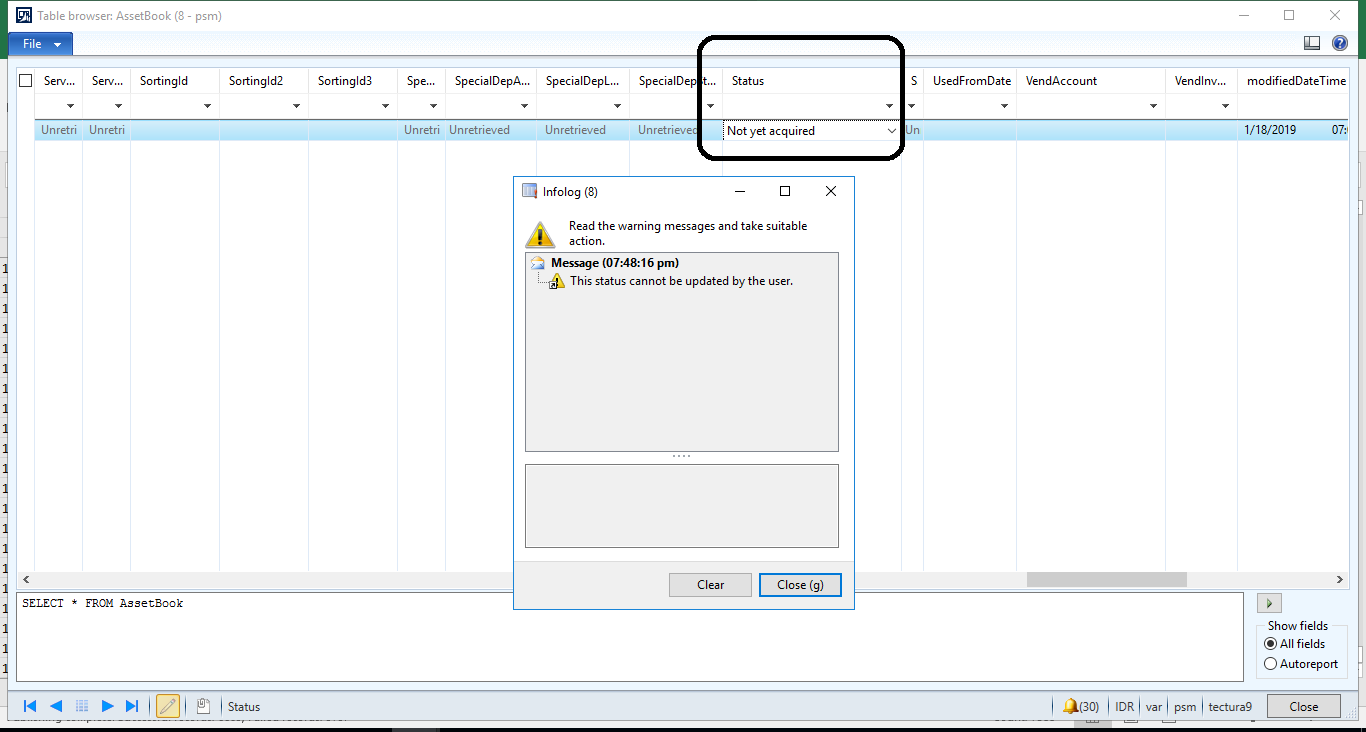
change.png

i tried on ax 2009, it was able to changed. is there any way ?

because i want to enter journal for "depreciation" type only (without acquisition)

*This post is locked for comments

I have the same question (0)
  • Suggested answer
    Galyna Fedorova Profile Picture
    3,566 on at

    Hi Agus Setiawan,

    I believe once you post fixed asset aquisition with that value model, it will automatically change the status to Open. Since Depreciation is a ratable reduction in the carrying amount of a fixed asset, how will you depreciate the fixed asset if you even didn't acquire it?

  • agus Profile Picture
    1,174 on at

    hi galyna,

    thanks for response, yes it's abnormal transaction due to an audited adjustment prior year. so i did compare between 2012 & 2009 to enter this scenario. in ax 2009 there was not notification error appear.

  • Verified answer
    Ludwig Reinhard Profile Picture
    Microsoft Employee on at

    Hi agus,

    You cannot change the status because the fixed asset has not been acquired and you thus do not have any transaction posted against this value model.

    Once you have posted an acquisition and/or depreciations you can change the status but without any transactions you can't.

    Best regards,

    Ludwig

  • Ludwig Reinhard Profile Picture
    Microsoft Employee on at

    Hello agus,

    Have your questions been answered or is there something left open/not answered?

    Would be great if you could keep us updated.

    Many thanks,  

    Ludwig

Under review

Thank you for your reply! To ensure a great experience for everyone, your content is awaiting approval by our Community Managers. Please check back later.

Helpful resources

Quick Links

Introducing the 2026 Season 1 community Super Users

Congratulations to our 2026 Super Stars!

Meet the Microsoft Dynamics 365 Contact Center Champions

We are thrilled to have these Champions in our Community!

Congratulations to the April Top 10 Community Leaders

These are the community rock stars!

Leaderboard > 🔒一 Microsoft Dynamics AX (Archived)

#1
CP04-islander Profile Picture

CP04-islander 24

#2
Michel ROY Profile Picture

Michel ROY 14

#3
Jagadabi Profile Picture

Jagadabi 6

Last 30 days Overall leaderboard

Featured topics

Product updates

Dynamics 365 release plans
