web
You’re offline. This is a read only version of the page.
close
Skip to main content

Notifications

Announcements

No record found.

Community site session details

Community site session details

Session Id :
Microsoft Dynamics CRM (Archived)

Subgrid headers have scrollbars?

(0) ShareShare
ReportReport
Posted on by 115

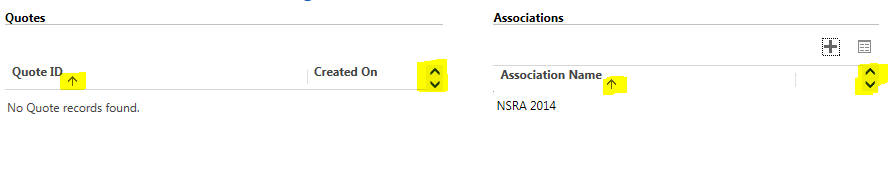
When adding subgrids to a form, they end up having scrollbars on the very far right side.  The arrow for sorting looks like a subscript when it should be lined up with the header text.  See the image below with the issues highlighted in yellow.  Has anyone ran across this in the past, and is there a good way to fix this without having to manually edit css files. I found that the issue is on the label.ms-crm-List-Sortable class there is an overflow:hidden property that is causing it to bring the sort arrow down and add the scrollbars.  However, that is in a file I don't have direct control over.  Any help would be appreciated.  Thanks!
*This post is locked for comments

I have the same question (0)
  • Mamatha Swamy Profile Picture
    5,426 on at

    Editing the CSS is unsupported. You will most likely loose those changes when an upgrade is installed and sometimes encounter upgrade issues.


    Try changing the column width in the view used for Sub-grid. Check if adjusting the resolution or maximizing the browser helps. Lastly, you could raise a support ticket if none of this helps. You'll most likely not be charged for these kind of issues

  • Suggested answer
    tls7 Profile Picture
    115 on at

    After lots of research, it turned out that a .css file that was added to the solution (that goes along with a javascript library we added) ended up conflicting with the default CRM .css files.  We had to go make an adjustment to that .css file, which fixed the problem.  Thanks!

  • Suggested answer
    Mithilesh Kumar Profile Picture
    10,047 on at

    Hi Tls7,

    Editing CSS is unsupported.

    You can go to the Sub Grid properties and increase the number of Rows. This will help you give your sub grid more space. You can also choose "Automatically expand to use available spaces" as show in figure below

    Hope that helps

    Thanks

Under review

Thank you for your reply! To ensure a great experience for everyone, your content is awaiting approval by our Community Managers. Please check back later.

Helpful resources

Quick Links

Responsible AI policies

As AI tools become more common, we’re introducing a Responsible AI Use…

Neeraj Kumar – Community Spotlight

We are honored to recognize Neeraj Kumar as our Community Spotlight honoree for…

Leaderboard > 🔒一 Microsoft Dynamics CRM (Archived)

#1
SA-08121319-0 Profile Picture

SA-08121319-0 4

#1
Calum MacFarlane Profile Picture

Calum MacFarlane 4

#3
Alex Fun Wei Jie Profile Picture

Alex Fun Wei Jie 2

Last 30 days Overall leaderboard

Featured topics

Product updates

Dynamics 365 release plans



