web
You’re offline. This is a read only version of the page.
close
Skip to main content

Announcements

No record found.

News and Announcements icon
Community site session details

Community site session details

Session Id :
Microsoft Dynamics CRM (Archived)

Could not publish solution: The import file is invalid. XSD Validation failed

(0) ShareShare
ReportReport
Posted on by 1,067

Hi all,

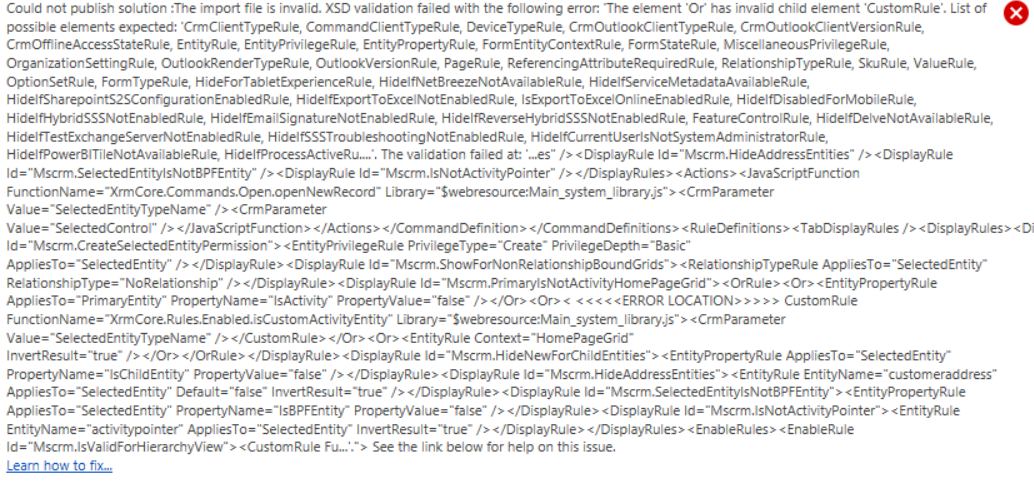
Today while trying to customize the command of the "+" button of the subgrid section for an specific entity using Ribbon workbench 2016, I started to get the next error:
4212.Untitled-picture.png

The thing is that I'm getting this error without doing any change as the only thing I do to get it is clicking "Customize Commad" for the "+" button on the subgrid section and try to publish. Also, I did notice that this is happening for multiple entities. The way I'm using Ribbon Workbench 2016 is in theory simple as I create one solution per entity, so the tool doesn't have to load multiple ribbons. 

Any help will be very appretiated. Thanks in advance.

*This post is locked for comments

I have the same question (0)
  • EnriqueMdz Profile Picture
    1,067 on at

    .

  • Kokulan Profile Picture
    18,054 on at

    Could you try and use the XrmToolBox version of the tool and see if you are still getting the same error?

    1665.ScreenClip-_5B00_154_5D00_.png

  • EnriqueMdz Profile Picture
    1,067 on at

    Hi Kokulan, thanks for your answer. That's the Ribbon workbench I'm currently using.

  • Kokulan Profile Picture
    18,054 on at

    Hi

    You could download the import the solution based one and try as well.

    www.develop1.net/.../ribbonworkbench.aspx

    I have come across few issues where some users had problem with the XrmToolBox version but worked fine when they tried the solution and vice versa. It might be worth a shot if you have not already tried it.

  • EnriqueMdz Profile Picture
    1,067 on at

    Thanks again for the idea, unfortunatelly I got the same result, so not sure if this is a bug on the ribbon on D365. I'm still concerned about this as I have to disable the buttons for almost 10 grids and 7 out of 10 are returning this error,

Under review

Thank you for your reply! To ensure a great experience for everyone, your content is awaiting approval by our Community Managers. Please check back later.

Helpful resources

Quick Links

Introducing the 2026 Season 1 community Super Users

Congratulations to our 2026 Super Stars!

Meet the Microsoft Dynamics 365 Contact Center Champions

We are thrilled to have these Champions in our Community!

Congratulations to the April Top 10 Community Leaders

These are the community rock stars!

Leaderboard > 🔒一 Microsoft Dynamics CRM (Archived)

Last 30 days Overall leaderboard

Featured topics

Product updates

Dynamics 365 release plans
