web
You’re offline. This is a read only version of the page.
close
Skip to main content

Notifications

Announcements

No record found.

Community site session details

Community site session details

Session Id :
Microsoft Dynamics AX (Archived)

AX SSRS Report Error Login failed for user 'NT AUTHORITY\ANONYMOUS LOGON'.

(0) ShareShare
ReportReport
Posted on by

Hi,

I am trying to execute Stored Procedure SQL from SSRS report (visual studio) as the dataset.

6811.vs.jpg 

I added myUser to SQL server logins.

The report run correctly in visual studio, then I deployed it and call the report from MenuItem - Output.

When I opened the Output menuitem, then I filled the parameters, it shown error Login failed for user 'NT AUTHORITY\ANONYMOUS LOGON'.
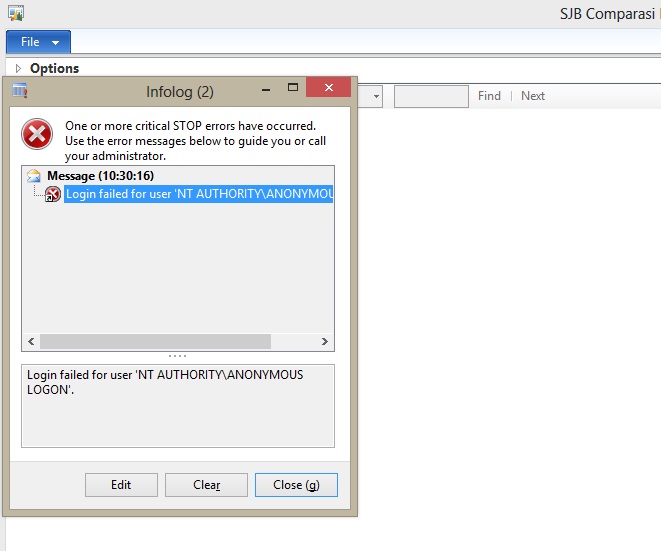
error-anonymous.jpg

Please help me to solve this error.

Thank you.

Best Regards,

Kiki

*This post is locked for comments

I have the same question (0)
  • Suggested answer
    Chaitanya Golla Profile Picture
    17,225 on at

    Hi,

    Please check the execution account on your Reporting services Configuration Manager is properly configured.

  • Community Member Profile Picture
    on at

    Hi Chaitanya,

    The 'Specify an execution account' option is checked, and the user is only administrator. Is   that true?

    Thank you.

    Best Regards,

    Kiki

  • Suggested answer
    Mahmoud Hakim Profile Picture
    17,887 on at

    Check the last comment in this thread

    community.dynamics.com/.../133982

  • Suggested answer
    Chaitanya Golla Profile Picture
    17,225 on at

    Hi,

    Yes. Check the execution account has proper access to the ssrs database(visible under database pane on the left).

  • Community Member Profile Picture
    on at

    Hi Mahmoud,

    I don't use sharepoint like that link explains, so I can't follow that steps.

    Regards,

    Kiki

  • Community Member Profile Picture
    on at

    Hi Chaitanya,

    The Execution Account is administrator, but the users who will consump my report are not administrator.

    Is there way to add the user in Reporting services Configuration Manager?

  • Suggested answer
    Chaitanya Golla Profile Picture
    17,225 on at

    Hi,

    I don't think administrator/certain user is suggested, please check with your admin team to have dedicated user account that can be used for ssrs execution account.

  • Tungman Profile Picture
    110 on at

    Your username must is domain controller so you can deploy your report into AOT.

  • RM-22040759-0 Profile Picture
    2,014 on at

    Adding one more point.

    You can use BCPROXY user account for SSRS execution account too.

    This might helps to you.

    Best Regards,

    Ravi Theja Madisetty

    https://technoguns.com

  • Sreedhar V Profile Picture
    20 on at

    Hi Kiki,

    Once you check with Administrator LogIn. Some times these type of problem occurs when admin restricts back-end server/report services.

Under review

Thank you for your reply! To ensure a great experience for everyone, your content is awaiting approval by our Community Managers. Please check back later.

Helpful resources

Quick Links

Responsible AI policies

As AI tools become more common, we’re introducing a Responsible AI Use…

Neeraj Kumar – Community Spotlight

We are honored to recognize Neeraj Kumar as our Community Spotlight honoree for…

Leaderboard > 🔒一 Microsoft Dynamics AX (Archived)

#1
Martin Dráb Profile Picture

Martin Dráb 4 Most Valuable Professional

#1
Priya_K Profile Picture

Priya_K 4

#3
MyDynamicsNAV Profile Picture

MyDynamicsNAV 2

Last 30 days Overall leaderboard

Featured topics

Product updates

Dynamics 365 release plans
