web
You’re offline. This is a read only version of the page.
close
Skip to main content

Announcements

No record found.

News and Announcements icon
Community site session details

Community site session details

Session Id :
Finance | Project Operations, Human Resources, ...
Suggested Answer

Bulk update A/R invoices due date

(0) ShareShare
ReportReport
Posted on by 50

HI all,

we need to bulk update duedate on A/R open invoices using Data migration tool. Need to know if this is possible and if so how. 

Thanks in advance.

I have the same question (0)
  • Suggested answer
    SouravDam Profile Picture
    11,732 on at

    Hello vini_a,

    You can use Customer invoice journal line data entity to upload the bulk open AR invoices with "Due dates".

    Below are the steps;

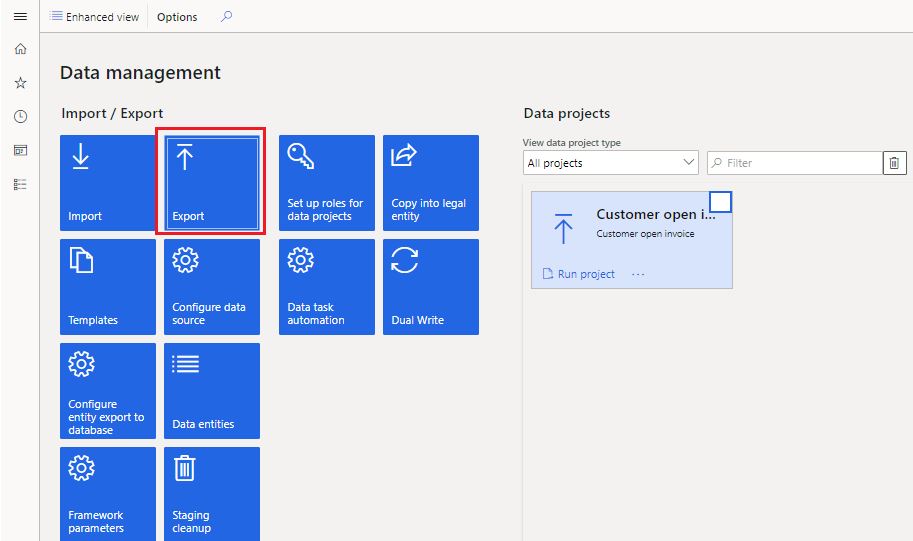
    --- Go to Data management and click on Export.
    0184.JPG

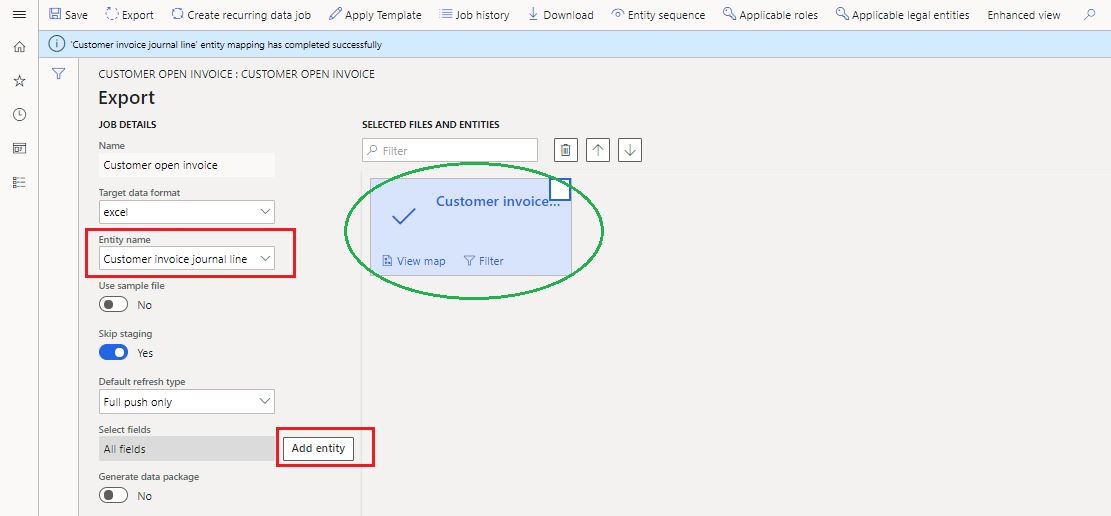
    --- Select the target data format, entity name and then click on Add entity. "Customer invoice journal line" entity will be added.
    8625.JPG

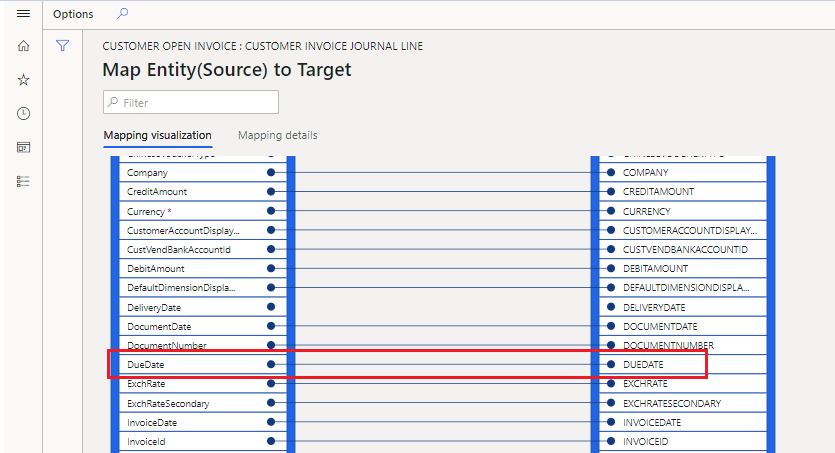
    --- For confirmation; you can click on View map to ensure the "Due date" table is available there.
    7167.JPG

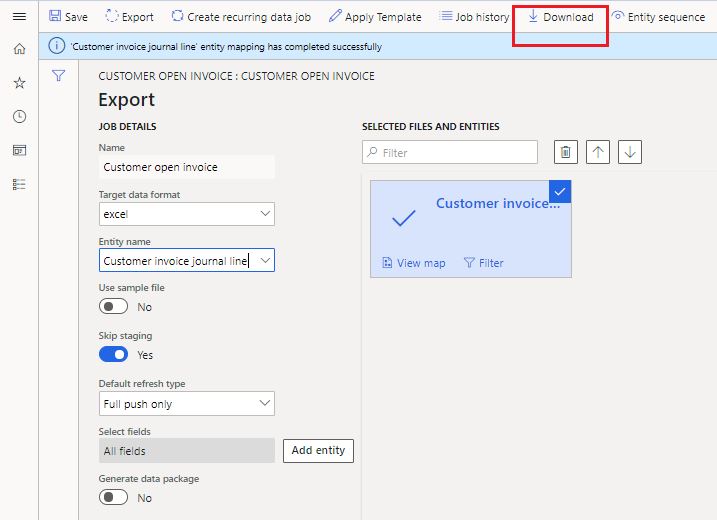
    --- Now simply click on Download to download the template.
    721680.JPG

    Once the template is downloaded; you can fill all relevant data in that excel sheet along with due date.

    --- Then create an Import.
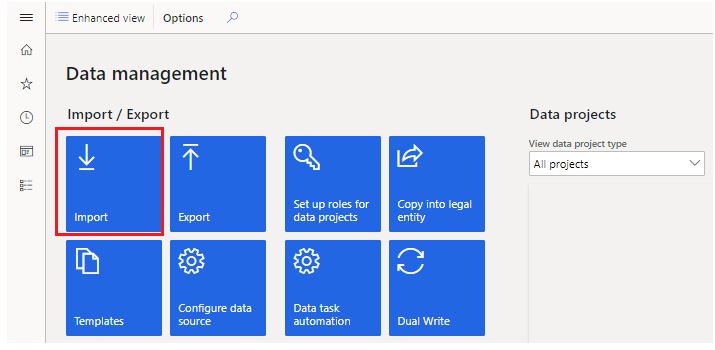
    50.JPG

    --- Select the source data format, select the same entity name which is Customer invoice journal line and click on Upload to upload the selected file you want to upload.
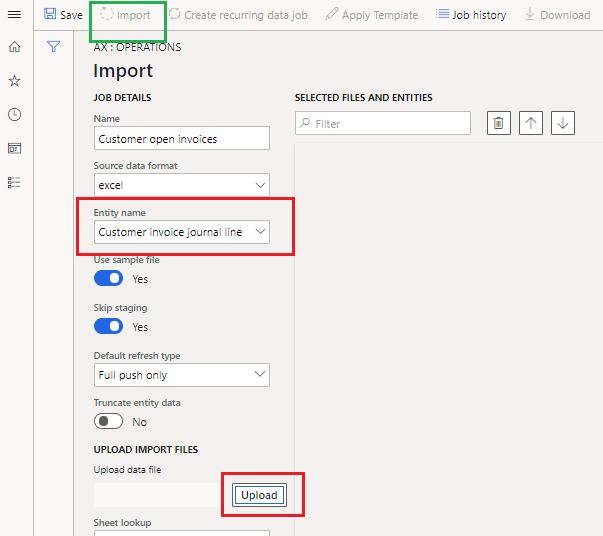
    60.JPG

    Once the file is uploaded; you will see the Import tab will be enabled.

    Click on "Import" to publish the AR open invoices with due dates in ERP. System will be processing the execution operation depends on the volume of your data you fit in the excel sheet.

    Once this is uploaded, you will be notified on the screen with a 'Tick' sign and also in the "Action center" if this is enabled in "User options".

    Kindly check and update in Forum.

    Best regards,
    Sourav Dam

    Kindly mark this thread 'Yes' if this is answered your query which may help other community members in this forum.

  • Suggested answer
    SouravDam Profile Picture
    11,732 on at

    Hello vini_a,

    Have you gone through the suggestion?

    Could you kindly update the Forum on this.

    Best regards,
    Sourav Dam

    Kindly mark this thread 'Yes' if this is answered your query which may help other community members in this forum.

  • vini_a Profile Picture
    50 on at

    HI Sourav,

    Thank you for your response. I currently trying this one. i am getting following error

    Record for Id - 66IUCCM34 not found.

    Issue exist in generate staging data

    '0' 'Customer invoice journal line' record(s) inserted in staging

    any idea which  table has Journal batch number for invoice?

    Thanks

  • Suggested answer
    SouravDam Profile Picture
    11,732 on at

    Hello vini_a,

    Have you filled your data in the excel after exporting it?

    You can check the error details in View staging data option.

    5001.JPG

    It will show you in which column you have got the error (as per your excel sheet you updated).

    Also; you can check the details in View execution log as well.

    Appreciate if you kindly share the screen shot of both areas as highlighted so that to understand it more precisely.

    Best regards,
    Sourav Dam

    Kindly mark this thread 'Yes' if this is answered your query which may help other community members in this forum.

  • vini_a Profile Picture
    50 on at

    pastedimage1590676152597v1.png

    i don't see anyerror in  view staging data section.

  • Suggested answer
    SouravDam Profile Picture
    11,732 on at

    Hello vini_a,

    Can you share any other error screenshot which can show the error column as asked before?

    Is there anything wrong in your excel sheet which you try to import? Have you changed any header in that excel or set any field or column in that excel like any custom type?

    If yes; then system will not allow you to import.

    Best regards,
    Sourav Dam

    Kindly mark this thread 'Yes' if this is answered your query which may help other community members in this forum.

  • vini_a Profile Picture
    50 on at

    HI Sourav,

    file looks fine . question is do we need to provide the Journalbatchnumber in import file ?

  • Suggested answer
    SouravDam Profile Picture
    11,732 on at

    Hello vini_a,

    Yes journal batch number and currency are mandatory fields as you can see marked below.

    17453.JPG

    Please try again and update the Forum.

    Else; let me know if it is possible to share the excel file here so that I can check if can be able to upload in my system.

    It will help me to figure out the root cause and solution too.

    Will be waiting to hear from you on this.

    Best regards,
    Sourav Dam

    Kindly mark this thread 'Yes' if this is answered your query which may help other community members in this forum.

  • vini_a Profile Picture
    50 on at

    HI Sourav,

    thank you for your help.  I am trying update the existing invoice in our system. So where can i find the Journal batch number for that particular invoice in D365 FO system?

    Thanks

  • Suggested answer
    SouravDam Profile Picture
    11,732 on at

    Hello vini_a,

    I am thinking another option to update this open AR invoices in system with "Due date".

    In Data management; you will get another entity named General journal which you can try too. You will get "Due date" there. Here you can maintain the journal batch number also.

    Just follow the same steps as mentioned in my 1st post. Export the template from this entity; fit your data and then import it back using same entity.

    Can you please try with this and let us know?

    Best regards,
    Sourav Dam

    Kindly mark this thread 'Yes' if this is answered your query which may help other community members in this forum.

Under review

Thank you for your reply! To ensure a great experience for everyone, your content is awaiting approval by our Community Managers. Please check back later.

Helpful resources

Quick Links

Introducing the 2026 Season 1 community Super Users

Congratulations to our 2026 Super Stars!

Meet the Microsoft Dynamics 365 Contact Center Champions

We are thrilled to have these Champions in our Community!

Congratulations to the April Top 10 Community Leaders

These are the community rock stars!

Leaderboard > Finance | Project Operations, Human Resources, AX, GP, SL

#1
Giorgio Bonacorsi Profile Picture

Giorgio Bonacorsi 608

#2
André Arnaud de Calavon Profile Picture

André Arnaud de Cal... 591 Super User 2026 Season 1

#3
CP04-islander Profile Picture

CP04-islander 430

Last 30 days Overall leaderboard

Product updates

Dynamics 365 release plans