web
You’re offline. This is a read only version of the page.
close
Skip to main content

Notifications

Announcements

No record found.

Community site session details

Community site session details

Session Id :
Finance | Project Operations, Human Resources, ...
Answered

Issue with workspace tile design

(0) ShareShare
ReportReport
Posted on by

Hi all,

We're having an issue since a couple of weeks with custom workspace tiles being that they display narrower than they should (see screenshot below). It's an issue that appears for some users, not all. I have logged this to Microsoft but we're not getting results as it's not a problem they can reproduce.

Things we've tried already:

1. Clear cache and cookies in the same browser users are currently using
2. Clear usage data in the environment for the affected users
3. Use a guest profile in the same browser
4. Try a different browser in the same machine
5. Try a different machine
6. Re-publish workspace

Did anyone else perhaps experience this issue? If yes, how can it be solved?
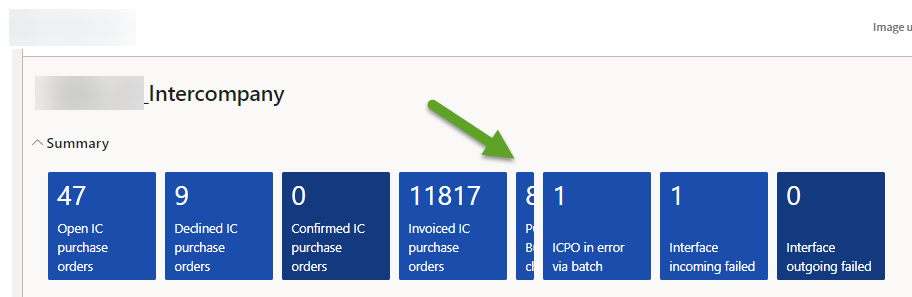
2022_2D00_10_2D00_11_5F00_08_2D00_33_2D00_32.png

Thanks

I have the same question (0)
  • Verified answer
    GirishS Profile Picture
    27,827 Moderator on at

    Hi Thomas,

    As you mentioned Microsoft not able to reproduce the issue. As a workaround there is a new feature available in D365 F&O which allows user to change the tile sizes. You can try changing the size of the tiles and see whether same issue is happening.

    There is a blog return by Andre - You can try this as a workaround.

    https://dynamicspedia.com/2022/07/allow-users-to-select-and-change-tile-sizes/

    Thanks,

    Girish S.

  • Suggested answer
    André Arnaud de Calavon Profile Picture
    301,248 Super User 2025 Season 2 on at

    Hi Thomas,

    Is this a custom workspace? There was a recent change to go from horizontal to vertically scrolling workspaces. Was this workspace developed when the vertically scrolling pages were not released as a feature yet? If so, check if all versions of the patterns are updated from 1.0 to version 1.1. You can read more about this update process on my blog: About the vertically scrolling workspaces in Dynamics 365 F&O - Dynamicspedia

  • Thomas Meersschaert Profile Picture
    on at

    Thanks André. 

    This is indeed a custom workspace but it's one that has been created via the user interface, not via Visual Studio. After that this workspace has been published to all users. Any suggestion on bulk updating these kinds of workspaces?

  • Thomas Meersschaert Profile Picture
    on at

    Thank you Girish. Enabling the feature and forcing the tile size to 2x2 is indeed a solution.

  • Suggested answer
    Komi Siabi Profile Picture
    13,122 Most Valuable Professional on at

    Hello Thomas.

    Thanks for confirming and validating Girish answer developed by André. This makes the community a better and a "Go to" place.

Under review

Thank you for your reply! To ensure a great experience for everyone, your content is awaiting approval by our Community Managers. Please check back later.

Helpful resources

Quick Links

Responsible AI policies

As AI tools become more common, we’re introducing a Responsible AI Use…

Neeraj Kumar – Community Spotlight

We are honored to recognize Neeraj Kumar as our Community Spotlight honoree for…

Leaderboard > Finance | Project Operations, Human Resources, AX, GP, SL

#1
Abhilash Warrier Profile Picture

Abhilash Warrier 677 Super User 2025 Season 2

#2
André Arnaud de Calavon Profile Picture

André Arnaud de Cal... 421 Super User 2025 Season 2

#3
Martin Dráb Profile Picture

Martin Dráb 317 Most Valuable Professional

Last 30 days Overall leaderboard

Product updates

Dynamics 365 release plans
