web
You’re offline. This is a read only version of the page.
close
Skip to main content

Notifications

Announcements

No record found.

Community site session details

Community site session details

Session Id :
Microsoft Dynamics AX (Archived)

Free Text Invoice Line Tax Rounding Issue

(0) ShareShare
ReportReport
Posted on by 1,036

Hello awesome community!

I have a free text invoice that has a line with an amount of  25,880.30 and it has a 5% tax.

So the 5% of 25,880.30 = 1294.015 

My issue is that I have an SSRS report that shows the lines of the Free Text Invoice and the amount of tax for the line.

In the report the amount above shows as 1294.02

While in AX, if we go to All Free Text invoice > Invoice Tab > Invoice Journals > Lines > View Distributions

it says the tax amount is 1294.01

Here is a screenshot:
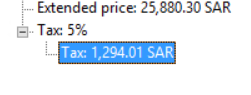
37741.Capture.PNG

This resulted in an inconsistency between the SSRS report and the AX client, how should I resolve this issue?

Should I stop the rounding in SSRS report design?

I'm not sure if the AX will round the amount if it was more than 0.005 like for example 0.006.

Any advice would be appreciated :)

Thanks in advance! 

*This post is locked for comments

I have the same question (0)
  • Suggested answer
    SouravDam Profile Picture
    11,730 on at

    Hi Momochi,

    Kindly check below points and confirm in this forum.

    1) Is it related to GCC country ?

    2) If 'Yes'; then make sure all values should reflect in 3 decimals (in both standard and customized reports). Just ask your developer to update this in system. Because this is a common practice to follow 3 decimals in transactions in ME region.  

    3) Please check in Sales tax code form in Tax module whether you have selected rounding precision 0.005 as shown in below screen shot or not. This will surely round currency values in nearest to 5 Fils. For example; if the value is 216.778 then system will round this to 216.780 automatically.

    3247.JPG

    4) Also, in the same form you have to check the tax calculation parameter whether it is selected as Net amount per line in marginal base or not. If you select this option; system will calculate tax for each line basis and not on total net amount of the journal where multiple lines are available with various decimal values in lines which may ultimately cause rounding issue.

    7140.JPG  

    5) Also check in Currencies form if you have set any rounding rule for SAR or not. In below example; my default currency is BHD. Therefore we have selected general rounding rule for SAR as 0.010

    In your case, if default system currency is SAR, then you have to set general rounding rule for SAR as 0.001

    1754.JPG

    Kindly check and update in this forum.

    Best regards,
    Sourav Dam

    Please take time to click 'Yes' against the answers that help you guide in right direction to help other community members.

  • Momochi Profile Picture
    1,036 on at

    Thank you Sourav Dam for your detailed response!

    1) Yes

    2) I will look into using 3 decimal for reports

    3) 4) 5)

    I tried creating a Free Text Invoice with the same line amount on a different AX environment with the same currency and Tax codes set ups

    The result was rounded!

    Here is a screenshot:

    tax-issue.PNG

    As you can see in the above screenshot, the result of sales tax has been rounded to 1294.02 while in my original environment it was 1294.01

    Here is a screenshot of the Currency SAR set up and Tax Code set up screens:

    t-1.PNG

    tax-issue-2.PNG

    Both environment shares the same set up but different results...... :/

  • Suggested answer
    SouravDam Profile Picture
    11,730 on at

    Hi Momochi ,

    Thanks for the feedback. I have gone through the screen shots you shared here and would like to highlight below points.

    1) Please set the rounding rules as per below. As your base currency is SAR, therefore rounding rule will follow as per below.

    2055.JPG

    2) You need to set the Round-off as 0.005 Fils in Sales tax code form at tax code level. Also, set the Marginal base as Net amount per line as showing in below screen shot. The screen shot what you have shared, is not set with below setups.

    1586.JPG

    Once all these are done, then please process the transaction and see the impact is coming correctly or not.

    Will be waiting for your update.

    Please take time to click 'Yes' against the answers that help you guide in right direction to help other community members.

  • Suggested answer
    SouravDam Profile Picture
    11,730 on at

    Hi Momochi ,

    Continuation of my last reply in this subject --- Please change the decimal value to 3 decimal first in system as highlighted before. You can see it is still showing 2 decimal in your screen shot.

    Best regards,
    Sourav Dam

    Please take time to click 'Yes' against the answers that help you guide in right direction to help other community members.

Under review

Thank you for your reply! To ensure a great experience for everyone, your content is awaiting approval by our Community Managers. Please check back later.

Helpful resources

Quick Links

Responsible AI policies

As AI tools become more common, we’re introducing a Responsible AI Use…

Neeraj Kumar – Community Spotlight

We are honored to recognize Neeraj Kumar as our Community Spotlight honoree for…

Leaderboard > 🔒一 Microsoft Dynamics AX (Archived)

#1
Martin Dráb Profile Picture

Martin Dráb 4 Most Valuable Professional

#1
Priya_K Profile Picture

Priya_K 4

#3
MyDynamicsNAV Profile Picture

MyDynamicsNAV 2

Last 30 days Overall leaderboard

Featured topics

Product updates

Dynamics 365 release plans
