web
You’re offline. This is a read only version of the page.
close
Skip to main content

Notifications

Announcements

No record found.

Community site session details

Community site session details

Session Id :
Microsoft Dynamics CRM (Archived)

Plugin Error: Object reference not set to an instance of an object

(0) ShareShare
ReportReport
Posted on by 334

Hi have a requirement to write a plugin that does a roll up in Microsoft Dynamics 2013, 

I have written the code but the plug in does nothing , so i resorted to debugging and found out the code had an error

the sample code is below


namespace OfficeTest
{
    public class Test : IPlugin
    {
        public void Execute(IServiceProvider serviceProvider)
        {
            ITracingService tracingService = (ITracingService)serviceProvider.GetService(typeof(ITracingService));

            IPluginExecutionContext context = (IPluginExecutionContext)serviceProvider.GetService(typeof(IPluginExecutionContext));
            if (context.InputParameters.Contains("Target") && context.InputParameters["Target"] is Entity)
            {
                Entity entity = (Entity)context.InputParameters["Target"];

                if (entity.LogicalName != "plx_remmitance")
                {
                    return;
                }

                try
                {
                    var productionID = entity.GetAttributeValue<EntityReference>("plx_production").Id;  // The Line which gennerates the error
                    string fetchxml = @"<fetch mapping='logical' version='1.0' distinct='false' output-format='xml-platform'>
             <entity name='plx_remmitance'>
              <attribute name='plx_amount' alias='totalamount' aggregate='sum'/>
              <filter type='and'>
             <condition value='" + productionID.ToString() + @"'  attribute='plx_production' operator='eq'   />
              </filter>
              </entity>
              </fetch>";

  IOrganizationServiceFactory serviceFactory = (IOrganizationServiceFactory)serviceProvider.GetService(typeof(IOrganizationServiceFactory));
                    IOrganizationService service = serviceFactory.CreateOrganizationService(context.UserId);

                    EntityCollection result = service.RetrieveMultiple(new FetchExpression(fetchxml));
                    decimal total = 0;
                    foreach (var c in result.Entities)
                    {
                        total = ((Money)((AliasedValue)c["totalamount"]).Value).Value;

                    }
                    ColumnSet orderCols = new ColumnSet(new String[] { "plx_totalremiitanceamount" });
                    Entity Production = service.Retrieve("plx_production", productionID, orderCols);
                    Console.WriteLine(total);
                    Production.Attributes["plx_totalremiitanceamount"] = new Money(total);
                    service.Update(Production);
                }


                catch (FaultException<OrganizationServiceFault> ex)
                {
                    throw new InvalidPluginExecutionException("An error occuredin Test", ex);
                }

                catch (Exception ex)
                {
                    tracingService.Trace("Test: {0}", ex.ToString());
                }


            }


        }


    }
}

The image for the debug process is within
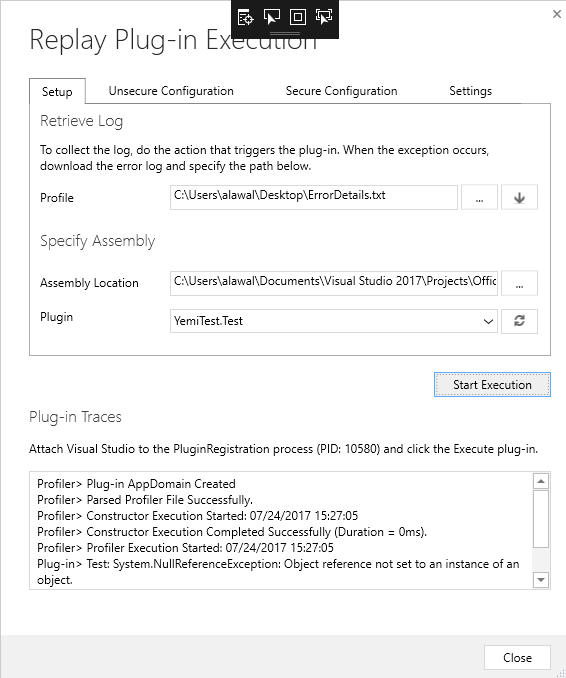
debug-log-comm.PNG

Will appreciate any suggestion  or better ways to achieve the roll up field with plugins.

The Production ID field which is a look up to the Production entity is where the error comes from

 var productionID = entity.GetAttributeValue<EntityReference>("plx_production").Id;

after this step in the debug it goes to the exception line

Am testing on a 365 environment which already has roll up field but Dynamics 2013 does not have.

Regards.

*This post is locked for comments

I have the same question (0)
  • Suggested answer
    Guido Preite Profile Picture
    54,086 Moderator on at

    simple. the plx_production does not contain a value

    this can happen when:

    1) you are in create and the field is empty

    2) you are in update and the field did not change during the update, so you need to use an Image in order to get the value

  • lawix10 Profile Picture
    334 on at

    Thanks, this is my first complex plugin

    so I can only use Pre-Image?

    Because this is the sample entity where I got the fetch xml from .

    The Production has a value 

    yemiiiiiii333.PNG

  • Guido Preite Profile Picture
    54,086 Moderator on at

    pre or post image depending the stage of your plugin (pre-operation or post-operation)

    but you need to use an Image, so you can have the value inside the plugin

  • lawix10 Profile Picture
    334 on at

    Thanks just to be sure,

    The plugin will run post update of the amount field, not when the production look up is changes

    its basically a roll-up plugin since dynamics 2013 does not have roll-up fields

    so should I use a post image?

  • Verified answer
    Guido Preite Profile Picture
    54,086 Moderator on at

    yes you can use a post-image, the post-image will contain the fields of your entity after the update is completed

  • ashlega Profile Picture
    34,477 on at

    Hey,


      btw, when choosing between pre and post image, also keep in mind that pre-image is what you had there before the update happened. If that attribute has been updated, pre-image will have previous value of that attribute. Post-image will have updated value (but post image won't be available in the pre-operation). 

      Long story short, I'd go with post-image, would register the plugin in the post-operation.. that would work for both create and update.. However, that attribute can still be empty, so I'd also do this:

    postImage = ...;

    var productionRef = postImage.GetAttributeValue<EntityReference>("plx_production");
    if(productionRef == null) return;
    var productionID = productionRef.Id;

      you can also replace this:

    ColumnSet orderCols = new ColumnSet(new String[] { "plx_totalremiitanceamount" });
    Entity Production = service.Retrieve("plx_production", productionID, orderCols);
    Console.WriteLine(total);
    Production.Attributes["plx_totalremiitanceamount"] = new Money(total);
    service.Update(Production);


    with this:

    Entity Production = new Entity("plx_production", productionID);
    Production.Attributes["plx_totalremiitanceamount"] = new Money(total);
    service.Update(Production);


  • lawix10 Profile Picture
    334 on at

    Thanks , really appreciate am learning a lot, have changed the code and the debugging also helps a lot so my new code is like this 

    try
                    {
    
    
                        Entity postImage = (Entity)context.PostEntityImages["postImage"];
                        var productionRef = postImage.GetAttributeValue<EntityReference>("plx_production");
    
                        if (productionRef == null) return;
    
                        var productionID = productionRef.Id;
    
                        string fetchxml = @"<fetch mapping='logical' version='1.0' distinct='false' output-format='xml-platform'>
                 <entity name='plx_remmitance'>
                  <attribute name='plx_amount' alias='totalamount' aggregate='sum'/>
                  <filter type='and'>
                 <condition value='" + productionID.ToString() + @"'  attribute='plx_production' operator='eq'   />
                  </filter>
                  </entity>
                  </fetch>";
    
                        IOrganizationServiceFactory serviceFactory = (IOrganizationServiceFactory)serviceProvider.GetService(typeof(IOrganizationServiceFactory));
                        IOrganizationService service = serviceFactory.CreateOrganizationService(context.UserId);
    
                        EntityCollection result = service.RetrieveMultiple(new FetchExpression(fetchxml));
                        decimal total = 0;
                        foreach (var c in result.Entities)
                        {
                            total = ((Money)((AliasedValue)c["totalamount"]).Value).Value;
    
                        }
                        Entity Production = new Entity("plx_production", productionID);
                        Production.Attributes["plx_totalremiitanceamount"] = new Money(total);
                        service.Update(Production);


                    }


    And I can see the correct ID when debugging, but a new error is thrown here

    EntityCollection result = service.RetrieveMultiple(new FetchExpression(fetchxml));

    the error is An aggregate operation was not initially specified and an aggregate operator was encountered.

  • lawix10 Profile Picture
    334 on at

    thanks so much , I added this line

    and the whole plugin worked

    aggregate='true'

    this was added to the fetchxml

  • lawix10 Profile Picture
    334 on at

    Thanks so much Alex for create and update the code works perfectly but for delete 

    I have created a new class also using pre-image 

    public class Delete : IPlugin
        {
            public void Execute(IServiceProvider serviceProvider)
            {
    
                ITracingService tracingService = (ITracingService)serviceProvider.GetService(typeof(ITracingService));
    
                IPluginExecutionContext context = (IPluginExecutionContext)serviceProvider.GetService(typeof(IPluginExecutionContext));
    
                if (context.InputParameters.Contains("Target") && context.InputParameters["Target"] is Entity)
                {
                    Entity entity = (Entity)context.InputParameters["Target"];
    
                    if (entity.LogicalName != "plx_remmitance")
                    {
                        return;
                    }
    
                    try
                    {
                        
    
                        Entity preImage = (Entity)context.PreEntityImages["preImage"];
                        var productionRef = preImage.GetAttributeValue<EntityReference>("plx_production");
    
                        if (productionRef == null) return;
    
                        var productionID = productionRef.Id;

    }
    the remaining code is standard

    However thanks to Debugging the code doesn't throw any error, but nothing is done. It stops at the point 

    if (context.InputParameters.Contains("Target") && context.InputParameters["Target"] is Entity)

    once it reaches that block its like the if statement is not met so it ends the code

    what am I doing wrong

  • Suggested answer
    RaviKashyap Profile Picture
    55,410 Moderator on at

    Hi Adeyemi,

    For Delete operation, you will get EntityReference in the Inputparameters.

    Change your code as follows for delete-

    if (context.InputParameters.Contains("Target") && context.InputParameters["Target"] is EntityReferense)

    {

    EntityReference entityRef = (EntityReference)context.InputParameters["Target"];

    // your other code as required

    }

Under review

Thank you for your reply! To ensure a great experience for everyone, your content is awaiting approval by our Community Managers. Please check back later.

Helpful resources

Quick Links

Responsible AI policies

As AI tools become more common, we’re introducing a Responsible AI Use…

Neeraj Kumar – Community Spotlight

We are honored to recognize Neeraj Kumar as our Community Spotlight honoree for…

Leaderboard > 🔒一 Microsoft Dynamics CRM (Archived)

#1
SA-08121319-0 Profile Picture

SA-08121319-0 4

#1
Calum MacFarlane Profile Picture

Calum MacFarlane 4

#3
Alex Fun Wei Jie Profile Picture

Alex Fun Wei Jie 2

Last 30 days Overall leaderboard

Featured topics

Product updates

Dynamics 365 release plans



