web
You’re offline. This is a read only version of the page.
close
Skip to main content

Announcements

No record found.

News and Announcements icon
Community site session details

Community site session details

Session Id :
Small and medium business | Business Central, N...
Suggested Answer

Planning Worksheet & Fixed Reorder Qty.

(0) ShareShare
ReportReport
Posted on by 50

Hi,

I'am trying to setup "Fixed Reorder Qty." reordering policy.

Firstly, There is many location in my database. However, just one location must be use by Planning Worksheet. 

Do I need to create a stockkeeping unit for this location or can I set this location by default?

And I have another question.

I set up my stockkeeping unit with the following options : 
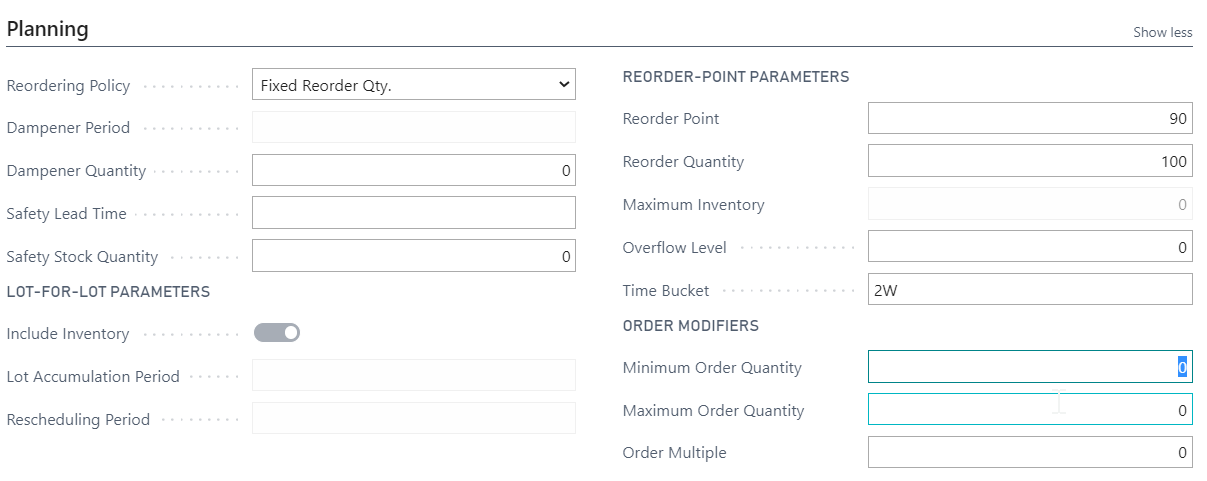
pastedimage1598967775243v1.png

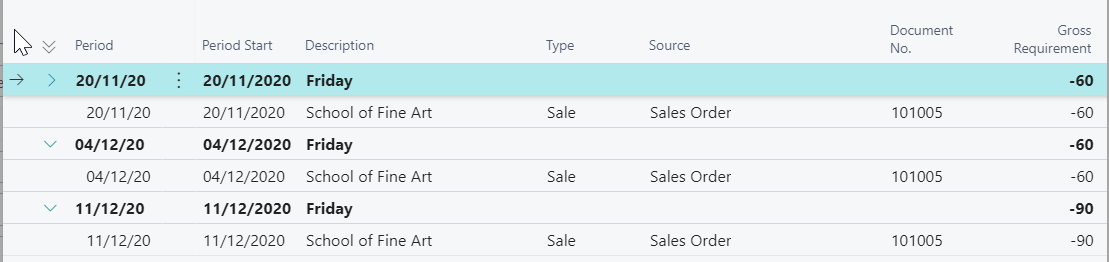
I have multiple sales orders: 

pastedimage1598967868118v2.png

When i use "Calculate regenerative plan" result is: 

pastedimage1598967968649v3.png

I do not understand why the replenishment of 14/12 is not advanced so as not to have to create an exception for the date of 11/12 ?

Thanks.

  • mcorvaisier Profile Picture
    50 on at

    So, for the first question I think i have found the answer.

    In Inventory Setup : "Location Mandatory" must be true.

    In Manufacturing Setup : "Components at locations..." set my location code.

  • Suggested answer
    jerome77 Profile Picture
    Microsoft Employee on at

    Hi

    My advice is to use SKU here.

    If you have an exception here, I believe this is because you are below your safety stock (so below 0 with your setup)

    It looks like you have  a leadtime to replenish = 7 days with qty 100, but within the same week you demand is 150. So you may be in hurry to replenish the needed qty this week.

    Kind regards

    Jerome

Under review

Thank you for your reply! To ensure a great experience for everyone, your content is awaiting approval by our Community Managers. Please check back later.

Helpful resources

Quick Links

Season of Sharing Community Challenge Winners!

Congratulations to our community stars!

Women in Power Builds Momentum

Expanding mentorship, skilling, and AI innovation

Leaderboard > Small and medium business | Business Central, NAV, RMS

#1
OussamaSabbouh Profile Picture

OussamaSabbouh 554 Super User 2026 Season 2

#2
YUN ZHU Profile Picture

YUN ZHU 360 Super User 2026 Season 2

#3
Teagen Boll Profile Picture

Teagen Boll 201 Super User 2026 Season 2

Last 30 days Overall leaderboard

Featured topics

Microsoft Training Manuals

Product updates

Dynamics 365 release plans