web
You’re offline. This is a read only version of the page.
close
Skip to main content

Announcements

No record found.

News and Announcements icon
Community site session details

Community site session details

Session Id :
Microsoft Dynamics AX (Archived)

Reservation Hierarchy (R3 WMS) does not apply for items with batch numbesr in Transfer Orders

(0) ShareShare
ReportReport
Posted on by

Hi all,

I i would like to ask if you guys are also experiencing batch reservation issues in Transfer Order in items with batch numbers. Before I show the warning/error I encounter, below is my setup for the item:

Storage Dimension group:
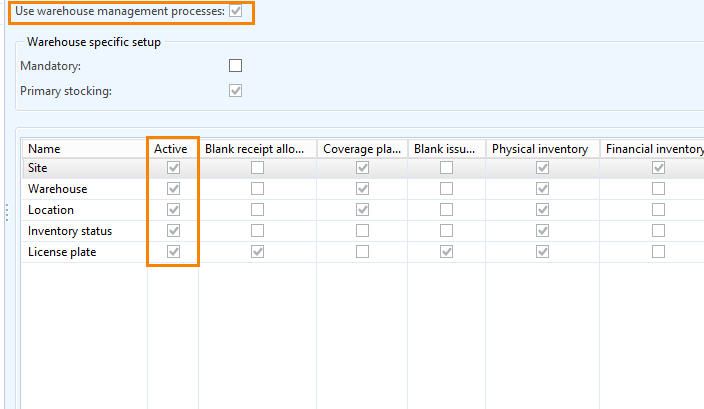
 7534.sd.jpg

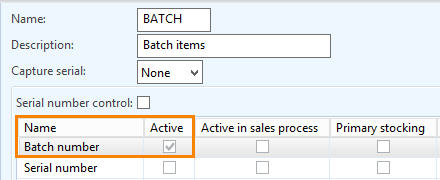
Tracking Dimension group:

bat.jpg

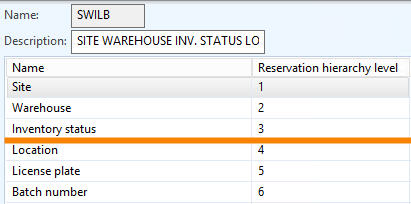
Reservation Hierarchy:

rh.jpg

Scenario:

I want AX to automatically reserve the items in Transfer Order without obliging the users to input batch number and location (that's why the reservation hierarchy is set to that order: Batch number below Location). Now, every time I try to ship the item, a warning prompts that the user should input batch number (which I think defeats the purpose of having reservation hierarchy). 

trans.jpg

*empty batch and location in Transaction form of the item (but Physically Reserved)
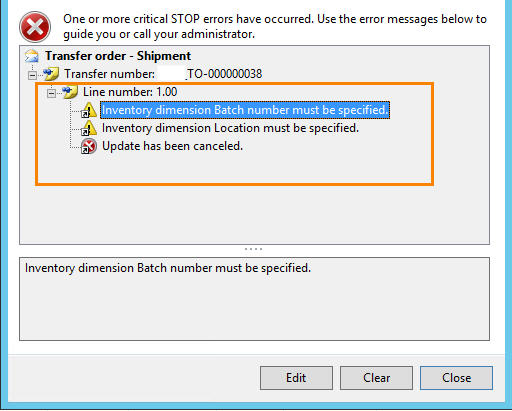
4214.error.jpg

*error message 

Other Setup:

Transfer order : Reserve Items automatically

Transfer Order line : Reserve Items automatically

Warehouse items: No default receipt and issue locations 

Did I miss something on the setup? 

Thank you.

*This post is locked for comments

I have the same question (0)
  • Guy Terry Profile Picture
    28,981 Moderator on at

    Hi Lyka,

    How are you picking items for the Transfer? Are you using warehouse management processes?

    By putting Batch below location, you are indicating that the determination of the batch to use should be made in the warehouse. If you're using location directives, they can find the batch for you.

    If you're not using Warehouse management, you could put Batch above location. With automatic reservation, the batch number will be determined by AX when the sales order line is created.

  • Suggested answer
    Community Member Profile Picture
    on at

    Hi Lyka,

    I had the same problem that you a few weeks ago. In my situation, the setup that i was missing was about assigning a "Default receipt location" to my TRANSIT warehouse.

    That solved this issue. As far as i remebered it wasn't necessary to my transit warehouse to be WHS enabled, but if the same error goes on, you can try activating it to WHS processes.

    Hope that helps!

Under review

Thank you for your reply! To ensure a great experience for everyone, your content is awaiting approval by our Community Managers. Please check back later.

Helpful resources

Quick Links

Introducing the 2026 Season 1 community Super Users

Congratulations to our 2026 Super Stars!

Meet the Microsoft Dynamics 365 Contact Center Champions

We are thrilled to have these Champions in our Community!

Congratulations to the April Top 10 Community Leaders

These are the community rock stars!

Leaderboard > 🔒一 Microsoft Dynamics AX (Archived)

#1
CP04-islander Profile Picture

CP04-islander 24

#2
Michel ROY Profile Picture

Michel ROY 14

#3
Jagadabi Profile Picture

Jagadabi 6

Last 30 days Overall leaderboard

Featured topics

Product updates

Dynamics 365 release plans