web
You’re offline. This is a read only version of the page.
close
Skip to main content

Notifications

Announcements

No record found.

Community site session details

Community site session details

Session Id :
Finance | Project Operations, Human Resources, ...
Answered

Modifying the subject when printing documents to email

(0) ShareShare
ReportReport
Posted on by 524

When sending an invoice through print management, I want the email subject to read something like "Invoice 1234", with 1234 being the actual invoice ID.

I find this undertaking exceedingly frustrating having found and changed the email subject now in roughly 473 places, only to still find the original subject text in my mail inbox....
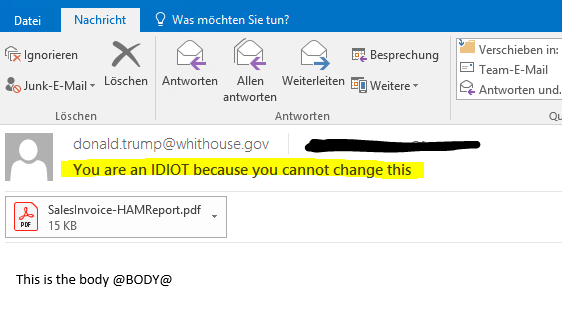
75532.Capture.PNG

The customer is using BottomLine Transform for output management, but I don't believe that is relevant since it will simply pick-up the email settings from AX.

Can someone who actually knows how to do this point me in the right direction....please? I will rename my first-born after you.

I have the same question (0)
  • Francesco Profile Picture
    524 on at

    Well @$@$& and *&&^^....it was Transform after all. Somewhere along the line it snatches the email address, subject and body and cramps them together in a single field, which apparently ends up producing the email nodes.

    Sorry folks, my son's name remains Nancy (after the last person who helped me out).

    I still would appreciate some feedback though. I now fixed it in PrintMgmt\getSettings, which doesn't seem very appropriate. With my newfound knowledge I could go back to my starting point (SrsReportRunController\preRunModifyContract), but the sensible thing to do is admit that I am fumbling around in the reporting maze and could use some expert guidance here.

  • Verified answer
    Ludwig Reinhard Profile Picture
    Microsoft Employee on at

    Hi Francesco,

    The subject field that you have available in the print management setting is a simple text field where you can enter a static text. If you want to have this dynamically filled with the invoice ID or some other invoice related data, a customization is needed.

    I don't know what bottom line brings in here but in a plain vanilla AX2012 system the configuation you are looking for is not available to my knowledge.

    Best regards,

    Ludwig

  • Francesco Profile Picture
    524 on at

    Hi Ludwig,

    Yes, it was a development question.

Under review

Thank you for your reply! To ensure a great experience for everyone, your content is awaiting approval by our Community Managers. Please check back later.

Helpful resources

Quick Links

Responsible AI policies

As AI tools become more common, we’re introducing a Responsible AI Use…

Neeraj Kumar – Community Spotlight

We are honored to recognize Neeraj Kumar as our Community Spotlight honoree for…

Leaderboard > Finance | Project Operations, Human Resources, AX, GP, SL

#1
Martin Dráb Profile Picture

Martin Dráb 451 Most Valuable Professional

#2
André Arnaud de Calavon Profile Picture

André Arnaud de Cal... 428 Super User 2025 Season 2

#3
BillurSamdancioglu Profile Picture

BillurSamdancioglu 239 Most Valuable Professional

Last 30 days Overall leaderboard

Product updates

Dynamics 365 release plans
