web
You’re offline. This is a read only version of the page.
close
Skip to main content

Notifications

Announcements

No record found.

Community site session details

Community site session details

Session Id :
Small and medium business | Business Central, N...
Suggested Answer

Inventory Movement for Sales Order / Error "The document Sales Order is not supported"

(0) ShareShare
ReportReport
Posted on by 40

Hi all,

we want to post an inventory movement for items of a sales order. For seperate reason we do not want to create a pick order.

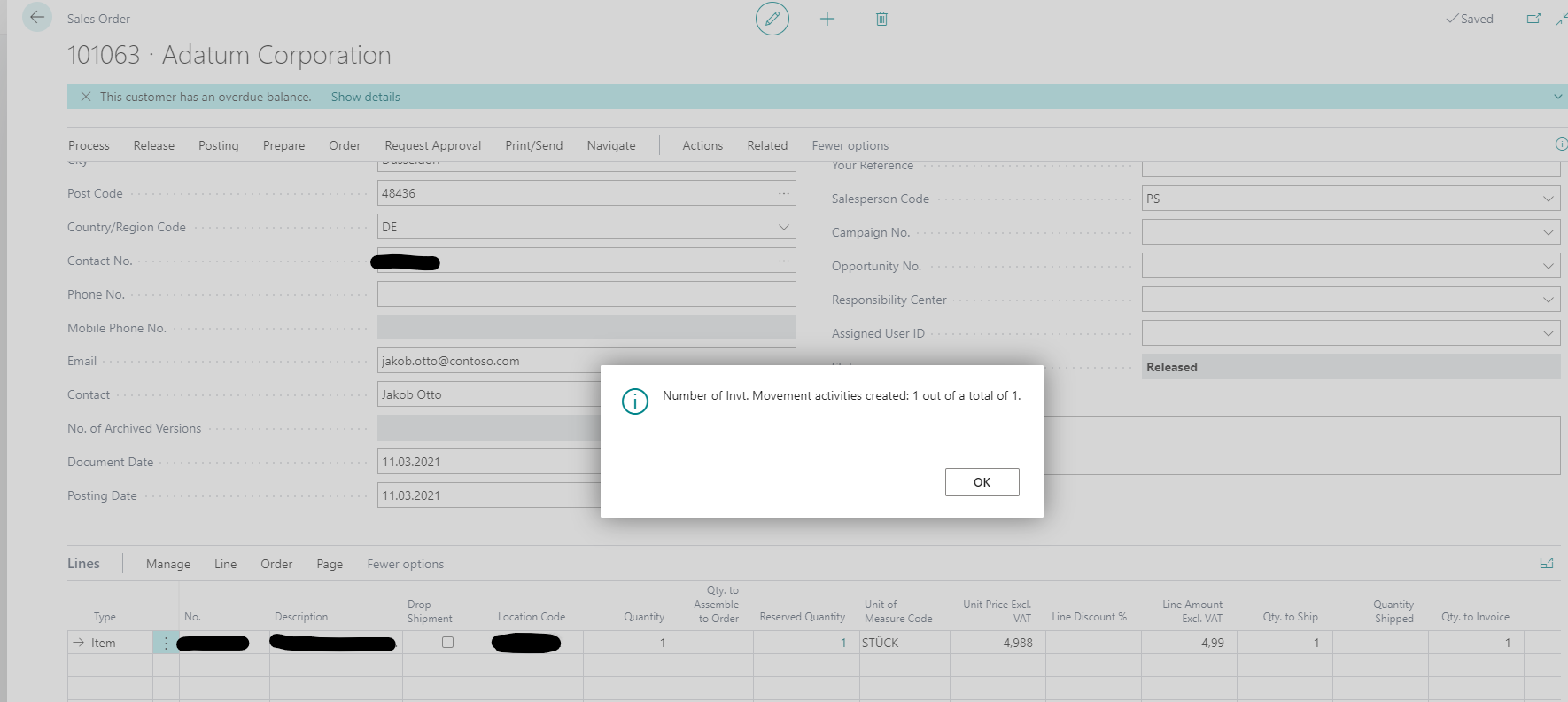
I can create the inventory movement from the sales order just fine. 

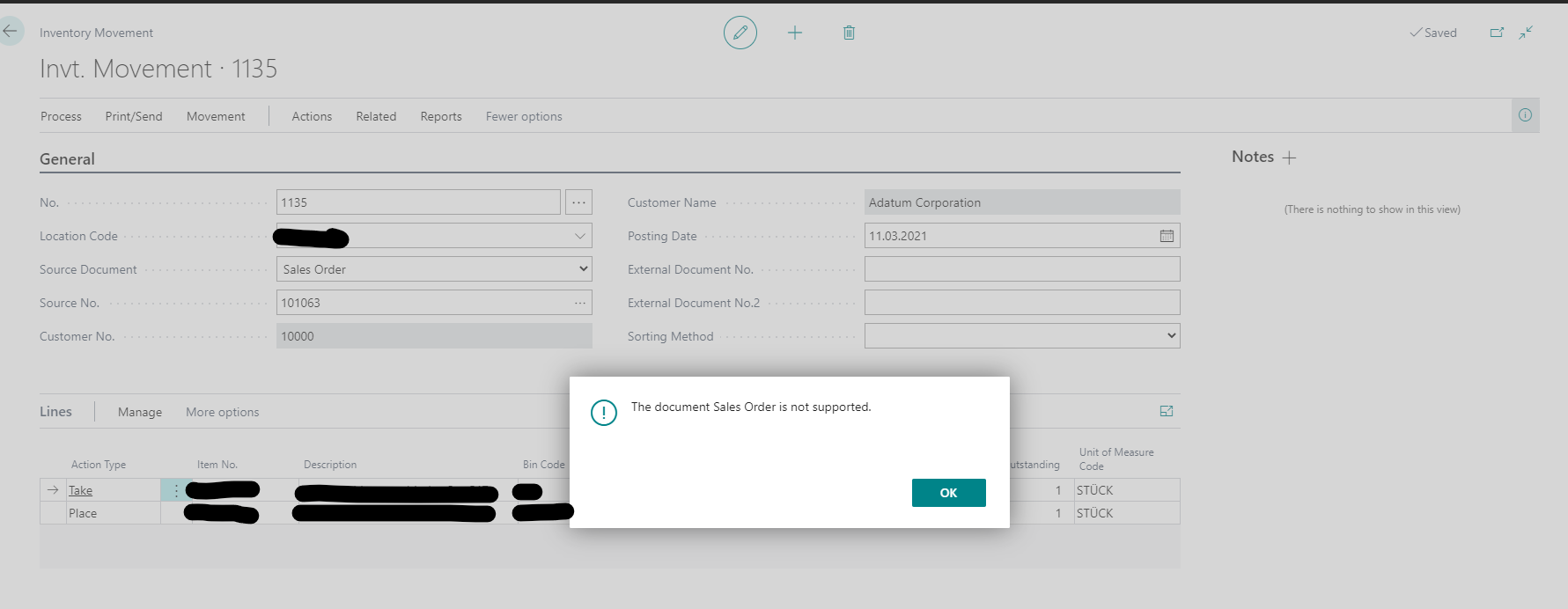
Now, when I want to register the inventory movement, I get the error "The document Sales Order is not supported".
pastedimage1615464421684v1.png

pastedimage1615464508102v2.png

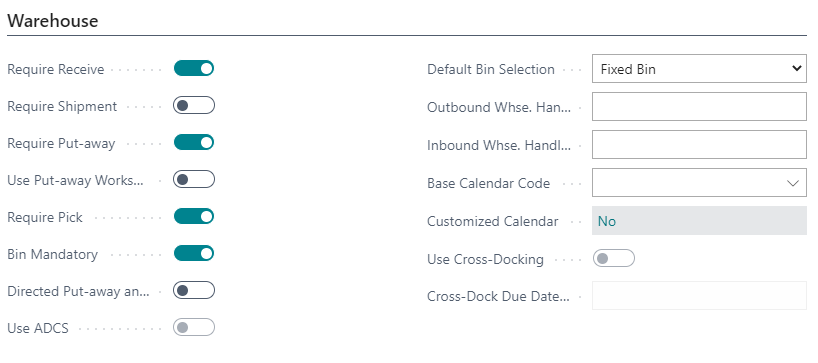
The location is set up like this:

pastedimage1615464543047v3.png

What is the reason for this behavior and how can we fix it? There was an old thread from 2017 but no solution provided there as well (except development).

https://community.dynamics.com/nav/f/microsoft-dynamics-nav-forum/261458/inventory-movement-from-a-sales-order-not-allowed

Thanks in Advance!

I have the same question (0)
  • Suggested answer
    Community Member Profile Picture
    on at

    Bob,

    When your location is set up to require pick processing but not shipment processing, you use the Inventory Pick page to record and post picking and shipping information for your source documents. The outbound source document can be a sales order, a purchase return order, an outbound transfer order, or a production order whose components are ready to be picked. You are using the Inventory Movement off the Sales Order and this will not work. You can create an inventory pick in three ways:

    1. Create the pick in two steps by first requesting an inventory pick by releasing the source document. This signals to the warehouse that the source document is ready for picking. The inventory pick can then be created on the Inventory Pick page based on the source document.

    2. Create the inventory pick directly from the source document itself.

    3. You can create inventory picks for several source documents at the same time by using the batch job.

    Hope this helps.

    Thanks,

    Steve

  • BobSacamano Profile Picture
    40 on at

    Hi Steve,

    thanks for your reply! Unfortunately we do not want to use Inventory Pick because we only need to post goods issue later on (from antoher location). I have also removed the "require pick processing" from the location but I am getting the same error in inventory movement.

    I just want to use an internal document to move the sales order items from bin 1 to bin 2 w/o having to copy all items manually in an internal movement. The inventory movement seems PERFECT for that except it gives me above mentioned error. I was wondering if this is a bug or a feature, as it does not make much sense to me why it should not be possible from a process perspective.

    Thanks and best regards

  • Suggested answer
    Community Member Profile Picture
    on at

    Bob,

    You could check the box Require Shipment will allow the Inventory Movement to work from Sales Orders. I have heard users making a small customization making the button in the sales order page that takes the items information and quantity and creates an internal movement.

    Hope this helps.

    Thanks,

    Steve

  • BobSacamano Profile Picture
    40 on at

    Hi Steve,

    I tried that but with Require Shipment box checked I get the "There is nothing to create." prompt in the sales order (when creating movements). From the "inventory movement" list the sales order is then missing in the source documents list.

    I am afraid we need to do a development.

    Thanks anyway :)

Under review

Thank you for your reply! To ensure a great experience for everyone, your content is awaiting approval by our Community Managers. Please check back later.

Helpful resources

Quick Links

Responsible AI policies

As AI tools become more common, we’re introducing a Responsible AI Use…

Neeraj Kumar – Community Spotlight

We are honored to recognize Neeraj Kumar as our Community Spotlight honoree for…

Leaderboard > Small and medium business | Business Central, NAV, RMS

#1
OussamaSabbouh Profile Picture

OussamaSabbouh 2,092

#2
YUN ZHU Profile Picture

YUN ZHU 663 Super User 2025 Season 2

#3
Sumit Singh Profile Picture

Sumit Singh 515

Last 30 days Overall leaderboard

Featured topics

Product updates

Dynamics 365 release plans