web
You’re offline. This is a read only version of the page.
close
Skip to main content

Notifications

Announcements

No record found.

Community site session details

Community site session details

Session Id :
Finance | Project Operations, Human Resources, ...
Suggested Answer

Error in importing ISV license using OV code signing certificate

(0) ShareShare
ReportReport
Posted on by 20

Hi,

We have implemented ISV licensing on our solution, when we were testing with the self-signed certificate based on Microsoft's documentation it went smoothly with no problems.

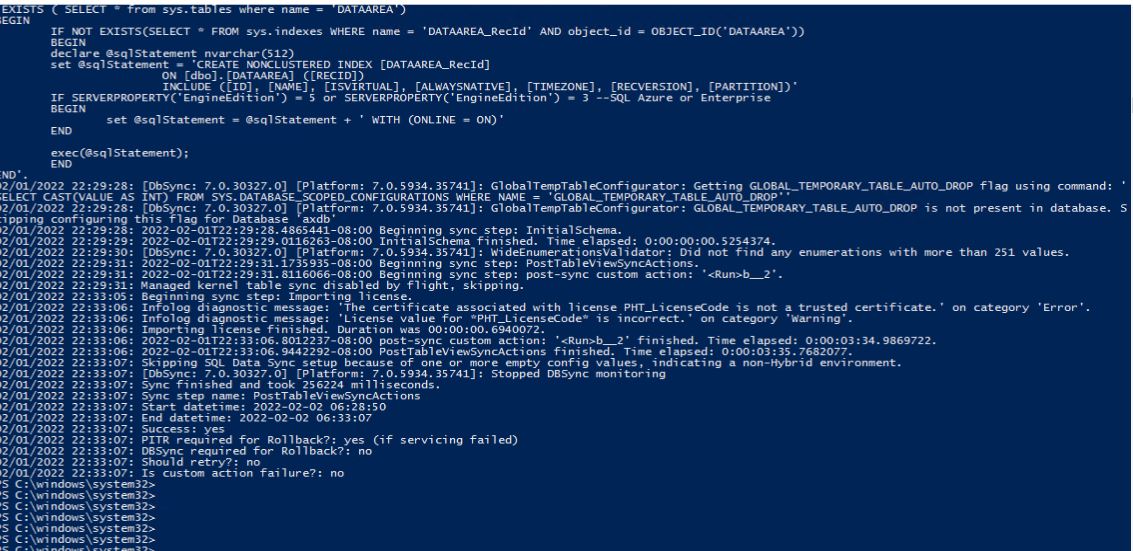
However when we try to import the customer specific license using the OV code signing certificate we have, we encountered the following warnings and the license was not imported to the db even after syncing the database using visual studio.

Attached is a photo of the error logs for reference.
6278.JPG

Any thoughts on how we can fix this? And what could be the probable cause for the errors?

I have the same question (0)
  • Suggested answer
    André Arnaud de Calavon Profile Picture
    300,911 Super User 2025 Season 2 on at

    Hi AlphaChino,

    The self-signed certificate is only working in development environments for testing purposes. For customer (production) environments you have to acquire a certificate from a Certificate Authority. This is also mentioned in the documentation: Independent software vendor (ISV) licensing - Finance & Operations | Dynamics 365 | Microsoft Docs

  • AlphaChino Profile Picture
    20 on at

    Hi Andre,

    Thank you for your response.

    Yes I am aware of that. And I forgot to state that this is still in dev environment as we are still testing how to sign licenses using the OV code signing certificate.

    While testing, I cannot import the license signed using the OV so I went back to step 1 and created a new Self-signed certificate but the weird thing is even the license generated using the self-signed certificate was not imported.

    Any idea as to why this is happening?

  • AlphaChino Profile Picture
    20 on at

    Hi Andre,

    I managed to make the self-signed certificate work again.

    However for generating licenses using the OV code signing certificate we have, it still says that the license value for the license code is incorrect.

  • Suggested answer
    André Arnaud de Calavon Profile Picture
    300,911 Super User 2025 Season 2 on at

    Hi Alpha,

    I have never tried to use a self-signed certificate and use another tenant for testing the ISV licensing. For the real ISV development we always used an organization validated account (current and previous employer).

    I do think it fails when the tenant is different than your own tenant used for the self-signed certificate. Anyway, I would recommend to use an OV certificate retrieved from a certificate authority.  

  • Guruprasanna Profile Picture
    1,078 on at
    We have also faced the similar issue recently when we were using the DigiCert code signing. What we have heard from the CA is import the trusted root and CA certificate to the 'Trusted Root certification Authority' first and then import the code signing certificate. Dont directly use the CA provided code signing certificate in the AOT rather import in the local machine later export the DER encoded binary X.509 (.CER) use this in to the AOT resource....

    If its still give the error of trusted certificate may be I guess order of certificate import would have been went wrong. Ask for the CA to reissue the certificate that should hopefully work.

Under review

Thank you for your reply! To ensure a great experience for everyone, your content is awaiting approval by our Community Managers. Please check back later.

Helpful resources

Quick Links

Responsible AI policies

As AI tools become more common, we’re introducing a Responsible AI Use…

Neeraj Kumar – Community Spotlight

We are honored to recognize Neeraj Kumar as our Community Spotlight honoree for…

Leaderboard > Finance | Project Operations, Human Resources, AX, GP, SL

#1
Martin Dráb Profile Picture

Martin Dráb 660 Most Valuable Professional

#2
André Arnaud de Calavon Profile Picture

André Arnaud de Cal... 549 Super User 2025 Season 2

#3
Sohaib Cheema Profile Picture

Sohaib Cheema 307 User Group Leader

Last 30 days Overall leaderboard

Product updates

Dynamics 365 release plans
