web
You’re offline. This is a read only version of the page.
close
Skip to main content

Announcements

No record found.

News and Announcements icon
Community site session details

Community site session details

Session Id :
Small and medium business | Business Central, N...
Answered

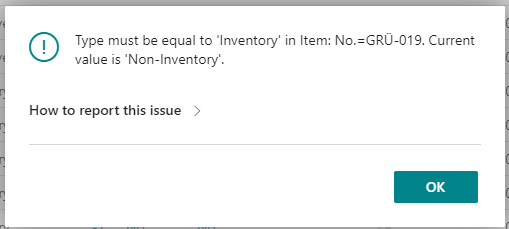
ISSUE - Type must be equal to 'Inventory'

(0) ShareShare
ReportReport
Posted on by 397 User Group Leader

pastedimage1648543372483v1.png

That issue appeared today for the first time - out of nowhere...

Just wanted to create a new article, as always with a template and then this error appears - also with other templates.

In my test I changed the type to Inventory - but then the next issue appears:
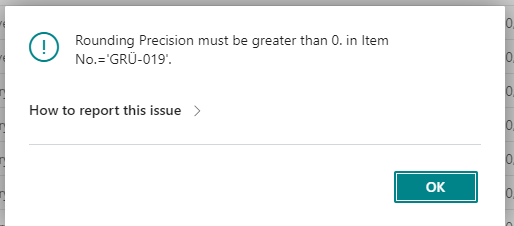
pastedimage1648543527852v2.png

Whats happening? I didn't change any settings.

Thank you.

Tom

I have the same question (0)
  • Suggested answer
    OliWall Profile Picture
    180 on at

    what fields have you set within your template?

    it looks like some of the fields you have tried to default are only compatible with item type "inventory".  For example replenishment type.

    you can view the template by searching for Item templates and seeing what fields it is trying to default.

  • Verified answer
    OliWall Profile Picture
    180 on at

    further to this, it appears the second error maybe related to a bug that has been reported on the forums yesterday

    community.dynamics.com/.../rounding-precision-must-be-greater-than-0-in-item-no-1262

    try and remove UOM from your template for the time being

  • Suggested answer
    T_Mauser Profile Picture
    397 User Group Leader on at

    My solution:

    I have overwritten the article templates per config packages

    • Changed the rounding precision from 0 to 1

    • Deleted the current templates

    • Added the changed template per config package

    All messages disappeared –  is working as before.

Under review

Thank you for your reply! To ensure a great experience for everyone, your content is awaiting approval by our Community Managers. Please check back later.

Helpful resources

Quick Links

Introducing the 2026 Season 1 community Super Users

Congratulations to our 2026 Super Stars!

Congratulations to our 2025 Community Spotlights

Thanks to all of our 2025 Community Spotlight stars!

Leaderboard > Small and medium business | Business Central, NAV, RMS

#1
OussamaSabbouh Profile Picture

OussamaSabbouh 1,682 Super User 2026 Season 1

#2
YUN ZHU Profile Picture

YUN ZHU 1,001 Super User 2026 Season 1

#3
Kamal Khakhkhar Profile Picture

Kamal Khakhkhar 610

Last 30 days Overall leaderboard

Featured topics

Product updates

Dynamics 365 release plans
