web
You’re offline. This is a read only version of the page.
close
Skip to main content

Notifications

Announcements

No record found.

Community site session details

Community site session details

Session Id :
Microsoft Dynamics CRM (Archived)

Where is the App Settings ?

(0) ShareShare
ReportReport
Posted on by 90

Hi Guys,

I have just created trial account for Dynamics CRM 365 and trying to figure out new features. For testing purpose i am trying to configure relationship assistant. In this link it says It can be set up in the "App Settings area of the Sales Hub app". In my trial environment i only see  "Dynamics 365--Custom" and "CRM Hub" as in the picture below.
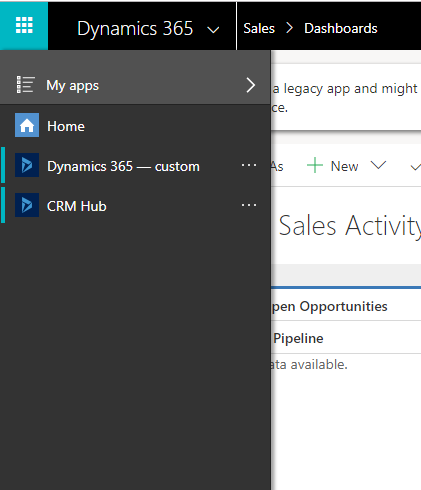
ask1.PNG

Here is my questions:

1. Should i install "Sales Hub" to configure relationship assistant?

2. Should i install "Sales Hub" to test Embedded Intelligence?

*This post is locked for comments

I have the same question (0)
  • Verified answer
    Kokulan Profile Picture
    18,054 on at

    Hi Fuat Tatar

    You should be able to configure the Assistant (formally Relationship Assistant) without installing Sales Hub. Please see the steps below.

    I have setup a trial instance and have the same apps installed as you have shown, please see below

    ScreenClip-_5B00_739_5D00_.png

    Steps to Configure Assistant

    01. Go to Advanced Settings as shown below and click settings tile and go to Sales Insights, as shown in the screenshots below

    ScreenClip-_5B00_737_5D00_.png

    ScreenClip-_5B00_738_5D00_.png

    02. Accept the terms for Embedded Intelligence and then you can configure the Assistant as shown below

    ScreenClip-_5B00_739_5D00_.png

    ScreenClip-_5B00_740_5D00_.png

    Hope this helps

  • fuattatar Profile Picture
    90 on at

    I followed your instructions and i was able to configure asistant and Embedded Intelligence. Thank you very much.

Under review

Thank you for your reply! To ensure a great experience for everyone, your content is awaiting approval by our Community Managers. Please check back later.

Helpful resources

Quick Links

Responsible AI policies

As AI tools become more common, we’re introducing a Responsible AI Use…

Neeraj Kumar – Community Spotlight

We are honored to recognize Neeraj Kumar as our Community Spotlight honoree for…

Leaderboard > 🔒一 Microsoft Dynamics CRM (Archived)

#1
SA-08121319-0 Profile Picture

SA-08121319-0 4

#1
Calum MacFarlane Profile Picture

Calum MacFarlane 4

#3
Alex Fun Wei Jie Profile Picture

Alex Fun Wei Jie 2

Last 30 days Overall leaderboard

Featured topics

Product updates

Dynamics 365 release plans



