web
You’re offline. This is a read only version of the page.
close
Skip to main content

Announcements

No record found.

News and Announcements icon
Community site session details

Community site session details

Session Id :
Finance | Project Operations, Human Resources, ...
Answered

Data Entity filter does not show correct labels

(0) ShareShare
ReportReport
Posted on by 23

HI All.

I have a data entity with several unmapped fields. These fields are populated in the postLoad method. These fields all have a EDT and a label (and help text). The same goes for the fields in the staging table.

When I check the filter on the entity, this is what I see:
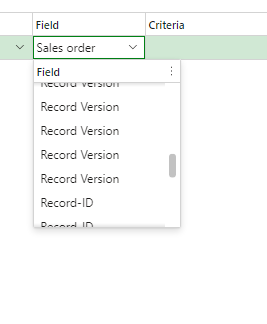
pastedimage1659438843184v1.png

All the unmapped fields show Record Version or Record-ID. The mapped fields show the correct label.

I added/removed labels, restarted IIS, of course the Refresh Entity list from the parameters. Removed the entity and added it again, but these labels in the filter do not change. I would expect the labels as I defined them on the entity (and Staging table) fields. 

What is it I do not see ? Can't seem to find any posts on google regarding this....

Thanks !!

Gerard Verbruggen

I have the same question (0)
  • Verified answer
    YY Lim Profile Picture
    960 on at

    Hi Gerard,

    The record version and record id is system field, you can see multiple of them because your entity consists of multiple join with different tables/entities. These are not your customized field.

  • Verified answer
    André Arnaud de Calavon Profile Picture
    305,178 Super User 2026 Season 1 on at

    Hi Gerard,

    When I read your question, you are using a Virtual field which gets its value with x++ coding on the postLoad() method. As stated in the documentation, you can't filter on this type of field. Then you would need a Computed field. See also the documentation: Computed columns and virtual fields in data entities - Finance & Operations | Dynamics 365 | Microsoft Docs

    The fields you see now are, like mentioned above, system fields per data source of your entity.

  • g.verbruggen Profile Picture
    23 on at

    Thanks Yuan and Andre,

    And sorry for the delayed response. I did not get the email that replies were posted. But it's clear to me know what is going on.

    Cheers,

    Gerard

Under review

Thank you for your reply! To ensure a great experience for everyone, your content is awaiting approval by our Community Managers. Please check back later.

Helpful resources

Quick Links

Introducing the 2026 Season 1 community Super Users

Congratulations to our 2026 Super Stars!

Meet the Microsoft Dynamics 365 Contact Center Champions

We are thrilled to have these Champions in our Community!

Congratulations to the April Top 10 Community Leaders

These are the community rock stars!

Leaderboard > Finance | Project Operations, Human Resources, AX, GP, SL

#1
Giorgio Bonacorsi Profile Picture

Giorgio Bonacorsi 722

#2
André Arnaud de Calavon Profile Picture

André Arnaud de Cal... 605 Super User 2026 Season 1

#3
Subra Profile Picture

Subra 547

Last 30 days Overall leaderboard

Product updates

Dynamics 365 release plans
