web
You’re offline. This is a read only version of the page.
close
Skip to main content

Announcements

No record found.

News and Announcements icon
Community site session details

Community site session details

Session Id :
Microsoft Dynamics AX (Archived)
Answered

on-hand pegging nothing

(0) ShareShare
ReportReport
Posted on by

Here is an example of the wierd pegging we have when an item has a minimum:
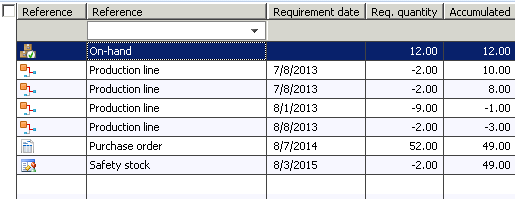
on-hand pegs nothing (??), safety stock and production orders peg on the PO.

What setting should we change to make the production orders peg on the on-hand until none is available and then peg on the PO with the safety stock, which would seem logical considering the dates we have for each of the requirements.

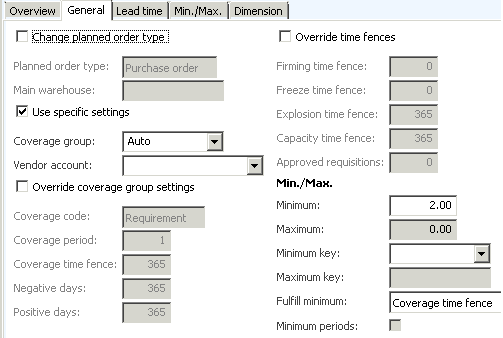
Here are the current order settings:
*This post is locked for comments

I have the same question (0)
  • Weaveriski Profile Picture
    23,620 Moderator on at

    The production orders are being pegged to the onhand. This is the net requirements screen rather than the pegging screen as it is showing the accumulated stock position whilst the pegging does not.

    In this you have 12 on hand, which are consumed by production orders with a requirement date over a year old, you can tell the on hand is consuming these otherwise your suggested purchase would have action messages telling you to advance by a year. So then as it is consumed you eventually have negative stock and the purchase order replenishing in 3 days (presumably lead time) and then safety stock taking two out in a years time!

    Why are you production orders a year old?

    Which version is this?

  • Community Member Profile Picture
    on at

    We are on AX2012R2.

    Sorry I did not show the pegging window at the bottom, but it is emty (and on-hand is selected).

    If I select each production order, the PO appears in the pegging window.

    The dates are old because job scheduling did not run well on them, I ran it again and now they are in the future, but still have the same issue.

  • Weaveriski Profile Picture
    23,620 Moderator on at

    What dimensions are configured for coverage group and what dimensions are applicable on the BOM line of the production order?

    Is this aligned to the on hand?

    Is the item batch controlled with a set disposition code?

    Can you show the first production line pegged to the purchase order?

    Where are you actually accessing this screen from?

    What is the stock status of the on hand stock?

    Is this a test system you are playing with?

    You have blanked out project - so are the production and purchasing elements being raised against a project?

  • Community Member Profile Picture
    on at

    The dimensions are all the same (we do master planning on warehouses, so the view I pasted here is from the same warhouse).

    We do not use batch.

    Yes this is a test env. (DEV).

    I get there from the Net Requirement button on the ecoresproductdetailsextended form.

    The productions are tied to a project yes, but not the PO as it's for Stock.

    I'll use the same thread to talk about another problem similar to this one (may be the same issue). When we have a production reqtrans, Stock with a minimum, and a PO, the production pegs directly the PO instead of the on-hand. Is this normal? Is there a way to make it peg on the stock instead?

  • Weaveriski Profile Picture
    23,620 Moderator on at

    What are you Master Plan settings relating to onhand use?

    Is the Production purely project based?

    What version of AX is this?

    How are your projects configured to handle inventory?

  • Community Member Profile Picture
    on at

    AX2012 R2

    This happens with all productions, project based or not. Also, if the PO is not there (only on-hand and a production), the production properly pegs the on-hand.

    These are the master plan settings:

  • Weaveriski Profile Picture
    23,620 Moderator on at

    Okay take projects out completely.

    Find an item with stock. Show me the stocking dimension group for it relating to the item coverage. Show me the tracking dimension group the same if it has one. Show me the on hand for it at warehouse and site level and any active tracking dimensions. If it has config/size/colour add these in. Show me the item coverage settings for it, and show me the pegging where the one consumption line is NOT taking inventory.

    It is standard for it to consume inventory if your settings and supply-demand are balanced for this.

  • Weaveriski Profile Picture
    23,620 Moderator on at

    I also presume your "Dynamic" plan is set as your "Master" plan in the MP Parameters?

  • Community Member Profile Picture
    on at

    Yes the dynamic planning is the master (and only) planning we use. I'll show you one without any projects.

    The only dimensions we use are Site/Warehouse/Location.

    So I have an Item with 34 on-hand in A/A/L, it has a minimum of 20 in A/A, two sales order in A/A/L, and one purchase order in A/A/L.

    sales.png

    2844.netreq.pngitemcoverage.png

  • Weaveriski Profile Picture
    23,620 Moderator on at

    In your penultimate screen if the second sales order did not exist you would have no suggested purchase order, but you have firmed that one because of a suggestion and it is now tied to the purchase order. The why it is pegged is interesting, I would want you to remove the second sales order and purchase order and re-run planning. I would want you to also check that the first sales order has not reference type associated with it. I would also check there are no positive days impact from planning in this reference (does not look like it from previous screen shots but this is a different item). I would also examine the action message, I am guessing it is telling you to advance 4 days, which also implies it believes the on hand will be 0 at that point, again pointing to positive days. Easier with it in front of you I am afraid.

Under review

Thank you for your reply! To ensure a great experience for everyone, your content is awaiting approval by our Community Managers. Please check back later.

Helpful resources

Quick Links

Introducing the 2026 Season 1 community Super Users

Congratulations to our 2026 Super Stars!

Meet the Microsoft Dynamics 365 Contact Center Champions

We are thrilled to have these Champions in our Community!

Congratulations to the April Top 10 Community Leaders

These are the community rock stars!

Leaderboard > 🔒一 Microsoft Dynamics AX (Archived)

#1
CP04-islander Profile Picture

CP04-islander 24

#2
Michel ROY Profile Picture

Michel ROY 14

#3
Jagadabi Profile Picture

Jagadabi 6

Last 30 days Overall leaderboard

Featured topics

Product updates

Dynamics 365 release plans
