web
You’re offline. This is a read only version of the page.
close
Skip to main content

Announcements

No record found.

News and Announcements icon
Community site session details

Community site session details

Session Id :
Microsoft Dynamics AX (Archived)

Item cost rollup by cost group

(0) ShareShare
ReportReport
Posted on by 6

Hi,

We use standard costing method. 

I have a problem with View “Costing sheet” in the item costing, I don’t see details of the cost for lines (for Material, Labor, Burden), only the Total amount.

The costing for item 340448-1-DM55 in the example (Released products / Manage costs – Item price / tab Pending prices / button Cost rollup by cost group) shows only one total line.
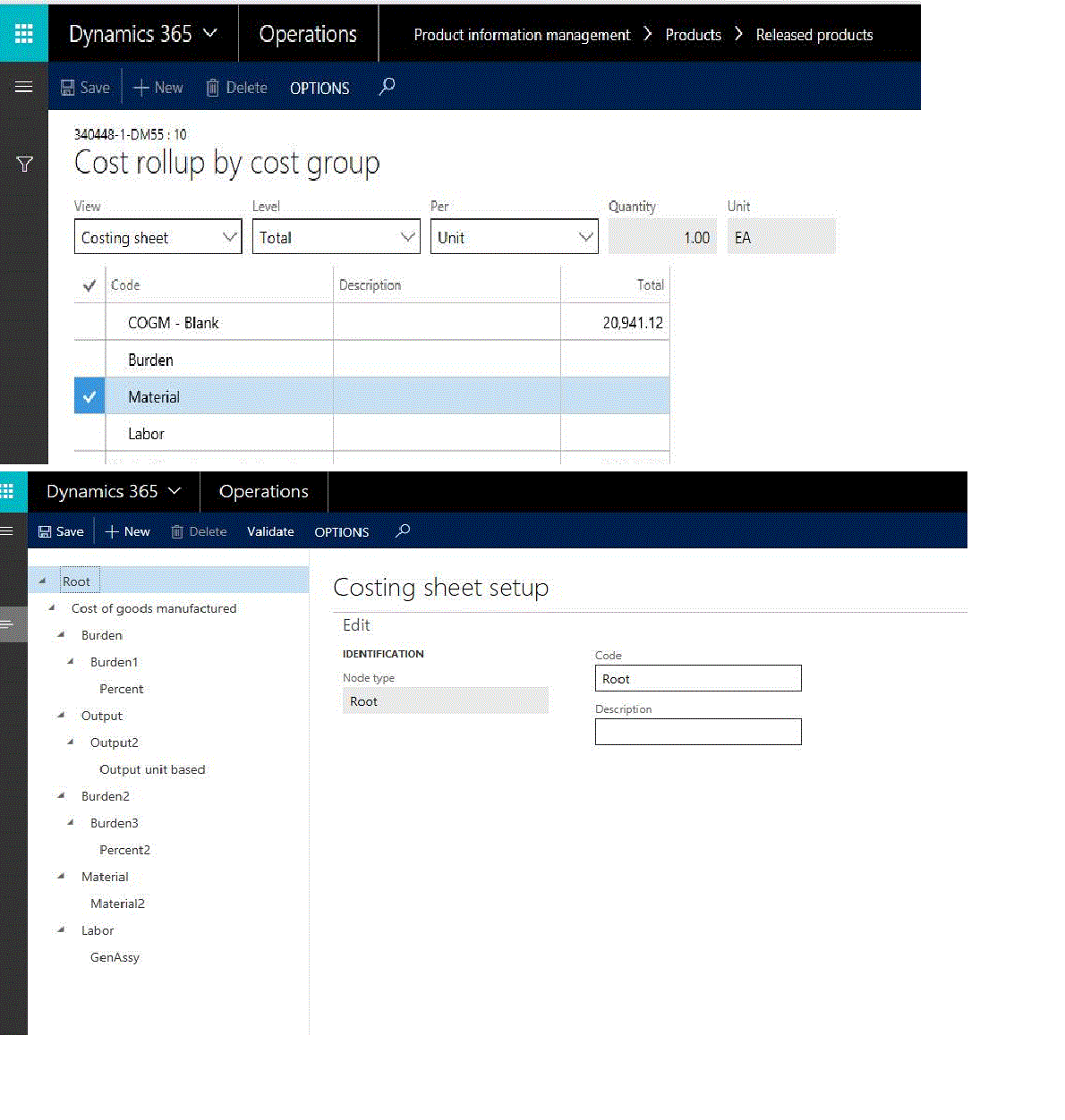
3414.Untitled.gif

*This post is locked for comments

I have the same question (0)
  • Verified answer
    Ludwig Reinhard Profile Picture
    Microsoft Employee on at

    Hello Sam,

    Are the material and labor costs setup completely for your item?

    That is, have the prices been activated in a costing version?

    Best regards,

    Ludwig

  • Samkh Profile Picture
    6 on at

    Hi

    I activated the price however it didn't make any difference.

    The material and labor cost setup are basically complete. Their prices are active and 'blocked'.

    Did I miss anything else?

    Thanks

  • Suggested answer
    Ludwig Reinhard Profile Picture
    Microsoft Employee on at

    Hi Sam,

    Have you checked that the correct cost Group that you have selected in the costing sheet is assigned?

    Best regards,

    Ludwig

  • Community Member Profile Picture
    on at

    Hi Sam

    Did it get sorted for you?

    @Ludwig I am facing the same issue and still can't see cost rollup by cost group displaying the breakdown.

    "Have you checked that the correct cost Group that you have selected in the costing sheet is assigned?". Assigned to item?. Many Thanks

  • Suggested answer
    Community Member Profile Picture
    on at

    Hi Sam,

    1)

    Go to:

    Cost management > Inventory accounting policies setup > Parameters

    2)

    Change the Cost breakdown-parameter to ‘Sub ledger’.

    3)

    Recalculate the item cost price. Now you will have a summary on Cost group-level.

    Cheers,

    Leif

Under review

Thank you for your reply! To ensure a great experience for everyone, your content is awaiting approval by our Community Managers. Please check back later.

Helpful resources

Quick Links

Introducing the 2026 Season 1 community Super Users

Congratulations to our 2026 Super Stars!

Meet the Microsoft Dynamics 365 Contact Center Champions

We are thrilled to have these Champions in our Community!

Congratulations to the March Top 10 Community Leaders

These are the community rock stars!

Leaderboard > 🔒一 Microsoft Dynamics AX (Archived)

#1
CP04-islander Profile Picture

CP04-islander 26

#2
imran ul haq Profile Picture

imran ul haq 8

#3
André Arnaud de Calavon Profile Picture

André Arnaud de Cal... 4 Super User 2026 Season 1

Last 30 days Overall leaderboard

Featured topics

Product updates

Dynamics 365 release plans
