web
You’re offline. This is a read only version of the page.
close
Skip to main content

Notifications

Announcements

No record found.

Community site session details

Community site session details

Session Id :
Microsoft Dynamics CRM (Archived)

Sharepoint integration wrong documents are opened

(0) ShareShare
ReportReport
Posted on by 2

Hi Guys,

We are facing very strange issue, we are using CRM 2016 onpremise with sharepoint integration.

We have uploaded few documents to the Account entity. We have some .doc,.jpeg,.xls,.pdf.

So the PDFs and Images are opened correctly but word and excel document open always the same word document even though the path is correct
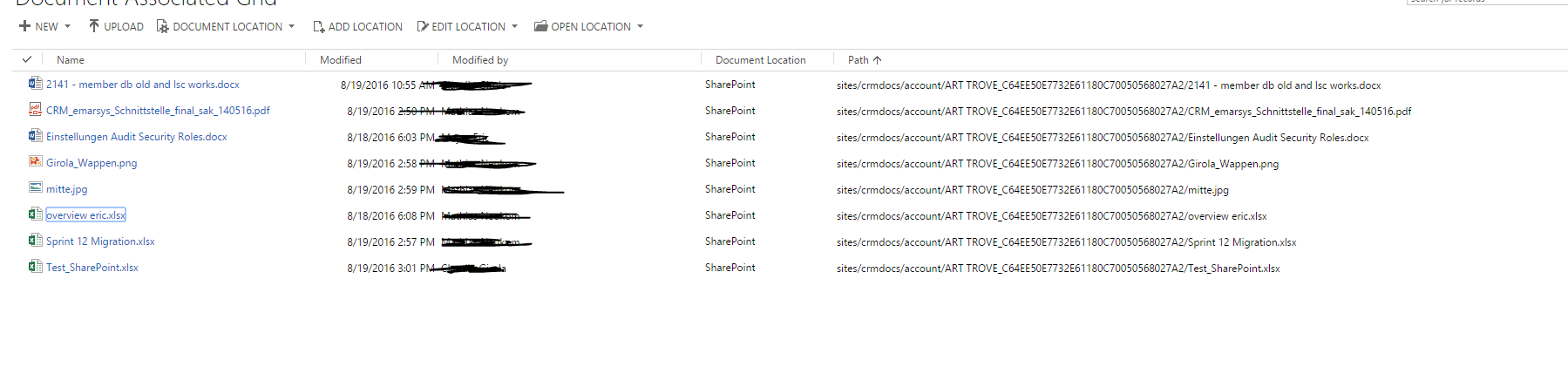
3771.Sharepoint.PNG

So it doesnt matter which .doc or .xls do you try to open the first word record will be opened every time (not the case for images and pdf)

Did someone encounter similar issue ?

Thanks for any help

*This post is locked for comments

I have the same question (0)
  • Inogic Profile Picture
    715 on at

    We have done the several SharePoint integration with CRM but we did not face such issue.

    Can you please check what url is generated when you clicks on documents. And try to create url as follows your sharepoint url/sites/crmdocs/account/ART.... .docx and open in browser to see it open correctly.

    Thanks!

    Sam

  • Stig Aatangen Profile Picture
    on at

    Hi

    I'm having the exact same issue. We have integrated CRM2016 on-premise to SharePoint on-premise. I just found out and do not know why.

  • JLU Profile Picture
    on at

    Hey Sam

    do you use the SharePoint WebApp Server to render you Office documents directly in the browser?

  • Community Member Profile Picture
    on at

    How did you guys go about resolving this issue? 

  • JLU Profile Picture
    on at

    We disabled the WepApp Server Extension on SharePoint Server.

  • Community Member Profile Picture
    on at

    Thank you! One last question, do users need read/write permission on SharePoint or does CRM handle all the permissions? 

    I thought the app-principal during integration was responsible for providing access to SP. We do not need to add any users or AD groups to SP. Is that a right assumption?

  • Aric Levin - MVP Profile Picture
    30,190 Moderator on at

    By default, your users will need to have permission on the SharePoint site, and it is handled separately and not by CRM.

    See the following Technet article for more information:

    technet.microsoft.com/.../jj863709.aspx

    Document is for SharePoint online, but most of the logic will apply for On-Premise as well.

  • Community Member Profile Picture
    on at

    Hmm...? Consider this scenario where an individual user does not have access to a specific entity record, but does have permissions to access the documents associated with the entity. Do we have to manually configure permissions for each folder in sharepoint document library?

  • Aric Levin - MVP Profile Picture
    30,190 Moderator on at

    Unfortunately, I would have to say that yes.

  • Community Member Profile Picture
    on at

    Instead, can we have two document locations. One site collection for regular documents and the other for confidential documents?

Under review

Thank you for your reply! To ensure a great experience for everyone, your content is awaiting approval by our Community Managers. Please check back later.

Helpful resources

Quick Links

Responsible AI policies

As AI tools become more common, we’re introducing a Responsible AI Use…

Neeraj Kumar – Community Spotlight

We are honored to recognize Neeraj Kumar as our Community Spotlight honoree for…

Leaderboard > 🔒一 Microsoft Dynamics CRM (Archived)

#1
SA-08121319-0 Profile Picture

SA-08121319-0 4

#1
Calum MacFarlane Profile Picture

Calum MacFarlane 4

#3
Alex Fun Wei Jie Profile Picture

Alex Fun Wei Jie 2

Last 30 days Overall leaderboard

Featured topics

Product updates

Dynamics 365 release plans



