web
You’re offline. This is a read only version of the page.
close
Skip to main content

Announcements

No record found.

News and Announcements icon
Community site session details

Community site session details

Session Id :
Microsoft Dynamics AX (Archived)

Inventory Value Report - Inventory Account Does Not Display

(0) ShareShare
ReportReport
Posted on by 1,632

The inventory value report should look something like this (done in Demo environment):
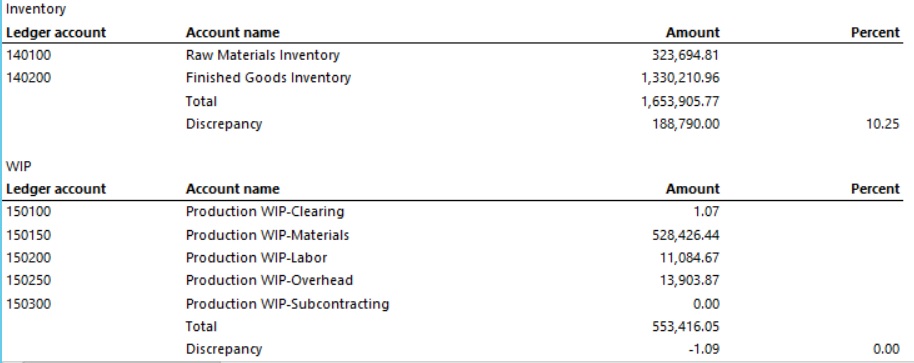
How-it-looks.jpg

But instead, looks like this (Production environment):
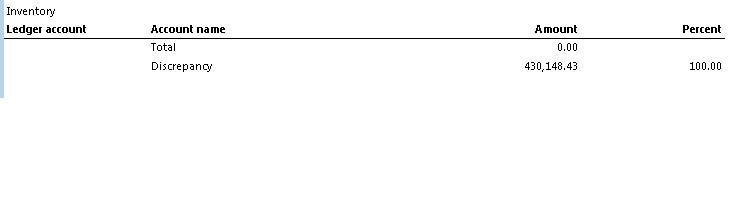
I used the same "Inventory Value Reports" setup for both reports (only different account numbers, because they are in different instances).  Is there something that I might be missing on the setup of the Inventory account?  Either on the GL side or the Inventory side?

Has anyone else had this issue?  I can't find anything online where the account information does not show up at all.

Another report that has a similar issue that makes me think this is an issue with the account setup is "potential conflicts - inventory and general ledger".  The value does not reflect the main account that I put in to the parameters for the report, it is a negative number and gives me a > 100% difference in inventory to inventory account.

*This post is locked for comments

I have the same question (0)
  • André Arnaud de Calavon Profile Picture
    304,711 Super User 2026 Season 1 on at

    Hi Ansel,

    Would you mind to also share screen shots of the setup used for both environments?

  • FAC.Ansel Profile Picture
    1,632 on at

    Demo Setup:

    Production setup:

  • Verified answer
    André Arnaud de Calavon Profile Picture
    304,711 Super User 2026 Season 1 on at

    Hi Ansel,

    They look similar. I assume the rows fasttab values are also the same. Please check the main account "1500". If you go to the main accounts list page in General Ledger and select this account, please check if the Total accounts are filled. There is a button on the menu bar with this name. Or is this not a total account?

  • FAC.Ansel Profile Picture
    1,632 on at

    '1500' is an Asset account.   In a duplicate test environment I create a new '1501' account and made it a total for the '1500' account and now the account shows up on the report.  Thanks for the help!

  • André Arnaud de Calavon Profile Picture
    304,711 Super User 2026 Season 1 on at

    Hi Ansel,

    Glad the issue is solved. Can you mark an answer so this thread will get the status answered?

Under review

Thank you for your reply! To ensure a great experience for everyone, your content is awaiting approval by our Community Managers. Please check back later.

Helpful resources

Quick Links

Introducing the 2026 Season 1 community Super Users

Congratulations to our 2026 Super Stars!

Meet the Microsoft Dynamics 365 Contact Center Champions

We are thrilled to have these Champions in our Community!

Congratulations to the April Top 10 Community Leaders

These are the community rock stars!

Leaderboard > 🔒一 Microsoft Dynamics AX (Archived)

#1
CP04-islander Profile Picture

CP04-islander 39

#2
Michel ROY Profile Picture

Michel ROY 14

#3
imran ul haq Profile Picture

imran ul haq 8

Last 30 days Overall leaderboard

Featured topics

Product updates

Dynamics 365 release plans
