web
You’re offline. This is a read only version of the page.
close
Skip to main content

Notifications

Announcements

No record found.

Community site session details

Community site session details

Session Id :
Microsoft Dynamics CRM (Archived)

BUG: Xrm.Page.getControl("name") returns null but Xrm.Page.getAttribute("name") returns correct

(0) ShareShare
ReportReport
Posted on by 680

Hi Experts,

I have a Two Options CRM field with Yes/No values, field name is showing on the form but field control (its dropdown) is not showing, I am using CRM 2015 online. 

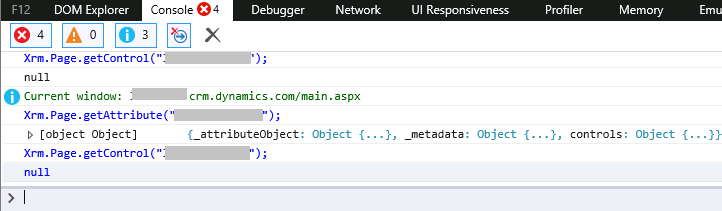
Issue is when I try to access the field with Xrm.Page.getAttribute I can access the object but when I try to access it with Xrm.Page.getControl, it returns an error "Unable to get property 'setVisible' of undefined or null reference (im trying to hide the control). 

I already have tried removing it from the form, save, publish then put it back to the form but the issue still exists. Any help is greatly appreciated. 

Field name is showing but not the dropdown control.
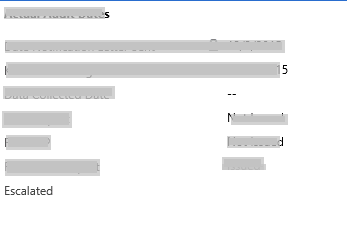
FieldSS.png

AccessField.png

*This post is locked for comments

I have the same question (0)
  • BharatPremji Profile Picture
    2,485 on at

    Hi,

    To hide the field you should use:

    Xrm.Page.ui.controls.get("attributename").setVisible(false);

    Bharat

  • LMP Profile Picture
    680 on at

    Hi Bharat,

    Thank you for your reply, Xrm.Page.getControl method is a shortcut method to access Xrm.Page.ui.controls.get. 

    https://msdn.microsoft.com/en-us/library/gg334266.aspx

  • LMP Profile Picture
    680 on at

    Hi Guido,

    Yes the field is inside the main form. No field level security set nor read only associated to it.

    The field is a "Two radio button", after changing it to "Checkbox" we can now access it's control but if we change it back again to "Two radio button" same thing happen as before. Why is it that when we change it to Two radio button the radio buttons doesn't display on the form?

    Thanks for replying, i'll do some more research regarding this.

  • BadrinathB Profile Picture
    970 on at

    Please check the value in HTML view source I m sure this might not have rendered when it is two radio button (Is value set for the field?). In case of check box value is by default set to No when it is not chcked.

Under review

Thank you for your reply! To ensure a great experience for everyone, your content is awaiting approval by our Community Managers. Please check back later.

Helpful resources

Quick Links

Responsible AI policies

As AI tools become more common, we’re introducing a Responsible AI Use…

Neeraj Kumar – Community Spotlight

We are honored to recognize Neeraj Kumar as our Community Spotlight honoree for…

Leaderboard > 🔒一 Microsoft Dynamics CRM (Archived)

#1
SA-08121319-0 Profile Picture

SA-08121319-0 4

#1
Calum MacFarlane Profile Picture

Calum MacFarlane 4

#3
Alex Fun Wei Jie Profile Picture

Alex Fun Wei Jie 2

Last 30 days Overall leaderboard

Featured topics

Product updates

Dynamics 365 release plans