web
You’re offline. This is a read only version of the page.
close
Skip to main content

Notifications

Announcements

No record found.

Community site session details

Community site session details

Session Id :
Microsoft Dynamics AX (Archived)

debugger issue in Dynamics 365

(0) ShareShare
ReportReport
Posted on by

Hi Guys,

I am facing this weird issue with the debugger in D365. Let me know if someone has encountered similar thing or got any useful resolution tips.

Firstly, I don't understand the difference between w3wp.exe and iisexpress.exe which appears when you go to attach a process in visual studio. sometimes one appears in the list sometimes the other and both serves the same purpose. can someone tell what's the logic behind?
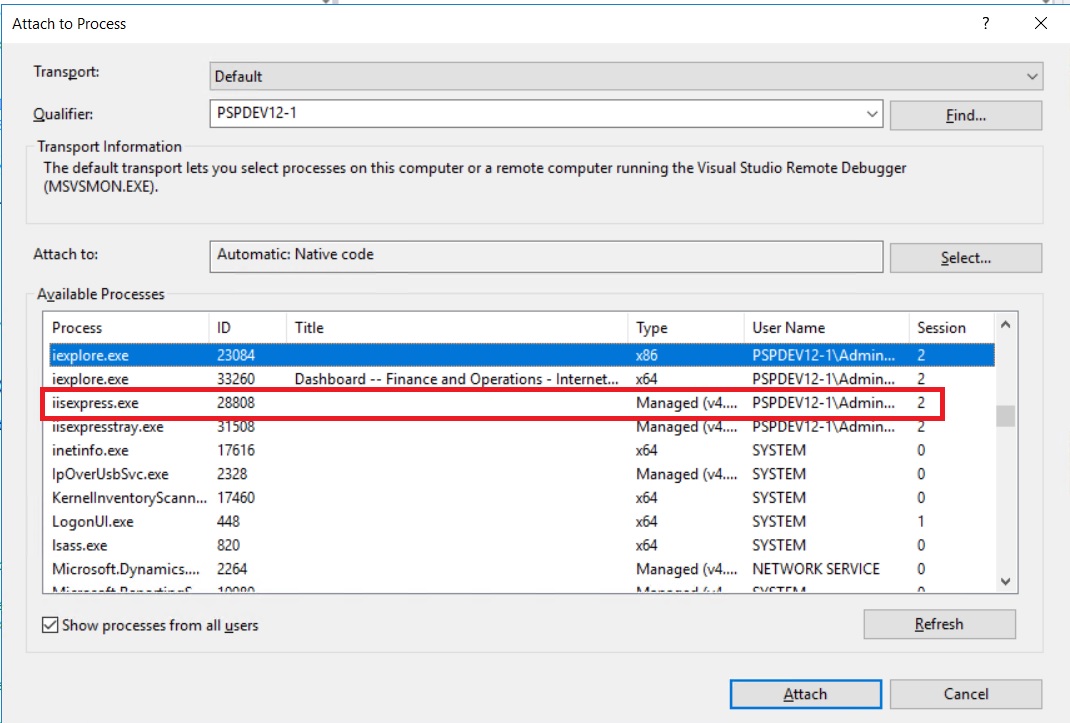
attachprocess.jpg

Secondly, the main issue, after attaching to the process, it doesn't enable the breakpoint often. Sometimes the issue gets resolved after loading the symbols manually / recompiling / iisreset, but sometimes it just doesn't enable no matter what I do. after a few hours or next day without any compilation I try the same steps, it starts working which leaves me in frustration.

Anyone who can suggest a resolution to this can claim a million dollar.

debugger.jpg

*This post is locked for comments

I have the same question (0)
  • Suggested answer
    Mea_ Profile Picture
    60,284 on at

    Hi Saurabh Mukherjee,

    There was a change in access rights to VMs managed by MS after PU12. You do't have access to admin user anymore there and without admin rights you cannot attach to w3wp.exe. So while Visual Studio is closed AX runs under w3wp. When you open VS, it starts iisexpress, so you can attach to it and debug your code. Sometimes it does not start, that's why you have "Restart IIS express" button under D365 -> Addins in VS and it often helps.

    Issue with symbols may be caused by "Load symbols only for items in the solution" tick box, so you need to be sure that it's disabled.

    To avoid issues with attach I usually use empty Runnable class as starting object to actually start AX in the debug mode.

  • Saurabh_star Profile Picture
    on at

    Hi Ievgen,

    I couldn't locate the add-in you mentioned in the visual studio, attached screenshot.

    loadsymbol.jpg

    Also, loading symbol from current solution is unchecked.

    loadsymbol.jpg

    I do see w3wp.exe service sometimes in the list, so not sure if as you said it's no longer available after last update, then how come it appears intermittently. But the bigger question is why won't the symbols load.

    Now I am thinking is this something to do with internet explorer, should I shift to Chrome for debugging. I will give that a try.

Under review

Thank you for your reply! To ensure a great experience for everyone, your content is awaiting approval by our Community Managers. Please check back later.

Helpful resources

Quick Links

Responsible AI policies

As AI tools become more common, we’re introducing a Responsible AI Use…

Neeraj Kumar – Community Spotlight

We are honored to recognize Neeraj Kumar as our Community Spotlight honoree for…

Leaderboard > 🔒一 Microsoft Dynamics AX (Archived)

#1
Martin Dráb Profile Picture

Martin Dráb 4 Most Valuable Professional

#1
Priya_K Profile Picture

Priya_K 4

#3
MyDynamicsNAV Profile Picture

MyDynamicsNAV 2

Last 30 days Overall leaderboard

Featured topics

Product updates

Dynamics 365 release plans
