web
You’re offline. This is a read only version of the page.
close
Skip to main content

Announcements

No record found.

News and Announcements icon
Community site session details

Community site session details

Session Id :
Microsoft Dynamics NAV (Archived)

Full backup of Navision 2015

(0) ShareShare
ReportReport
Posted on by

hi,

I'm new to Dynamics Navision.

Currently we are using Dynamics Navision 2015 with SQL server 2016.  I need to take a full backup of the entire system including data.

I managed to backup the database through SQL server. But I'm not clear as to how to backup the company data + any customized forms and reports. I tried to do this by Export to a Data File option in the NAV client (I have SUPER user rights), but it doesn't work as when I proceed the entire application gets stuck and closes after a few minutes.
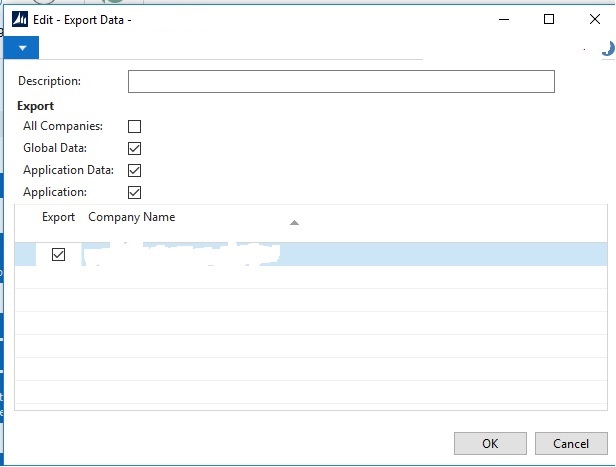
6278.4.jpg

Is it required to do this when none of the users are logged in ?

Can someone please guide me the correct steps to follow on how to backup the application.

I need to setup a test environment of the live application and data in a different server. Your guidance on this will be highly appreciated.

Thanks

*This post is locked for comments

I have the same question (0)
  • Suggested answer
    CDsilva Profile Picture
    4,188 on at

    Hi,

    Take sql backup of your database. this not only backsup your customized objects but also the data. refer step 1 of my blog chrisdsilvablog.wordpress.com/.../upgradation-of-database-from-microsoft-dynamics-nav-2016-to-2017-part-1

  • Suggested answer
    Stefano Demiliani Profile Picture
    37,166 Most Valuable Professional on at

    A full database backup on SQL contains application objects + data for all companies. Just restore that as a new database.

  • Community Member Profile Picture
    on at

    @Stefano,

    What about the Navision users and permissions ? Does the sql DB backup contain those data as well ?

  • Suggested answer
    CDsilva Profile Picture
    4,188 on at

    Hi,

    The below objects cannot be backed up which includes Windows Users. After you take a backup and restore to a new database, run the below query

    USE [Database Name]  

    GO

    delete from [dbo].[User]

    delete from [dbo].[Access Control]

    delete from [dbo].[User Property]

    delete from [dbo].[Page Data Personalization]

    delete from [dbo].[User Default Style Sheet]

    delete from [dbo].[User Metadata]

    delete from [dbo].[User Personalization]

  • Suggested answer
    Stefano Demiliani Profile Picture
    37,166 Most Valuable Professional on at

    Yes the backup contains all permissions and users data.

    If you want to reset the users data, then clean the table suggested by Chris.

    You can add new users also via Powershell (New-NavServerUser).

  • Community Member Profile Picture
    on at

    @Stefano, @Chris,

    Users are authenticated by NavUserIDs (not windows user IDs), so only backing up and restoring the full SQL DB should do the job completely including users and permissions, rite ?

  • Suggested answer
    CDsilva Profile Picture
    4,188 on at

    Yes, John.

  • Stefano Demiliani Profile Picture
    37,166 Most Valuable Professional on at

    Yes!

Under review

Thank you for your reply! To ensure a great experience for everyone, your content is awaiting approval by our Community Managers. Please check back later.

Helpful resources

Quick Links

Introducing the 2026 Season 1 community Super Users

Congratulations to our 2026 Super Stars!

Meet the Microsoft Dynamics 365 Contact Center Champions

We are thrilled to have these Champions in our Community!

Congratulations to the March Top 10 Community Leaders

These are the community rock stars!

Leaderboard > 🔒一 Microsoft Dynamics NAV (Archived)

Last 30 days Overall leaderboard

Featured topics

Product updates

Dynamics 365 release plans
