web
You’re offline. This is a read only version of the page.
close
Skip to main content

Announcements

No record found.

News and Announcements icon
Community site session details

Community site session details

Session Id :
Microsoft Dynamics AX (Archived)

One or more accounting distributions is missing a ledger account. Use the Accounting distribution form or the Posting profile to update the ledger account.

(0) ShareShare
ReportReport
Posted on by

We have encountered this problem when trying to submit PO for approval.

"One or more accounting distributions is missing a ledger account.  Use the Accounting distribution form or the Posting profile to update the ledger account."
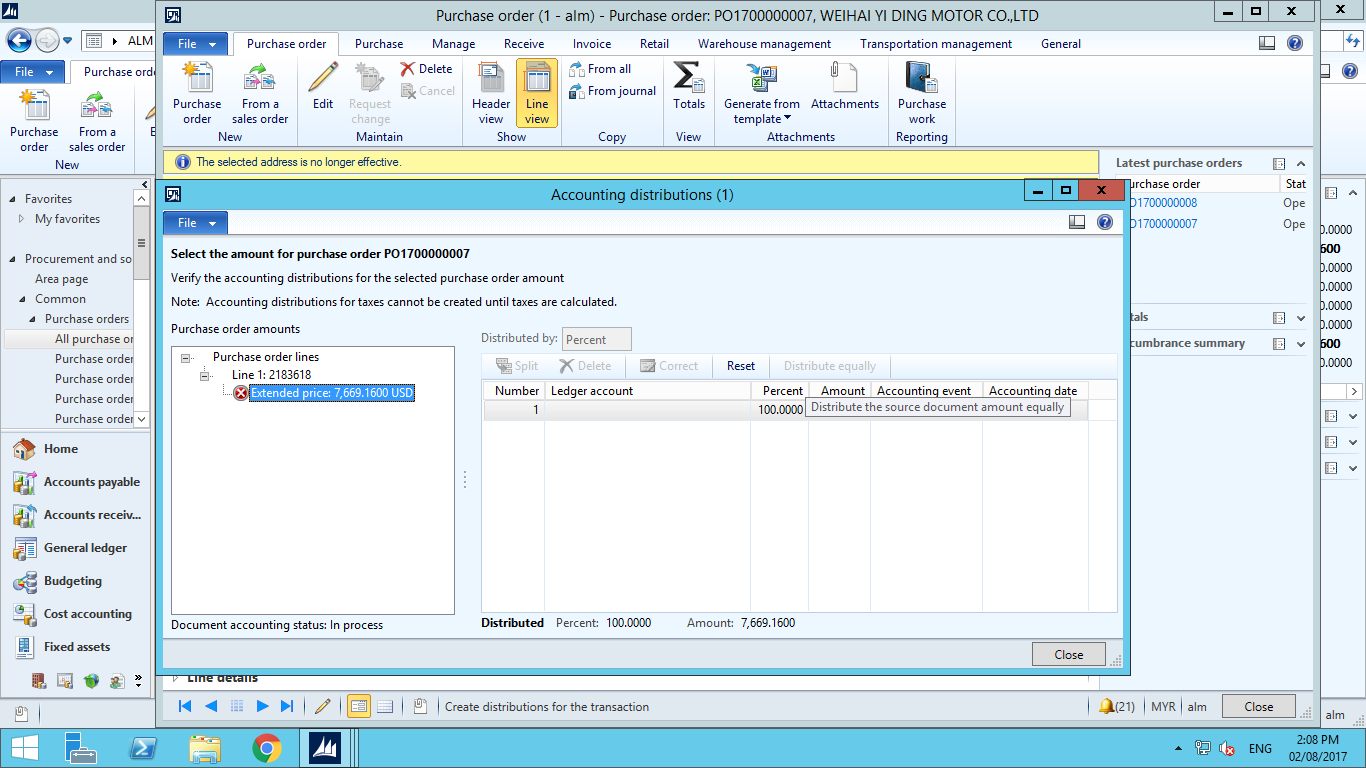
02732.Untitled.png

Thanks,

Dave

*This post is locked for comments

I have the same question (0)
  • Suggested answer
    Ludwig Reinhard Profile Picture
    Microsoft Employee on at

    Hi Dave,

    If the ledger account is missing in this form then your inventory posting Setup might not be complete.

    Please check your accounting setup under inventory-setup-posting-posting in the PO tab.

    Best regards,

    Ludwig

  • Dave.KWOK Profile Picture
    on at

    Hi ludwig, we have checked the inventory posting setup and everythings looks fine.

    What could be the possible rootcause?

  • Ludwig Reinhard Profile Picture
    Microsoft Employee on at

    Hi Dave,

    You cannot edit anything in the form, so there must be a setup missing.

    Have you also checked the automatic posting accounts that are set up in GL?

    Is this the first time that you experience this issue for a specific PO/item?

    Can you replicate the problem in a demo environment?

    Best regards,

    Ludwig

  • Dave.KWOK Profile Picture
    on at

    Hi Ludwig,

    This is a newly created entity. The automatic posting accounts is blank now.

    We are replicating the issue in our staging now.

    BR, Dave

  • Ludwig Reinhard Profile Picture
    Microsoft Employee on at

    Hi Dave.KWOK,

    Probably the fastest way to find the underlying reason is getting a developer involved.

    It is strange that all accounts seem to be setup correctly but that no account is shown in the distributions form.

    Would be great if you could keep us updated here.

    Many thanks,

    Ludwig

  • Suggested answer
    Community Member Profile Picture
    on at

    There might be *Purchase Expenditure for Expense* account is missing in Item Posting Profile, do assign the account for the respective item groups and then check it again.

    Regards,

    Faheem

  • Suggested answer
    Community Member Profile Picture
    on at

    Go to Inventory & warehouse management > Setup > Posting > Posting

    Go to the tab Purchase order

    Check if all ledger accounts are setup

    In my instance, the “Purchase expenditure for expense” was not filled for all item groups.

    Issue resolved.

  • Ludwig Reinhard Profile Picture
    Microsoft Employee on at

    Hello Dave,

    Have you been able to get this resolved in the meantime?

    Best regards,

    Ludwig

Under review

Thank you for your reply! To ensure a great experience for everyone, your content is awaiting approval by our Community Managers. Please check back later.

Helpful resources

Quick Links

Introducing the 2026 Season 1 community Super Users

Congratulations to our 2026 Super Stars!

Congratulations to our 2025 Community Spotlights

Thanks to all of our 2025 Community Spotlight stars!

Leaderboard > 🔒一 Microsoft Dynamics AX (Archived)

#1
Sagar Suman Profile Picture

Sagar Suman 2 Super User 2026 Season 1

#1
Alexey Lekanov Profile Picture

Alexey Lekanov 2

#1
Pratik Bhosle Profile Picture

Pratik Bhosle 2

Last 30 days Overall leaderboard

Featured topics

Product updates

Dynamics 365 release plans


