web
You’re offline. This is a read only version of the page.
close
Skip to main content

Notifications

Announcements

No record found.

Community site session details

Community site session details

Session Id :
Microsoft Dynamics AX (Archived)

Getting Pattern error while trying to adding Tab Page control on Newly Created Extension

(0) ShareShare
ReportReport
Posted on by 6,125

Hi All

I am getting design pattern error while trying to adding New Tab page on newly created Extension of purchase agreement form. can someone please help me to figure out what and where i am doing wrong. i have new update-8 VM and nothing is customized 
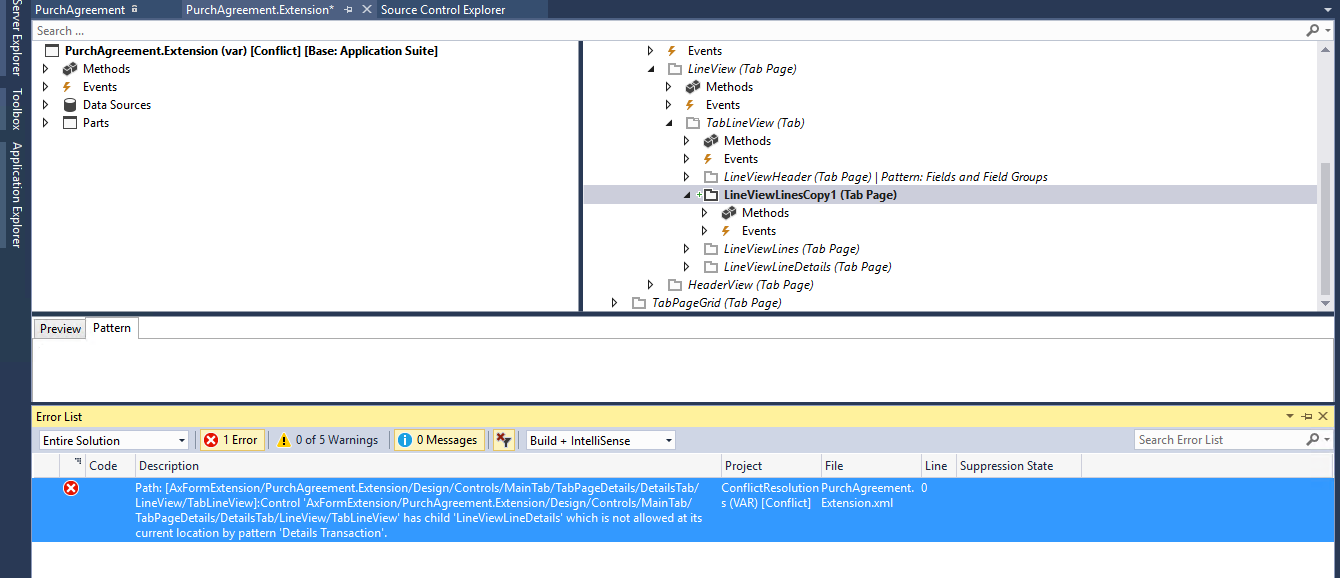
PurchaseAgreement.png

i am getting below error while compiling 

Path: [AxFormExtension/PurchAgreement.Extension/Design/Controls/MainTab/TabPageDetails/DetailsTab/LineView/TabLineView]:Control 'AxFormExtension/PurchAgreement.Extension/Design/Controls/MainTab/TabPageDetails/DetailsTab/LineView/TabLineView' has child 'LineViewLineDetails' which is not allowed at its current location by pattern 'Details Transaction'. ConflictResolutions (VAR) [Conflict] C:\AOSService\PackagesLocalDirectory\Conflict\Conflict\AxFormExtension\PurchAgreement.Extension.xml 0

*This post is locked for comments

I have the same question (0)
  • Sohaib Cheema Profile Picture
    49,438 User Group Leader on at

    On your personal request I have reproduced issue and I found that you are simply violating form pattern. You cannot go out of way when form patter has been set already to 'Details Transaction'

    the location where you added form control is not allowed to do, as this violates form pattern. please have a look at next image.

    vfpv02.png

    Have a look at next image, when I added control at another location, it accepted. Simply because that did not violated pattern.

    vfpv02.png

  • Shahrukh Profile Picture
    501 on at

    Hi Sohaib,

    I am facing the same issue on SalesTable form. And what you are saying is that we cannot add another tab page in this pattern. Mean number of tabs pages are fixed = 3, and we cannot add 4th one? But we did this in AX 2012 and D365 update 3 as well. It was working there. Now we are trying to move it to update 8 and it is giving error. So is there any work around for doing this?

  • Sohaib Cheema Profile Picture
    49,438 User Group Leader on at

    Yes Right.

    You can add new tabs at certain places whereas on certain places you cannot add new tabs or any kind of controls.

    No one asking to limit number of tabs to 3 only. But you cannot destroy pattern.

    This is simply in-line with Microsoft defined patterns. Microsoft takes responsibility to display your application(D365) seamlessly, cross-platform, whether you open on browser, tablet or phone.  

    If you got any further doubts, reaching Microsoft via support channel can be helpful.

  • fajar Profile Picture
    3,805 on at

    Hi Sohaib,

    i try added new control like your picture.
    i added control in LineViewLineDetails (TabPage)

    but i get error...

    Error Path: [AxFormExtension/PurchAgreement.Extension/Design/Controls/MainTab/TabPageDetails/DetailsTab/LineView/TabLineView/LineViewLineDetails]:Control 'AxFormExtension/PurchAgreement.Extension/Design/Controls/MainTab/TabPageDetails/DetailsTab/LineView/TabLineView/LineViewLineDetails' has child 'FormTabControl1' which is not allowed at its current location by pattern 'Details Transaction'.

    please help.

    can i add new control in this form?

    thanks.

  • Suggested answer
    nmaenpaa Profile Picture
    101,160 Moderator on at

    I think you can nowadays (since PU20) change the pattern of the form to Custom using extensions.

    docs.microsoft.com/.../platform-extensibility

  • fajar Profile Picture
    3,805 on at

    yes...

    thanks Nikolaos..

Under review

Thank you for your reply! To ensure a great experience for everyone, your content is awaiting approval by our Community Managers. Please check back later.

Helpful resources

Quick Links

Responsible AI policies

As AI tools become more common, we’re introducing a Responsible AI Use…

Neeraj Kumar – Community Spotlight

We are honored to recognize Neeraj Kumar as our Community Spotlight honoree for…

Leaderboard > 🔒一 Microsoft Dynamics AX (Archived)

#1
Martin Dráb Profile Picture

Martin Dráb 4 Most Valuable Professional

#1
Priya_K Profile Picture

Priya_K 4

#3
MyDynamicsNAV Profile Picture

MyDynamicsNAV 2

Last 30 days Overall leaderboard

Featured topics

Product updates

Dynamics 365 release plans
