web
You’re offline. This is a read only version of the page.
close
Skip to main content

Announcements

No record found.

News and Announcements icon
Community site session details

Community site session details

Session Id :
Microsoft Dynamics AX (Archived)

Unmatched controls - Form design

(0) ShareShare
ReportReport
Posted on by 6,480

Hello,

How to solve the "Unmatched controls" error when adding new group to design?
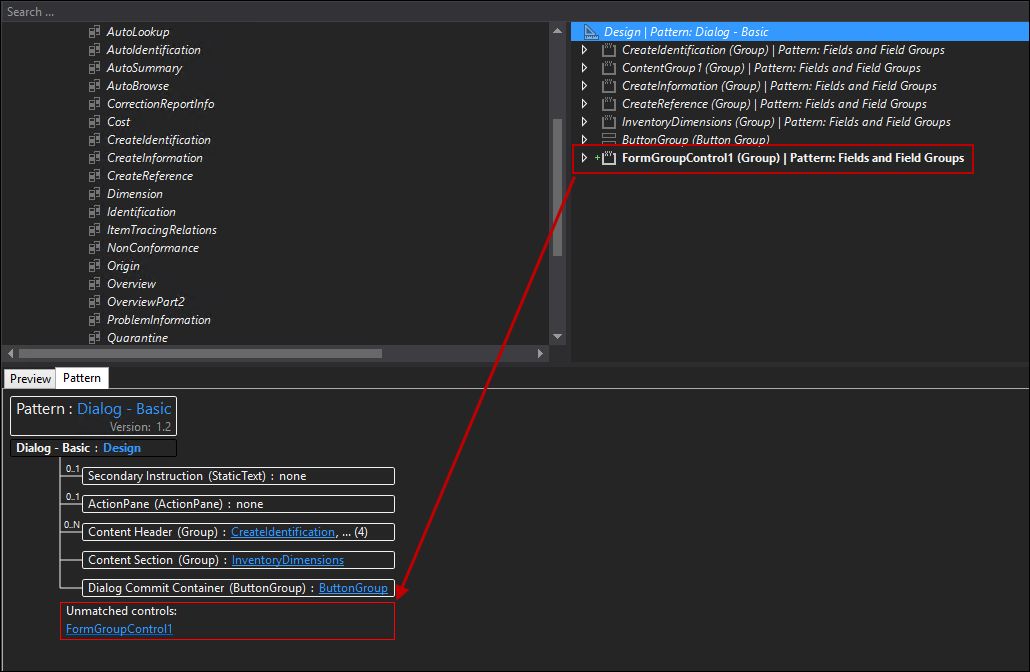
unmatched.png

This is the error also if you "Insert sibling".

I only found the link, which says regarding this error the below, but did not fully understand what the solution is:

https://docs.microsoft.com/en-us/dynamics365/unified-operations/dev-itpro/user-interface/form-styles-patterns

"There are two typical reasons why groups appear as "unmatched" in the Fields and Field Groups subpattern:

  • There is more than one level of group depth. Solution: Refactor the groups so that they have only one level of depth inside the container that you’re trying to apply the Fields and Field Groups subpattern on.
  • There is an image or static text inside the group. Solution: Remove or relocate that control, if you can."

*This post is locked for comments

I have the same question (0)
  • Verified answer
    Fedir Kryvyi Profile Picture
    1,026 on at

    Dialog - Basic pattern restricts your control, because all groups needs to be placed before ButtonGroup(Dialog Commit Container). But you cannot change order of controls on form extension.

    You can:

    a. Place your group inside of another group, if there are not to many fields and it doesn't make design to ugly

    b. Create duplicate of this standard dialog, place your group, and replace standard dialog with your own one(In all menu items, code, menu etc.)

  • Johnny Profile Picture
    6,480 on at

    Hi Fedir,

    thanks for the reply.

    Unfortunately it's not possible to place your group inside of another group there. It gives you option to "insert sibling", but it ends with same error.

    Maybe I'll go with second option.

Under review

Thank you for your reply! To ensure a great experience for everyone, your content is awaiting approval by our Community Managers. Please check back later.

Helpful resources

Quick Links

Introducing the 2026 Season 1 community Super Users

Congratulations to our 2026 Super Stars!

Congratulations to our 2025 Community Spotlights

Thanks to all of our 2025 Community Spotlight stars!

Leaderboard > 🔒一 Microsoft Dynamics AX (Archived)

#1
Joris dG Profile Picture

Joris dG 5

#2
Sagar Suman Profile Picture

Sagar Suman 2 Super User 2026 Season 1

#2
Alexey Lekanov Profile Picture

Alexey Lekanov 2

Last 30 days Overall leaderboard

Featured topics

Product updates

Dynamics 365 release plans
