web
You’re offline. This is a read only version of the page.
close
Skip to main content

Notifications

Announcements

No record found.

Community site session details

Community site session details

Session Id :
Microsoft Dynamics CRM (Archived)

Calling Action from C# with HttpRequestMessage

(0) ShareShare
ReportReport
Posted on by 311

Hi,

When I call an Action with parameters I always get 400 BadRequest. 

PseudeCode is as bellow.

Parameter names are correct.

URL is also correct - it works before adding the parameters (to both Action and message Content)


  var message = new HttpRequestMessage(HttpMethod.Post, someURL);
   var pars = new
            {
                requestType = "O"
                , volumeNoteComment = "xx"
            };
            if (pars != null) message.Content =new JsonConvert(pars);
            HttpClient client = new HttpClient();
            /// here some client initialization....which is OK.
            var response = client.SendAsync(message);

// response is 400 Bad request

Result of message.Content.ReadAsStringAsync():
     Id = 769, Status = RanToCompletion, Method = "{null}", Result = "{\"requestType\":\"O\",\"volumeNoteComment\":\"xx\"}"
    AsyncState: null
    CancellationPending: false
    CreationOptions: None
    Exception: null
    Id: 769
    Result: "{\"requestType\":\"O\",\"volumeNoteComment\":\"xx\"}"
    Status: RanToCompletion


Definition of arguments
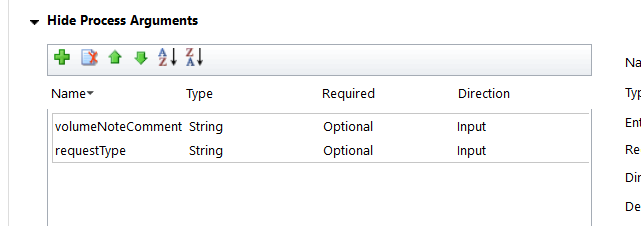
Arguments.PNG
      

*This post is locked for comments

I have the same question (0)
  • Suggested answer
    RaviKashyap Profile Picture
    55,410 Moderator on at

    Hi,

    I would suggest to use Rest builder and check if you are able to call you custom action with paramters or not. This is to isolate if the problem is within the custom action or with your code. In my case, I created the custom action , activated it but then later changed some parameter. I found that the custom action was referring to the old paramters hence failing when calling. If this is the case,you may want to create your custom action again with some other name ensuring that you don't change the parameter once the custom action is created.

    Hope this helps.

  • Nikica Profile Picture
    311 on at

    Hi Ravi,

    thx for your help. In the end when I came to work on Monday everything worked fine. With the same code. I assume either

    - some "Publish all customizations" happened (even I can't believe that no Publish All Customization" happened during several hours I investigated this issue and I don't see relation between Actions and publishing),

    -or CRM needs some time to have actual version on WEB API.

  • RaviKashyap Profile Picture
    55,410 Moderator on at

    Hi Nikica,

    It is possibly a caching issue then. Glad it is now resolved.

    Please close the thread and mark the suggestion as helpful if you feel it helped you :)

Under review

Thank you for your reply! To ensure a great experience for everyone, your content is awaiting approval by our Community Managers. Please check back later.

Helpful resources

Quick Links

Responsible AI policies

As AI tools become more common, we’re introducing a Responsible AI Use…

Neeraj Kumar – Community Spotlight

We are honored to recognize Neeraj Kumar as our Community Spotlight honoree for…

Leaderboard > 🔒一 Microsoft Dynamics CRM (Archived)

#1
SA-08121319-0 Profile Picture

SA-08121319-0 4

#1
Calum MacFarlane Profile Picture

Calum MacFarlane 4

#3
Alex Fun Wei Jie Profile Picture

Alex Fun Wei Jie 2

Last 30 days Overall leaderboard

Featured topics

Product updates

Dynamics 365 release plans



