web
You’re offline. This is a read only version of the page.
close
Skip to main content

Notifications

Announcements

No record found.

Community site session details

Community site session details

Session Id :
Microsoft Dynamics AX (Archived)

SSRS Report Header and Detail

(0) ShareShare
ReportReport
Posted on by 563

Dear Experts,

I use Microsoft Dynamic AX 2012 R3

I want to create SSRS Report using Report Data Provider

Just populate data into 2 temporaries table, here is the data
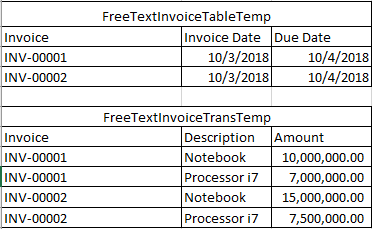
2146.Table.PNG

How to create report with Header and Detail like image below
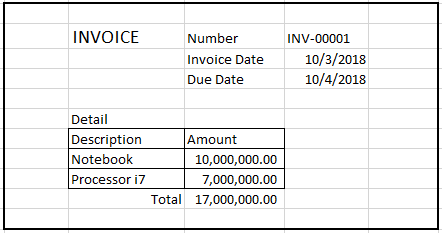
0753.Report.PNG

The report grouping only 1 invoice on 1 page, so If I have data on the table above , I get 2 reports

Any reference or tutorial what should I do?

Thanks in advance

Regards,

Bintang

*This post is locked for comments

I have the same question (0)
  • Sohaib Cheema Profile Picture
    49,438 User Group Leader on at

    That’s very natural for standard AX trading documents. It opens for 1 report 1 time. If you run it for two invoices you would see two screens popping up.

    Now as solution, you can design a new report and then you can force AX to open your design of report rather than standard one.

    technet.microsoft.com/.../cc624720.aspx

    Basically your report will be grouped by Invoice ID and there will be page breaks between each instances of group.

  • Keshav Kumar Profile Picture
    220 on at

    Hi,

    Follow these steps in the provided link to make the SSRS reports.

    You will have to write your logics in rdp classes.

    https://community.dynamics.com/ax/b/thedynamicsblog/archive/2014/02/25/developing-ssrs-report-using-rdp-in-microsoft-dynamics-ax-2012

    Use Textboxes to make the header part and use tablix for the body part i.e for your description and amount fields.

  • Bintang Profile Picture
    563 on at

    Dear Sohaib Cheema,

    Sorry, I meant 1 report and 2 pages group by the invoice. So on the 1st page is data of INV-000001 and page 2 is data of INV-0000002

    How to grouping by the data outside the table?

  • Bintang Profile Picture
    563 on at

    Dear Keshav Kumar,

    I know how to create Auto Design Report, thank you for reminding me

    What I want is not an ordinary report, I need to make some data to be a header and detail of report as you can see on my post

  • Bintang Profile Picture
    563 on at

    Dear Sukrut Parab,

    How to group some data outside the table?

    So depend on my data, I will have 2 page for each INV number

  • Sohaib Cheema Profile Picture
    49,438 User Group Leader on at

    That’s the moment when we need to cheat SSRS designer and I think probably this is one of the reasons, AX authors have developed many report in such a way that those execute once per instance.


    So, to achieve this, you don’t need to go out of table. Every piece of data on report will be in a table. You might be wondering at moment how you will keep design well enough if you keep everything in table. That is possible. You need to add rows and columns, and hide lines in Tablix to make them appear as those don’t exist. It needs to remove existing header and footer and managing heard/footer within Tablix. For demonstration, have a look at two blogpost and you can see it is easy to cheat SSRS design.

    https://www.mssqltips.com/sqlservertip/3447/sql-server-reporting-services-ssrs-repeating-headers-on-pages/

    https://www.mssqltips.com/sqlservertip/3482/sql-server-reporting-services-ssrs-controlling-report-page-breaks/


Under review

Thank you for your reply! To ensure a great experience for everyone, your content is awaiting approval by our Community Managers. Please check back later.

Helpful resources

Quick Links

Responsible AI policies

As AI tools become more common, we’re introducing a Responsible AI Use…

Neeraj Kumar – Community Spotlight

We are honored to recognize Neeraj Kumar as our Community Spotlight honoree for…

Leaderboard > 🔒一 Microsoft Dynamics AX (Archived)

#1
Priya_K Profile Picture

Priya_K 4

#1
Martin Dráb Profile Picture

Martin Dráb 4 Most Valuable Professional

#3
Scott_itD Profile Picture

Scott_itD 2 Community Manager

Last 30 days Overall leaderboard

Featured topics

Product updates

Dynamics 365 release plans
