web
You’re offline. This is a read only version of the page.
close
Skip to main content

Announcements

No record found.

News and Announcements icon
Community site session details

Community site session details

Session Id :
Finance | Project Operations, Human Resources, ...
Suggested Answer

Financial Report Designer - Dimension breakdown

(0) ShareShare
ReportReport
Posted on by 160

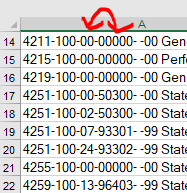
When I export a report (Financial Report Designer / Management Reporter) to Excel, on one tab, I can see the breakdown by dimension... but the dimensions are showing up out of order.

We are supposed to be Main Account > Fund > Program > Department > District

Instead, I am seeing Main Account > Fund > Department > Program > District   in two places on the page:
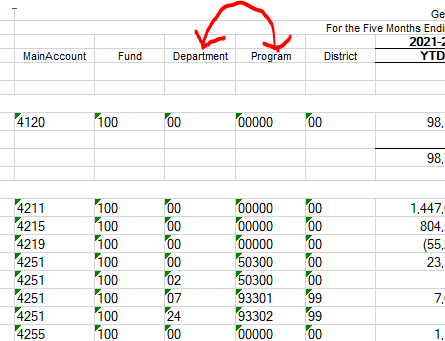
pastedimage1639682916588v1.png

pastedimage1639683025529v2.png

What is controlling this?  How can I get these to display in the correct order?

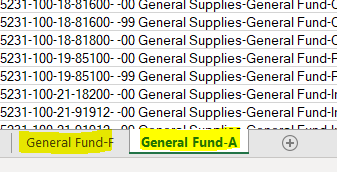
I am also supposed to see a third tab (transactions) but there are only two tabs.  This may or may not be related to the dimensions setup.
pastedimage1639683314420v3.png

I have the same question (0)
  • Suggested answer
    Ramit Paul Profile Picture
    22,803 Most Valuable Professional on at

    Hi Andrew,

    Your dimensions are setup in column definition, you can adjust the same from there.

    Also, can you check the report 'detail level' if that is setup correctly as below, and while exporting the report, you need to use the filter like beloiw

    pastedimage1639685597408v1.png

    pastedimage1639685742590v2.png

  • Suggested answer
    OsmanIstanbul Profile Picture
    2,818 on at

    Hi,

    If you are talking about details of the report (transactions), it will come from voucher transactions' order. This order comes from account structures. You should change it from the root.

    Regards.

  • Suggested answer
    saurabh bharti Profile Picture
    15,045 Moderator on at

    This order must be coming from accounting structure , and have two different sheets : possibly you have two different structure for this combination.

    Also see if following setup works on report definition:

    pastedimage1639709547118v1.png

Under review

Thank you for your reply! To ensure a great experience for everyone, your content is awaiting approval by our Community Managers. Please check back later.

Helpful resources

Quick Links

Introducing the 2026 Season 1 community Super Users

Congratulations to our 2026 Super Stars!

Meet the Microsoft Dynamics 365 Contact Center Champions

We are thrilled to have these Champions in our Community!

Congratulations to the March Top 10 Community Leaders

These are the community rock stars!

Leaderboard > Finance | Project Operations, Human Resources, AX, GP, SL

#1
Giorgio Bonacorsi Profile Picture

Giorgio Bonacorsi 658

#2
André Arnaud de Calavon Profile Picture

André Arnaud de Cal... 468 Super User 2026 Season 1

#3
Syed Haris Shah Profile Picture

Syed Haris Shah 333 Super User 2026 Season 1

Last 30 days Overall leaderboard

Product updates

Dynamics 365 release plans