web
You’re offline. This is a read only version of the page.
close
Skip to main content

Announcements

No record found.

News and Announcements icon
Community site session details

Community site session details

Session Id :
Finance | Project Operations, Human Resources, ...
Suggested Answer

I need to add line in a grid and then overwrite a button to insert the records data in some table

(0) ShareShare
ReportReport
Posted on by 45

Hi, 

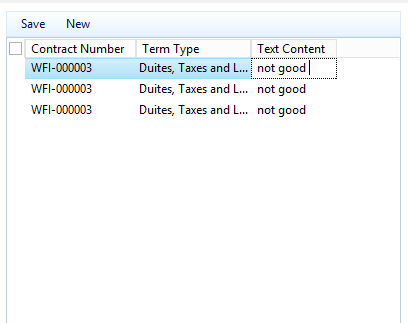
I have a grid with datasource A for example inside Tab, and I have three columns in the grid I added a button new to add lines for the grid, till here it's ok 

my problem is 2 cases:

1st case when I assign the first field to datasourca A and datafield A.ItemId, second field to datasourca A and datafield A.ItemType and this one is enum and the third one put its data as text from another place.. and automatically it saves the lines when I choose or write anything and that's a problem to me because and doesn't save the the third field in it's same record 

2nd case, I tried to get out of the datasource for the fields, but all the line now are the same whenever I change a field in a record it change to this value for all lines 

if any help for any case I would be really thankful case 2
I have the same question (0)
  • Suggested answer
    nmaenpaa Profile Picture
    101,172 Moderator on at

    Seems you have some issues in your data source setup or grid setup.

    Do you have more data sources in this form or only this one?

    Do you have more data sources in this grid or only this one?

    How many records are in the underlying table?

    Please check that all the fields in your grid are linked to an actual field in the data source.

  • Kareem Taima Profile Picture
    45 on at

    more data source in this form

    only one data source for the grid

    none, I don't want to get data from the table I want to insert in the table

  • nmaenpaa Profile Picture
    101,172 Moderator on at

    Are your grid fields linked to fields in the form data source?

    Also, please share all possible details about your data sources.

  • Kareem Taima Profile Picture
    45 on at

    I'm sorry all I wan't asking a clear question, now I understand the problem and I solved it

    sorry for wasting your time

Under review

Thank you for your reply! To ensure a great experience for everyone, your content is awaiting approval by our Community Managers. Please check back later.

Helpful resources

Quick Links

Introducing the 2026 Season 1 community Super Users

Congratulations to our 2026 Super Stars!

Meet the Microsoft Dynamics 365 Contact Center Champions

We are thrilled to have these Champions in our Community!

Congratulations to the March Top 10 Community Leaders

These are the community rock stars!

Leaderboard > Finance | Project Operations, Human Resources, AX, GP, SL

#1
Giorgio Bonacorsi Profile Picture

Giorgio Bonacorsi 694

#2
André Arnaud de Calavon Profile Picture

André Arnaud de Cal... 646 Super User 2026 Season 1

#3
CP04-islander Profile Picture

CP04-islander 337

Last 30 days Overall leaderboard

Product updates

Dynamics 365 release plans
