web
You’re offline. This is a read only version of the page.
close
Skip to main content

Notifications

Announcements

No record found.

Community site session details

Community site session details

Session Id :
Microsoft Dynamics GP (Archived)

Text Control Type in Scrolling Window?

(0) ShareShare
ReportReport
Posted on by 1,588

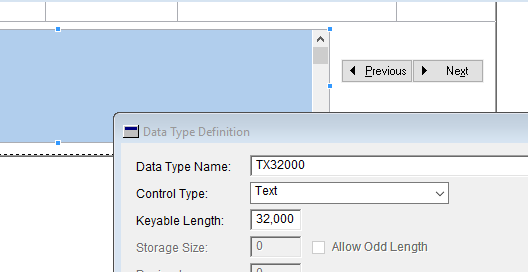
I have a field with the Text Control Type in the expanded portion of a scrolling window. Data is filling all other fields except this one. Is there something special about this Control Type and scrolling window fill behavior?
text_5F00_data_5F00_type.png

*This post is locked for comments

I have the same question (0)
  • Derek Albaugh Profile Picture
    on at

    Hello Chad,

    To verify, in your scrolling window, the fields are populating fine, it's just one field that you have in the scrolling window, set as a Text Control Type, is not populating with any data?

    I looked through the documentation and case history we have, but didn't find much specific to Text Control Type fields in Scrolling windows. The Dexterity Programmer's Guide Vol 2 (PRGV2.pdf) has a chapter on Scrolling Windows, but nothing specific to Text Control Type to add to this.

    Let me know if the above is valid and I'll leave this open on the Forums as there are some MVPs and partners that frequent these forums that are well-versed in Dexterity and customizations that may have more to offer.

    I'll keep researching as well to see what else I can find.

    Thank you,

  • Verified answer
    chadbruels Profile Picture
    1,588 on at

    That is correct. However, we have gone around the problem by simply setting the value in the line fill script. While my curiosity still wonders why it did not obey the AutoCopy flag like the rest, for now we have a working project.

  • Derek Albaugh Profile Picture
    on at

    Thanks Chad for the update. I'm happy you were able to find a work-around on this.

    I didn't find much of anything on it as well, so not sure why it acted the way it did for you, but again, happy it is working for you.

    Have a great day.

Under review

Thank you for your reply! To ensure a great experience for everyone, your content is awaiting approval by our Community Managers. Please check back later.

Helpful resources

Quick Links

Responsible AI policies

As AI tools become more common, we’re introducing a Responsible AI Use…

Neeraj Kumar – Community Spotlight

We are honored to recognize Neeraj Kumar as our Community Spotlight honoree for…

Leaderboard > 🔒一 Microsoft Dynamics GP (Archived)

#1
mtabor Profile Picture

mtabor 1

Last 30 days Overall leaderboard

Featured topics

Product updates

Dynamics 365 release plans



