web
You’re offline. This is a read only version of the page.
close
Skip to main content

Notifications

Announcements

No record found.

Community site session details

Community site session details

Session Id :
Microsoft Dynamics CRM (Archived)

Change Case Business Process Flow with a Work flow

(0) ShareShare
ReportReport
Posted on by

Hi am New to CRM and am trying to  Change Case Business Process Flow with a Work flow here is the Steps have Created

1. Created a Business Process Flow for cases having Four Stage ( Active, In Queue, Working On and Resolved), i deactivated  the Phone to Case Process.

2. I created  case subjects 

3. Created a route rule for each subject to be on different Queues depending on the subject.

All this Work perfectly , The next stage is where am stuck 

4. Will like to create a workflow that changes the stage of Cases ( 1 above ) as the case belongs to a Queue (a queue item)

I would be grateful if someone can help me resolve this. Thanks in advance
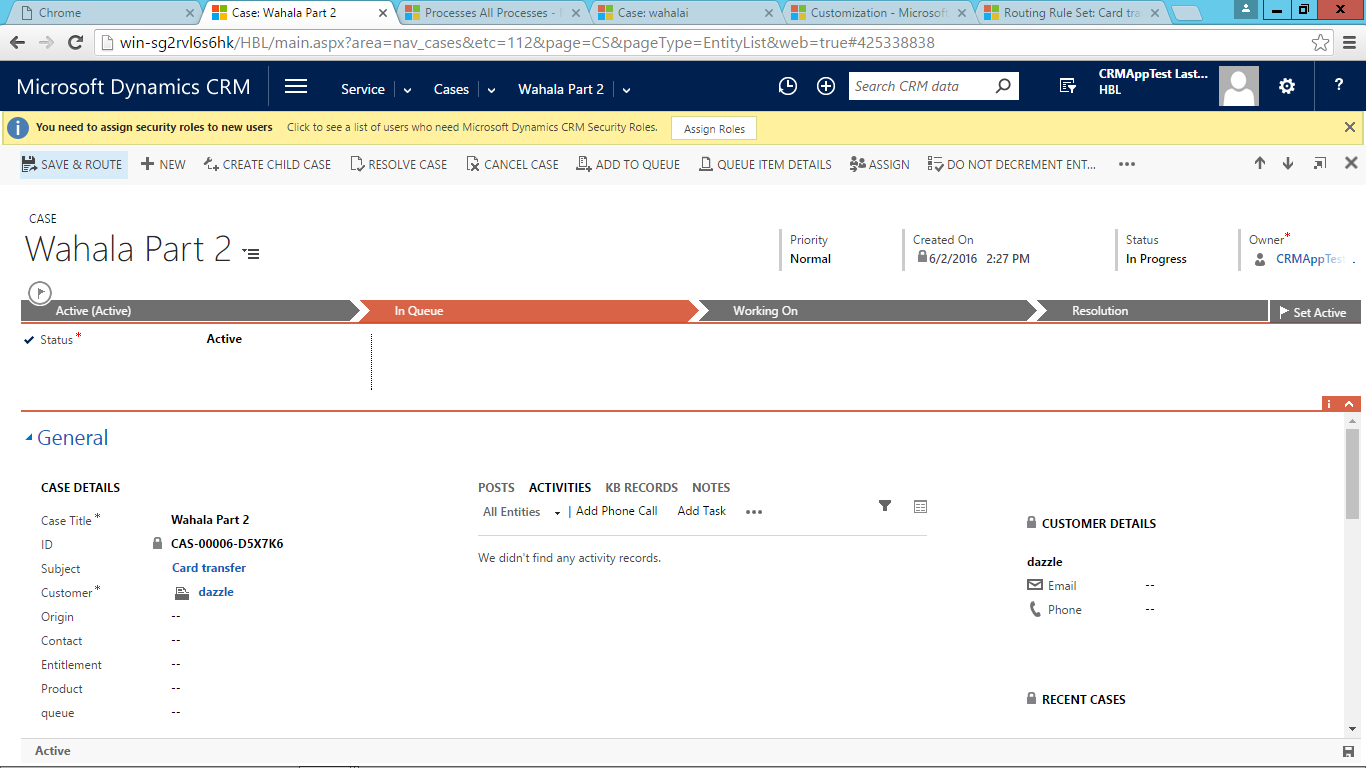
8880.business-Process.png

I like to move from the stage active to In Queue if case becomes a Queue Item

*This post is locked for comments

I have the same question (0)
  • Suggested answer
    Community Member Profile Picture
    on at

    Hi Ogunbolude,


    You are on the right track. Great job on the Business Process Flow & Routing

    Now to create your Workflow.

    1) Solution > Components > Processes > New

    2) Fill Process Name as desired, Category: Workflow, Entity: Case, Type: New blank process.

    3) Start when: Record fields change Subject

    4) Add Step > Check Condition > Process Stage > Stage Category > Equals > Active

    5) Add Step > Update Record > Case > Set Properties to change Service Stage to 'In Queue'

    Thanks,

    Tim


  • Community Member Profile Picture
    on at

    thanks Timixer but this is what i found out with the conditions and Service stage . Please kindly verify

    Thanks

    3835.properties.png

    3835.properties.png

  • Community Member Profile Picture
    on at

    I was trying to avoid javascript but looks like it is needed to call the stageid as a web resource. I hope this helps below.

    community.dynamics.com/.../how-to-change-process-and-stage-programmatically

    Example Code: code.msdn.microsoft.com/Change-Dynamics-CRM-2013-a6beb85e

Under review

Thank you for your reply! To ensure a great experience for everyone, your content is awaiting approval by our Community Managers. Please check back later.

Helpful resources

Quick Links

Responsible AI policies

As AI tools become more common, we’re introducing a Responsible AI Use…

Neeraj Kumar – Community Spotlight

We are honored to recognize Neeraj Kumar as our Community Spotlight honoree for…

Leaderboard > 🔒一 Microsoft Dynamics CRM (Archived)

#1
SA-08121319-0 Profile Picture

SA-08121319-0 4

#1
Calum MacFarlane Profile Picture

Calum MacFarlane 4

#3
Alex Fun Wei Jie Profile Picture

Alex Fun Wei Jie 2

Last 30 days Overall leaderboard

Featured topics

Product updates

Dynamics 365 release plans



